

Key takeaways
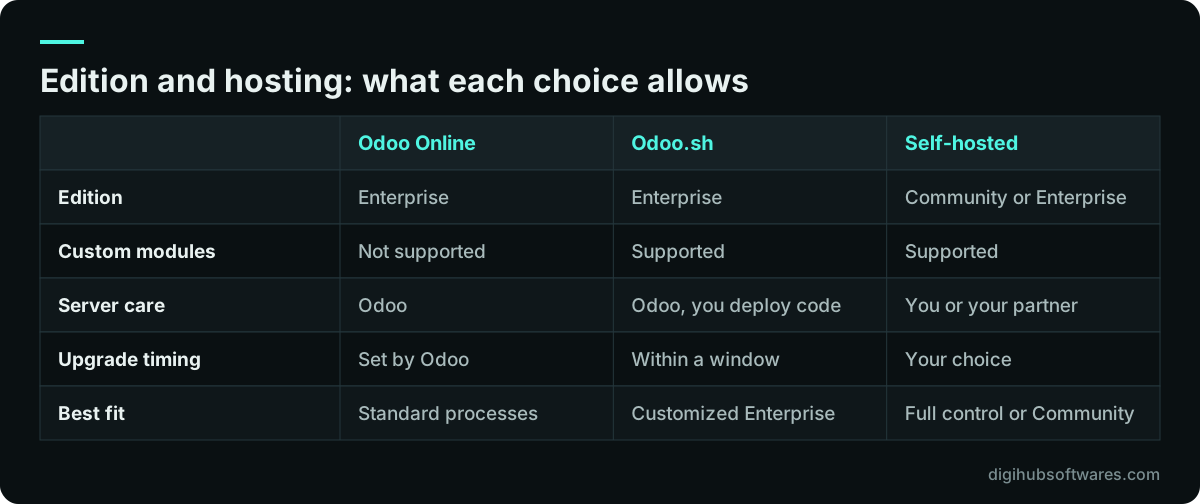
- Decide the edition and the hosting model before scoping, because Odoo Online cannot run custom modules and Studio needs Enterprise.
- Write down every process you will run in Odoo as a sequence of steps, then mark each step as standard, configured or custom.
- Start new projects on Odoo 20, released in September 2026, unless a module you depend on is not ready for it yet.
- Run at least two full rehearsals of the data migration on a copy of the database before the cutover weekend.
- Budget for the year after go-live: support hours, user changes and the next version upgrade are real costs.
What is an Odoo implementation?
An Odoo implementation is the project that turns Odoo's standard apps into the system a specific company runs on: its products, prices, taxes, warehouses, approval rules, reports and opening balances. Installing Odoo takes minutes. Implementing it takes weeks or months, because the work is about your business, not the software.
A good implementation ends with three things. Staff can do their daily work in Odoo without a spreadsheet on the side. Finance can close a month and trust the numbers. Someone in the company understands how the system is set up and can explain why. If any of those is missing, the project is not finished, whatever the go-live date says.
This Odoo implementation guide is written for the person who signs off the project: an owner, a CFO or an IT manager. It covers the decisions you need to make, the order to make them in and the checks that tell you whether the project is on track. For the delivery side, our Odoo implementation service describes how we run the work itself.
Which Odoo edition and hosting should you decide first?
Decide the edition and the hosting model first, because both limit what you can build later. Odoo Community is the open-source core and is free to download. Odoo Enterprise adds apps and features on top of it and is sold as a per-user subscription. On Odoo's own editions comparison (opens in a new tab), full Accounting, Studio, the mobile apps, Helpdesk, Field Service, Planning, Quality, PLM, Barcode and Knowledge appear only in Enterprise, while Invoicing, CRM, Sales, Inventory, Manufacturing, Purchase and Point of Sale exist in both.
Hosting is the second fork. Odoo Online is Odoo's managed cloud: quick to start, but it does not accept custom modules or modules from the Odoo Apps Store. Odoo.sh is Odoo's platform for hosting a customized Enterprise database with staging branches and Git. Self-hosting means you or your partner run the server, which is the only route for Community and gives the most control with the most responsibility.
Two articles go deeper on these choices. Read what you actually lose with Odoo Community before assuming the free edition will do, and compare Odoo Online, Odoo.sh and self-hosting before you commit to a server. Odoo's pricing page, at the time of writing, ties Odoo.sh, on-premise hosting, Studio, multi-company and external API access to its Custom plan, which matters for budgeting.
The Odoo implementation guide in seven phases
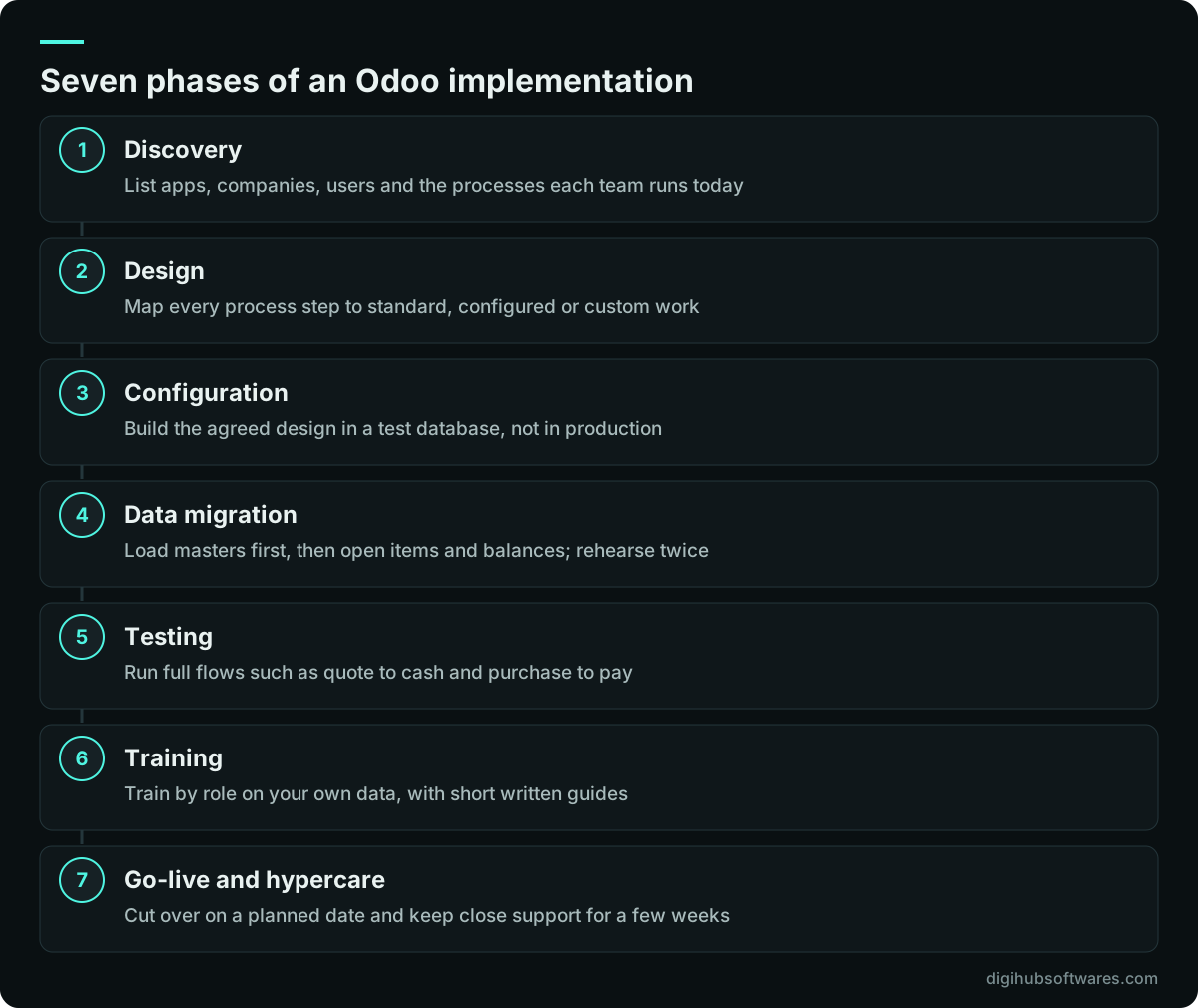
The core Odoo implementation steps form seven phases: discovery, design, configuration, data migration, testing, training and go-live, followed by a period of hypercare. The phases overlap a little, but each one has an exit check, and skipping a check is the most common way a project slides.
Discovery and design produce a written scope: the apps, the companies, the users and every process step mapped to standard Odoo, configuration or custom work. Configuration builds that scope in a test database. Data migration loads masters first and transactions last. Testing proves complete business flows, not single screens. Training is done by role, using your own data. Go-live is a planned cutover with a rollback point, and hypercare is the few weeks of close support that follow.
The phases in this Odoo implementation guide apply to a three-app rollout for a small trading company as much as to a multi-site manufacturer. What changes is the depth of each phase and how many times you loop through design and testing.
How do you scope an Odoo implementation plan?
Scope an Odoo implementation plan by writing each business process as a numbered list of steps, naming who does each step, and marking where the data comes from and goes to. A process list is more useful than a feature list, because it shows the handovers between teams, and handovers are where an ERP earns or loses its keep.
Start with the flows that touch money: quote to cash, purchase to pay, stock receipt to stock valuation, and payroll or expenses if they are in scope. For each one, ask what the team does today, what goes wrong, and which report proves it worked. Then ask the uncomfortable question: which of these steps exist only because the old system could not do better? Those steps should not be rebuilt in Odoo.
The output of discovery is a short document the sponsor signs. It should list the following.
- The apps in scope for this phase, and the ones deliberately left for later.
- Companies, currencies, warehouses and branches, with the legal entity for each.
- User roles and roughly how many people hold each role.
- Each process step marked as standard, configured or custom, with an owner.
- The data to migrate, its source and how many years of history are needed.
- Integrations with banks, payment gateways, marketplaces, couriers or other software.
- The reports that finance and management need on day one.
- A target go-live date and the dates that cannot move, such as a year end or a VAT quarter.
Configuration or customization: where should the line sit?
Configure first and customize only where a process step gives you a real advantage or is required by law or by a customer contract. Configuration uses the settings, fields, rules and views Odoo already provides, and it survives version upgrades with little effort. Customization means new code in a custom module, which has to be maintained and upgraded with every new version.
There is a middle layer. Odoo Studio, which is part of Enterprise, lets an administrator add fields, change views and build simple automations without writing a module. Studio changes are easier to carry through upgrades than code, but a database full of unplanned Studio fields becomes hard to understand. Treat Studio changes like code: list them, name them consistently and record why each one exists.
A useful test for every custom request is to ask what it costs to run without it for three months. If the answer is a few extra minutes a day, park it until after go-live, when users understand the standard flow. If the answer is lost orders, wrong tax or a broken customer contract, build it. When custom work is justified, a specialist Odoo customization team should keep it in a separate module with tests, so the next upgrade is predictable.
How should you migrate data into Odoo?
Migrate data in layers: reference data first, then master data, then open transactions, then opening balances, and rehearse the full load at least twice before the real cutover. Each layer depends on the one before it. You cannot import an open sales order until the customer, the product, the price list and the tax exist.
Most of the effort is cleaning, not importing. Duplicate customers, products with three names, suppliers with no tax number and stock counts nobody trusts all have to be fixed by someone who knows the business. Odoo's import tool handles CSV and Excel files well, but it will faithfully load bad data as quickly as good data.
Decide early how much history you need. Many companies bring only open items and balances, keeping the old system read-only for audits and lookups. Bringing several years of transactions is possible, but it multiplies the testing. If your current books live in Tally or spreadsheets, our practical plan for moving from Tally or spreadsheets to Odoo walks through the mapping, and our Odoo data migration service covers the extraction and reconciliation work.
| Layer | Examples | Check before moving on |
|---|---|---|
| Reference data | Chart of accounts, taxes, units, currencies | Finance signs off accounts and tax codes |
| Master data | Customers, vendors, products, BOMs, employees | No duplicates, required fields filled |
| Open transactions | Unpaid invoices, open orders, purchase orders | Totals match the old system's aged reports |
| Opening balances | Trial balance, stock quantities and values | Trial balance and stock value match to the cent |
What changes for inventory and manufacturing teams?
Inventory and manufacturing are where Odoo's design choices have the largest effect on daily work and on the accounts. Routes decide how goods move between locations. Reordering rules decide when Odoo proposes a purchase or a production order. In Odoo 20, the cost method (standard price, FIFO or average cost) and the valuation setting (perpetual at invoicing, or periodic at closing) decide how stock movements reach the general ledger.
Those settings are hard to change once transactions exist, so they belong in the design phase, agreed between operations and finance. Our explainer on Odoo routes, reordering rules and inventory valuation sets out the options and their accounting effects in plain terms.
For manufacturers, the bill of materials is the master record everything else depends on: costing, purchasing, capacity and quality checks. Build the BOMs for your top products early, test a full production run with real quantities, and only then load the rest. Our guide to setting up bills of materials and routings in Odoo Manufacturing covers kits, variants, operations and work centers, and our manufacturing industry page shows how the apps fit together for a production business.
How do tax and localization fit into the rollout?
Set up the fiscal localization for each company at the start, because it installs the chart of accounts, tax rates and tax reports that every later transaction depends on. Odoo publishes localizations for many countries, including the United Kingdom, the United Arab Emirates and Pakistan, listed in its fiscal localization documentation (opens in a new tab).
For a UK company, that means VAT rates, the VAT return and periodic submission to HMRC under Making Tax Digital. In the UAE it means VAT under the Federal Tax Authority's rules, and now Corporate Tax planning as well. In Pakistan it means sales tax and income tax treatment that matches FBR requirements, which often needs extra configuration on top of the base localization. In every case, the system is configured to support your compliance; confirm the setup with your tax adviser before the first return.
Groups that span countries need multi-company and multi-currency rules agreed early, including how intercompany sales are invoiced. Our regional pages explain the local detail for Odoo implementation in the UK, Odoo implementation in the UAE and Odoo implementation in Pakistan.
What belongs on an Odoo go-live checklist?
An Odoo go-live checklist confirms four things: the flows work end to end, the data reconciles, the people know their jobs and there is a way back if the cutover fails. Testing should use real scenarios written by the people who do the work, such as a customer return with a partial refund or a purchase received in two deliveries.
Training works best by role and on your own data. A warehouse picker needs twenty minutes on a scanner screen, not a tour of accounting. Short written guides with screenshots, one per task, outlast any training session. Pick one or two people in each team as key users and train them first; they become the first line of help after go-live.
Use a checklist like this one in the final week.
- Every process in the signed scope has passed a full test, signed by its owner.
- The final migration rehearsal reconciled the trial balance, receivables, payables and stock value.
- User accounts, access rights and approval limits match the role list.
- Email, printers, barcode scanners, payment methods and bank feeds have been tested in the live setup.
- Document numbering, tax reports and invoice layouts have been checked by finance.
- The old system's cutoff date and the freeze on new entries are agreed and communicated.
- A rollback plan exists, with the decision time and who makes the call.
- The hypercare rota and the way users report issues are published to all staff.
How long does an Odoo implementation take, and what does it cost?
A focused rollout of a few standard apps for one company usually takes a few weeks, while a multi-company project with custom modules, integrations and data migration takes several months. The Odoo implementation timeline depends far more on scope and on how quickly the business makes decisions than on the software itself.
Cost follows the same drivers: the number of apps, companies and users, the amount of custom work, the integrations and the volume of data to clean and move. Licences and hosting are a separate line, paid to Odoo or your hosting provider. Our detailed guide to budgeting an Odoo implementation breaks these drivers down and shows the costs that appear after go-live.
As a reference point, Digihub publishes fixed packages on its Odoo pricing page. The table below quotes them exactly. They cover our implementation work only, exclude Odoo licences, hosting and local sales tax, and the Enterprise tier is a starting price confirmed after discovery.
| Package | Scope | Price | Timeline |
|---|---|---|---|
| Starter | 1 to 3 apps, up to 15 users, 30 days of support | $2,400 / £1,850 / AED 8,900 | 3 to 5 weeks |
| Growth | 5 to 8 apps, multi-company, 60 days of support | $6,500 / £4,950 / AED 23,900 | 6 to 10 weeks |
| Enterprise | 9 or more apps, custom modules, integrations, 90 days of support | From $13,500 / £9,950 / AED 49,500 | 10 to 16 weeks |
What happens after go-live?
After go-live the work shifts from building to running: fixing small issues, adding users, adjusting reports and planning the next version upgrade. The first month brings a steady stream of questions as real volumes hit the system. That is normal and is why hypercare exists.
Version planning starts sooner than most owners expect. According to Odoo's standard and extended support policy (opens in a new tab), each major version receives three years of standard support. Odoo 20 was released in September 2026 with standard support planned to September 2029, and Odoo 17's standard support ended in September 2026. Odoo Online databases are upgraded on Odoo's schedule, while Odoo.sh and self-hosted databases give you more control over timing. Our guide to planning an Odoo version upgrade explains how to test an upgrade without disrupting operations.
The second phase of apps is often the best value of the whole project. Once the core flows are stable, adding Helpdesk, Field Service, Planning or a deeper eCommerce link builds on data the company already trusts.
When should you bring in an Odoo partner?
Bring in outside help when the project involves accounting, more than one company, custom modules or data migration, because those are the areas where mistakes are expensive to undo. A small team using CRM and Invoicing in a standard way can often set up Odoo Online with Odoo's own onboarding and a few days of advice.
When you compare implementers, use the phases in this Odoo implementation guide as your question list: ask how they scope, who writes and owns the custom code, how they test migrations, what happens in the weeks after go-live and how they handle upgrades. Ask to see a sample scope document. A firm that cannot explain where your processes fit standard Odoo is guessing.
Digihub is an independent Odoo development company based in Peshawar, Pakistan, working remotely with clients in the UK, the UAE and Pakistan since 2015. We are not an official Odoo partner, and we say plainly where Enterprise is required. Ownership of custom code passes to you on full payment, and every go-live includes 30 days of free fixes. You can read more about our Odoo development company work or start with a short scoping call.
Sources and further reading
Official documentation and guidance if you want to read more about this topic.
Related guides and services
Questions readers ask
What are the main steps to implement Odoo?
The main steps are discovery, design, configuration, data migration, testing, training and go-live, followed by a few weeks of close support. Discovery lists the apps, companies, users and processes. Design maps each process step to standard, configured or custom work. The later phases build, load, prove and launch that design, with a signed check at the end of each one.
Should a new Odoo project start on Odoo 20?
In most cases, yes. Odoo 20 was released in September 2026 and has standard support planned until September 2029, so it gives the longest runway. The exception is when a third-party module or a localization feature you depend on has not been released for Odoo 20 yet. In that case, Odoo 19 is a reasonable start, with an upgrade planned once the module is ready.
Can I implement Odoo Community instead of Enterprise to save money?
You can, but check the gaps first. Community has Invoicing, CRM, Sales, Inventory, Manufacturing and Purchase, but not full Accounting, Studio, the mobile apps, Helpdesk or Odoo's upgrade service. Community also needs self-hosting. For some companies the saving is real; for others, rebuilding the missing parts costs more than the subscription. Compare the specific apps your processes use.
How much history should we migrate into Odoo?
Most companies migrate open items and opening balances only, and keep the old system read-only for lookups and audits. That keeps testing manageable and the cutover short. Bring more history only when a clear need exists, such as customer purchase history for sales teams or multi-year comparisons that cannot be produced from the old system. Every extra year of history adds cleaning and reconciliation work.
Does Odoo handle UK MTD, UAE VAT and Pakistan FBR requirements?
Odoo publishes fiscal localizations for the United Kingdom, the United Arab Emirates and Pakistan, which set up the chart of accounts, tax rates and tax reports. The UK localization includes periodic VAT submission to HMRC. Local rules still need careful configuration and review. The system is configured to support your compliance; confirm the setup with your tax adviser before filing.