

Key takeaways
- Choose the costing method per product category with your accountant before any stock is received, because it shapes every later cost.
- Treat LIFO and FEFO as picking rules only: in Odoo they decide which units leave first, not how stock is valued.
- Use landed costs for freight, duty and insurance, and put those products on FIFO or average cost, which landed costs require.
- Set reordering rules on forecasted stock with realistic minimums, maximums and order multiples, then review the Replenishment screen daily.
- Run the Inventory Valuation report and accrual reviews at each month end so stock in accounting matches stock in the warehouse.
Part of our guide: Odoo implementation guide: how to implement Odoo ERP from scoping to go-live
What is Odoo inventory valuation?
Odoo inventory valuation is how Odoo puts a money value on the stock you hold and on each unit you sell, consume or scrap. It answers two questions: what does each unit cost, and when does that cost reach the accounts. The first is the costing method. The second is the accounting method.
The Inventory app tracks value in real time as goods are received and delivered. The Accounting app updates the stock accounts when bills and invoices are posted and through a closing entry that settles the difference. Odoo's valuation cheat sheet (opens in a new tab) sets out this split clearly, and it explains most of the questions finance teams ask after go-live.
Valuation is an accounting decision as much as a system setting. Agree it with whoever signs your accounts, then configure it. Our Odoo inventory service and Odoo accounting service cover the setup together, because the two apps share these settings.
Standard price, FIFO or average cost: which costing method should you use?
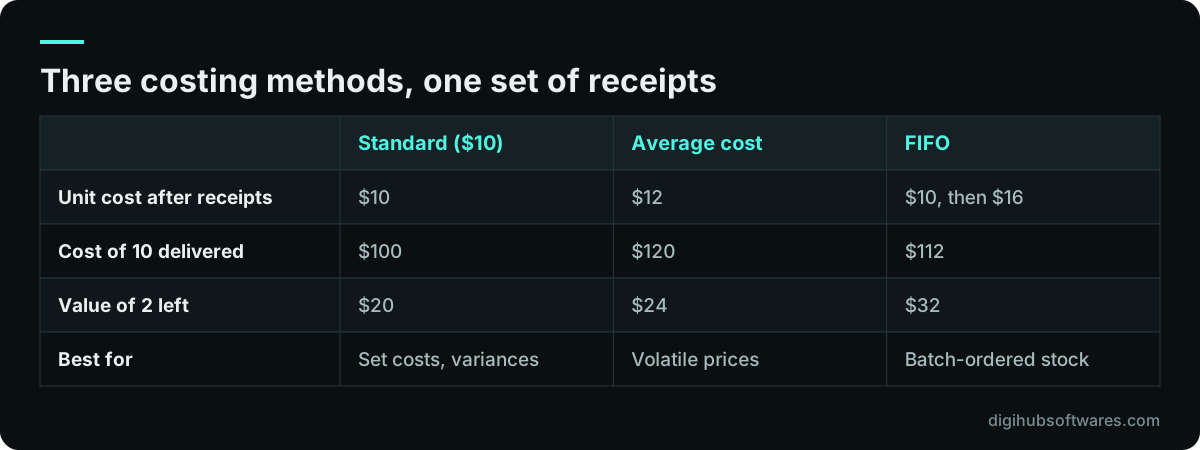
Odoo supports three costing methods. Standard price uses a fixed unit cost you update yourself. Average cost (AVCO) recalculates a weighted average each time stock arrives. First in, first out (FIFO) values each delivery at the cost of the oldest units still in stock. You set a default under Accounting, Configuration, Settings, and you can override it on each product category.
The worked example below follows the one in Odoo's cheat sheet: receive 8 units at $10, then 4 at $16, then deliver 10. The goods cost $144 in total, but each method splits that amount differently between what you sold and what remains.
As a rule of thumb, standard price suits manufacturers who set costs deliberately and want variances to stand out. Average cost suits distributors whose purchase prices move often. FIFO suits businesses where batches really do leave in order and where the gap between old and new prices matters. LIFO is not a costing method in Odoo. It exists only as a removal strategy for picking, and Odoo's documentation notes that LIFO valuation is not allowed under IFRS.
Perpetual or periodic valuation, and what changed in Odoo 19?
The accounting method decides when stock value reaches your general ledger. Perpetual (at invoicing) records stock as an asset when vendor bills are posted and expenses cost of goods sold when customer invoices are posted. Periodic (at closing) posts vendor bills as expenses and adjusts stock value through a closing entry, which can be manual, daily or monthly.
Odoo associates periodic with Continental accounting, common in Europe, and perpetual with Anglo-Saxon accounting, used in countries such as the USA and India. Many businesses in Pakistan, the UK and the UAE expect cost of goods sold on each invoice, which points to perpetual, but confirm the choice with your accountant.
Odoo 19 changed how perpetual valuation works, and Odoo 20 keeps that design. Earlier versions posted a journal entry for every stock movement, which flooded the general ledger. Now the stock valuation account moves when bills and invoices are posted, and a closing entry handles goods received but not billed, or delivered but not invoiced. The old stock interim accounts are gone. If you are upgrading from Odoo 18 or earlier, our Odoo upgrade planning guide covers the rebalancing step.
| Criterion | Perpetual (at invoicing) | Periodic (at closing) |
|---|---|---|
| Vendor bill posts to | Stock valuation (asset) | Expense account |
| Cost of goods sold | When the customer invoice posts | Through the closing entry |
| Closing entry | Covers receipts and deliveries not yet invoiced | Updates stock value for the period |
| Usually paired with | Anglo-Saxon accounting | Continental accounting |
Which accounts does Odoo use for stock valuation?
A small set of accounts does the work, and each can be set company-wide in the Accounting settings or overridden on a product category. Getting them right on day one avoids reclassifying entries later.
If you are bringing stock across from another system, load product costs before quantities so the opening stock value matches your old trial balance. Our guide on how to migrate from Tally to Odoo walks through that reconciliation.
- Valuation account: the current asset account that holds the value of stock on hand.
- Variation account: records stock movements for the period covered by the closing entry, and acts as a buffer until accruals are booked.
- Expense or cost of goods sold account: set on the product or category and used when goods are sold.
- Price difference account: with perpetual valuation and standard price, captures the gap between standard cost and the billed price.
- Inventory loss account: set on the Inventory Loss location so adjustments and shrinkage are reported apart from normal movements.
- Cost of production account: optional, set on the Production location to separate manufacturing movements.
How do landed costs work in Odoo?
Landed costs add freight, insurance, customs duty and similar charges to the value of the goods they relate to, so your product cost reflects what the stock really cost to bring in. For importers this is often the difference between margins that look healthy and margins that are real.
Enable Landed Costs in the Valuation section of the Inventory settings and pick a journal. Then create a service product for each recurring charge, such as sea freight or customs duty, and tick Is a Landed Cost with a default split method: equal, by quantity, by current cost, by weight or by volume. When the freight bill arrives, add that product to the draft bill, create the landed cost, link it to the validated receipt and compute the split. The products on that receipt must be in a category using FIFO or average cost. Standard price products cannot absorb landed costs.
Choose the split method to match how the charge really arises. Freight on bulky goods follows volume or weight. Duty follows value, so by current cost is usually closer. An equal split is rarely right unless every line is similar.
How do routes move stock through an Odoo warehouse?
Routes are sets of push and pull rules that decide how products travel between locations. Pull rules respond to demand, such as a confirmed sales order, and create the first transfer. Push rules move goods onward as soon as they arrive at a location. For most warehouses you never touch the rules directly.
Instead, enable Multi-Step Routes and Storage Locations in the Inventory settings, then choose the incoming and outgoing flow on each warehouse. Odoo generates the routes and locations for you, and its routes documentation (opens in a new tab) advises against editing rules to build these standard flows. Each extra step adds a transfer to validate, so add steps only where they catch real errors. Distribution businesses usually gain the most from two- and three-step flows, as covered on our distribution industry page.
| Flow | Steps | When it helps |
|---|---|---|
| Receive and store | 1 step: Vendors to Stock | Small stores, few receipts |
| Receive then store | 2 steps: Input, then Stock | Check quantities before putaway |
| Receive, quality control, store | 3 steps: Input, Quality Control, Stock | Inspected or regulated goods |
| Deliver | 1 step: Stock to Customers | Simple dispatch |
| Pick then deliver | 2 steps: Output, then Customers | Staging area before loading |
| Pick, pack, deliver | 3 steps: Packing Zone, Output, Customers | eCommerce and mixed orders |
How do Odoo reordering rules decide when to buy or make more?
A reordering rule keeps the forecasted quantity of a product at a location between a minimum and a maximum. When the forecast drops below the minimum, Odoo creates a request for quotation if the product is bought, or a manufacturing order if it is made. You manage rules under Inventory, Operations, Replenishment.
Three conditions must hold for a rule to work. The product must be Goods with Track Inventory ticked. A bought product needs a vendor on its Purchase tab, and Odoo uses the vendor at the top of the list. A manufactured product needs a bill of materials, which our guide to Odoo bill of materials setup explains.
Rules run on Auto or Manual triggers. Auto rules fire when the scheduler runs, once a day by default, or when a confirmed sales order pushes the forecast below the minimum. Manual rules only list the product on the Replenishment screen for someone to approve. Use the Multiple field when vendors sell in cases or cartons, so Odoo rounds orders to whole packs. Start with manual triggers for expensive items and auto for routine consumables.
When should you use replenish on order instead of a reordering rule?
Use Replenish on Order (MTO) when each customer order needs its own purchase or production, and a 0/0/1 reordering rule when you want order-driven buying without tying the stock to one customer. Both create replenishment only when demand appears, but they behave differently once goods arrive.
MTO links the purchase or manufacturing order to the sales order that caused it and reserves the goods for that order. Odoo warns that if you cancel that linked order, it does not create a replacement automatically. A 0/0/1 rule, with minimum and maximum at zero and a quantity to order of one, buys or makes one unit each time demand takes the forecast below zero, but the stock is not reserved for a specific customer and the order is not linked back. Since Odoo 19, the Buy and Manufacture routes are hidden from the product's Routes field by default and applied automatically, so you mostly tick Replenish on Order (MTO) and let Odoo do the rest.
How do you check stock valuation at month end?
Compare the two views of value and close the gap with a closing entry. Inventory, Reporting, Stock shows quantity and value by product, including at a past date. Accounting, Review, Inventory Valuation shows the accounting balance, the stock variation and the ending stock, and its Generate Entry button creates the closing entry for review.
A short checklist, run every month by the same person, catches most problems early. If you want help designing that routine or fixing an existing setup, our Odoo pricing page lists our support blocks and monthly care plans.
- Validate or cancel old draft receipts and deliveries so the stock report reflects reality.
- Post outstanding vendor bills and customer invoices, then review Bills To Receive, Invoices To Be Issued, Billed Not Received and Invoiced Not Delivered.
- Create accrual entries for the lines that need them.
- Open the Inventory Valuation report, check the stock variation, then generate and post the closing entry.
- Review inventory adjustments and scrap posted to the inventory loss account.
- Spot-check unit costs on a few products by opening their cost history.
Sources and further reading
Official documentation and guidance if you want to read more about this topic.
Related guides and services
Questions readers ask
Which costing method is best in Odoo?
There is no single best method. Average cost suits most trading businesses whose purchase prices change often. Standard price suits manufacturers who want planned costs and visible variances. FIFO suits stock that leaves in batch order. Whichever you pick for Odoo inventory valuation, set it per product category before receiving stock, and agree it with your accountant first.
Can I change the costing method after go-live?
You can edit it on a product category, but treat it as an accounting decision, not a quick setting, because it changes how every product in that category is valued from then on. Do it at a period end, test it on a copy of your database first, and have your accountant check the resulting entries before you post anything.
Does Odoo support LIFO valuation?
No. Odoo values stock using standard price, average cost or FIFO. LIFO is available only as a removal strategy, which decides which physical units are picked first. You can pick goods last in, first out while valuing them at average cost. Odoo's documentation notes that LIFO valuation is not allowed under IFRS.
Why does my stock value in accounting differ from the inventory report?
Since Odoo 19, the accounts update when bills and invoices are posted, while the Inventory app updates on every receipt and delivery. Goods received but not yet billed, or delivered but not invoiced, cause a temporary gap. The Inventory Valuation report under Accounting shows that variation, and posting the closing entry and accruals brings the two in line.
What is the difference between routes and reordering rules?
Routes decide how stock moves: from vendor to stock, through quality control, or from stock to packing and dispatch. Reordering rules decide when to replenish: they trigger a purchase or manufacturing order when forecasted stock falls below a minimum. A reordering rule uses a route, such as Buy or Manufacture, to decide what kind of order it creates.