

Key takeaways
- Choose Odoo Online only if standard apps and Studio cover your processes, because it does not accept custom or Apps Store modules.
- Choose Odoo.sh when you need custom modules on Enterprise but do not want to manage servers.
- Choose self-hosting for Odoo Community, for strict data-location rules or for full control of upgrade timing.
- On a self-hosted server, set a strong admin password, a database filter and list_db = False before going live.
- Moving from Odoo Online later is possible, but intermediate SaaS versions must first be upgraded to a major version.
Part of our guide: Odoo implementation guide: how to implement Odoo ERP from scoping to go-live
Odoo Online vs Odoo.sh: what is the difference?
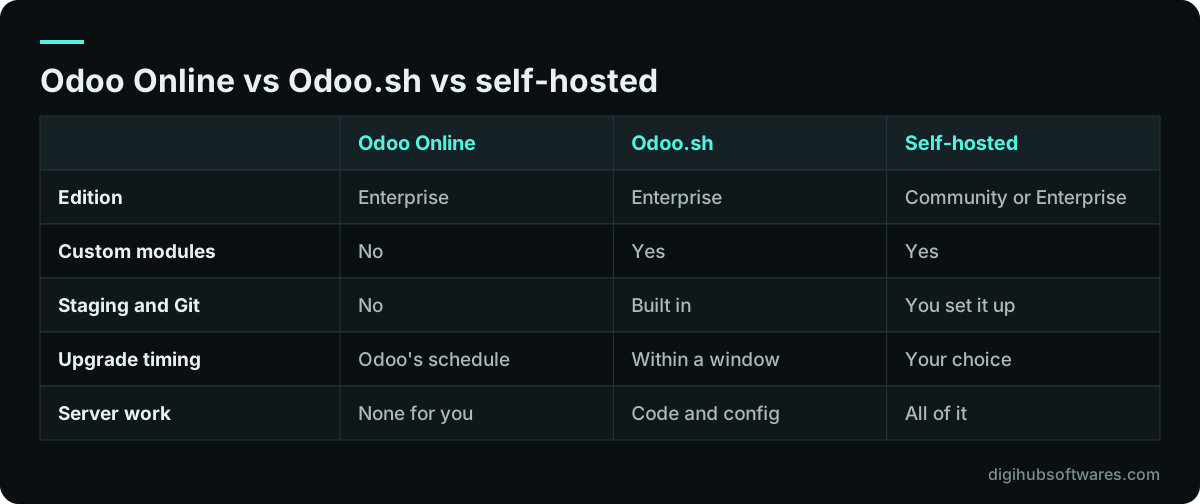
Odoo Online is a managed software service where Odoo runs everything and you cannot install custom code, while Odoo.sh is a hosting platform where Odoo runs the infrastructure and you deploy your own modules from a Git repository. Both run Odoo Enterprise. Self-hosting is the third route: you or your partner run Odoo on your own server or cloud account, with either edition.
The Odoo Online vs Odoo.sh question usually settles itself once the scope is written. If every process fits standard apps plus Studio, Odoo Online is simpler and cheaper to run. If even one process needs a custom module or an Apps Store module, Odoo Online is ruled out. This choice comes early in our Odoo implementation guide for exactly that reason.
Who should choose Odoo Online?
Odoo Online suits companies whose processes fit Odoo's standard apps, possibly adjusted with Studio, and who want no server work at all. Odoo's Odoo Online documentation (opens in a new tab) describes private databases hosted and managed by Odoo, backed up daily under its cloud hosting SLA, and states that Odoo Online is incompatible with custom modules or modules from the Odoo Apps Store.
Odoo Online also runs the newest software. Odoo releases SaaS versions every two to three months, such as SaaS 19.1 to 19.4 between January and July 2026, and those versions exist only on Odoo Online. Upgrades are mandatory there: Odoo runs a test upgrade, notifies you a few weeks ahead and upgrades the database automatically if you do not act by the deadline. That is good for staying current and hard for companies that want to freeze a validated setup.
At the time of writing, Odoo's Standard plan covers all apps on Odoo Online, and the Custom plan is needed for multi-company, Studio and external API access. Check the current terms on the Odoo pricing page before you choose.
What is Odoo.sh and who is it for?
Odoo.sh is Odoo's own cloud platform for hosting Enterprise databases that carry custom code. It gives each project Git branches for development, staging and production, automatic builds and tests, a web shell and SSH access, so a developer can test a change on a copy of production before it goes live.
It fits companies that need custom modules or third-party modules, want a proper test environment, and prefer not to run servers. You still need someone who can work with Git and deploy code, but Odoo handles the hardware, the operating system and the backups.
Pricing is by component. The Odoo.sh pricing page (opens in a new tab) lists workers, storage, the hosting type (shared or dedicated) and staging environments, and says the hosting price does not include the Enterprise licence. Odoo.sh also requires Odoo's Custom licence plan. Our Odoo.sh hosting and deployment service covers project setup, branch strategy and releases.
When does self-hosted Odoo make sense?
Self-hosted Odoo makes sense when you run Community, when you must keep data in a specific country or network, or when you need full control over the version and the timing of upgrades. It is also the only route that lets you stay on a version indefinitely, though Odoo does not recommend it.
The trade-off is responsibility. Someone has to install Odoo and PostgreSQL, configure a reverse proxy with HTTPS, apply security patches, take and test backups, monitor disk and memory, and plan upgrades. For Enterprise on your own server, the database also has to reach Odoo's subscription servers each week to stay registered. If nobody owns those jobs, self-hosting turns a licence saving into a security risk.
Many self-hosted setups run Odoo in containers. Our guide to running Odoo in Docker covers a production layout, and our Docker containerization work applies the same approach to other systems.
What security work does each hosting option leave to you?
Every option leaves user access, passwords and permissions to you, and self-hosting adds the whole server on top. On Odoo Online, your job is strong passwords, two-factor authentication for admins and sensible access rights. On Odoo.sh, add code review and the care of anything you deploy. On your own server, you own the full stack.
Odoo's deployment documentation (opens in a new tab) lists the settings that matter most for a public server. Before go-live, check at least these:
- Set admin_passwd to a long random value, because it protects the database management screens.
- Set dbfilter so each hostname matches one database, then set list_db = False to hide the database list and manager.
- Put Odoo behind a reverse proxy with HTTPS, set proxy_mode = True and redirect plain HTTP to HTTPS.
- Keep PostgreSQL off the public internet and give Odoo its own database user without superuser rights.
- Take automatic backups to a separate location and restore one on a schedule to prove they work.
- Apply Odoo and operating system updates on a regular cycle, tested on a staging copy first.
How do upgrades differ by hosting?
Upgrades are imposed on Odoo Online, scheduled within a window on Odoo.sh and fully in your hands when self-hosted. Odoo's upgrade documentation (opens in a new tab) says a major version on Odoo Online must be upgraded every two years, and minor versions a few weeks after the next release. On Odoo.sh, you get the three years of standard support plus two more years to complete the upgrade. On-premise databases can stay on a version as long as you choose.
Odoo 20, released in September 2026, has standard support planned until September 2029. Extended support, for an extra fee, is offered on Odoo.sh for a limited number of versions and on-premise for any version. Custom modules must be ported to the new version before the database can be upgraded, so a heavily customized Odoo.sh project needs upgrade work planned well inside its window. Our guide to planning an Odoo version upgrade covers the testing steps.
Can you change hosting later?
Yes, but some moves are easier than others. Moving from Odoo Online to Odoo.sh or your own server starts with a database backup. The catch is the version: Odoo.sh and on-premise do not support the intermediate SaaS versions, so a database on, say, SaaS 19.3 must first be upgraded to the next major version, Odoo 20, before it can move.
Moving to Odoo Online goes the other way. All non-standard apps have to be uninstalled first, because Odoo Online does not accept them, and the database must be on a supported version. If your custom modules hold important data or logic, that move is rarely practical. The safest plan is to pick the hosting that fits your custom-code needs for the next few years, not just for go-live.
Which Odoo hosting option should you choose?
Settle Odoo Online vs Odoo.sh vs self-hosting by answering four questions in order: edition, custom code, server ownership and upgrade control. The first answer that rules an option out usually decides it.
If you have chosen Community, you are self-hosting; our article on what you lose with Odoo Community explains that trade. If you need custom modules on Enterprise and have no server team, Odoo.sh is the natural fit. If everything is standard, Odoo Online is the least work. Self-hosted Enterprise is for companies with data-location rules, a capable IT team or a need to fix the upgrade calendar. To see how each route changes the cost, read our guide to budgeting an Odoo implementation, or ask our Odoo consulting team to review your scope.
Sources and further reading
Official documentation and guidance if you want to read more about this topic.
Related guides and services
Questions readers ask
Can I install custom modules on Odoo Online?
No. Odoo's documentation states that Odoo Online is incompatible with custom modules and with modules from the Odoo Apps Store. You can still adjust Odoo Online with Studio, which adds fields, views and simple automations without code. If your scope needs any custom or third-party module, choose Odoo.sh or self-hosting instead, and decide this before configuration starts.
Is Odoo.sh more expensive than Odoo Online?
Usually, yes, because Odoo.sh adds a hosting charge on top of the Enterprise licence and requires Odoo's Custom plan, while Odoo Online plans include hosting. Odoo.sh is priced by workers, storage, hosting type and staging environments, so the cost grows with traffic and data. Check current figures on the Odoo.sh and Odoo pricing pages, which change over time and by country.
Is self-hosted Odoo cheaper?
Self-hosting can cost less in fees, especially with Community, but it adds work: server setup, security patches, backups, monitoring and upgrades. If that work is done properly by a staff member or a partner, the total may still be lower. If it is skipped, the saving is false, because an unpatched or unbacked-up ERP server is a business risk, not a bargain.
Does Odoo Online upgrade my database automatically?
Yes, upgrades on Odoo Online are mandatory. Odoo runs a silent test upgrade, notifies you a few weeks before the deadline and lets you trigger and test the upgrade yourself. If you take no action by the due date, Odoo upgrades the database automatically. Major versions on Odoo Online must be upgraded every two years, and SaaS versions soon after the next release.
Can I move from Odoo.sh to my own server?
Yes. An Odoo.sh project can be backed up and restored on your own server, because both run the same major versions and support custom modules. You then take over hosting, patching, backups and upgrades, and an Enterprise database must stay registered with your subscription code. Test the restore on a staging server first and plan the cutover around a quiet period.