

Key takeaways
- Go live at the start of a financial year or a sales tax period, not in the middle of one.
- Turn Sundry Debtor and Sundry Creditor ledgers into Odoo contacts, not into separate accounts.
- Load open invoices and bills against a clearing account so receivables and payables are not counted twice.
- Reconcile Odoo's opening trial balance, receivables, payables and stock value against Tally before anyone posts a new entry.
- Keep Tally available read-only for history and audits instead of migrating years of vouchers.
Part of our guide: Odoo implementation guide: how to implement Odoo ERP from scoping to go-live
What does it take to migrate from Tally to Odoo?
It takes four pieces of work: deciding when to switch, mapping Tally's structure to Odoo's, loading clean master data, and loading balances that agree with Tally. The technical import is the easy part. The judgment calls about what to bring and what to leave behind decide whether the first month in Odoo is calm or chaotic.
Tally and Odoo think about data differently. Tally ERP 9 and TallyPrime are built around ledgers and vouchers: almost everything, including each customer, is a ledger under a group. Odoo is built around business records. Customers are contacts, products carry their own accounting settings, and invoices, receipts and stock moves create journal entries in the background. A migration is mostly a translation between those two models.
Most businesses that migrate from Tally to Odoo also gain things Tally does not do: sales and purchase orders, warehouse operations, CRM, manufacturing or a web shop in the same database. Decide which apps you will run on day one before you plan the data, because the apps define which records you need. Our Odoo implementation guide covers that scoping step.
Should you bring full history or only opening balances?
For most companies, bring opening balances plus open items and leave the voucher history in Tally. Opening balances, unpaid invoices and bills, and the stock count are what Odoo needs to run from day one. Old vouchers add cost and risk, and you rarely use them in daily work.
Odoo's accounting getting started guide (opens in a new tab) names three possible transition points: the end of the fiscal year, the end of a tax period, or the middle of a tax period, which it advises against because two systems then share one return. For most Pakistani companies the financial year ends on 30 June and sales tax returns are monthly, so the practical choices are 1 July or the first day of a month.
If management wants year-on-year comparisons inside Odoo, a middle path works well: import monthly closing balances per account for the previous year as summary journal entries. You get comparable reports without importing thousands of individual vouchers. Keep a backup of the Tally company data, and a working copy of Tally, for audits and look-ups.
How Tally masters map to Odoo records
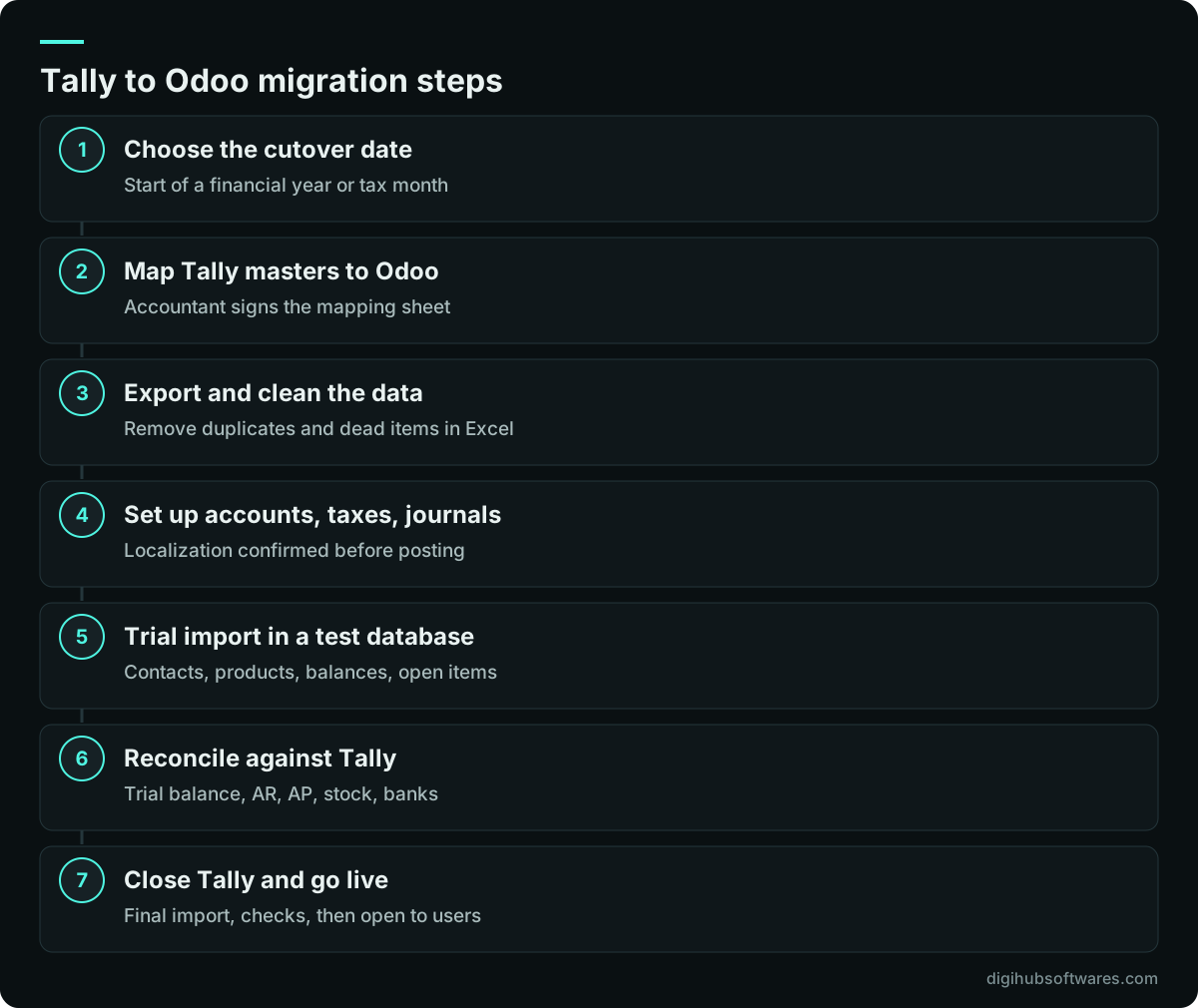
The core of a Tally to Odoo migration is a mapping sheet: every Tally master type, the Odoo record it becomes, and the rules for cleaning it. Build this sheet before exporting anything, and get the accountant to sign it off.
The most common mistake is importing every Tally ledger as an Odoo account. In Tally, each customer is a ledger under Sundry Debtors. In Odoo, customers are contacts that share one receivable account, and the customer is tracked on each journal line. Importing a thousand customer ledgers as accounts makes the chart unusable and breaks Odoo's aged receivable reports.
| Tally master | Becomes in Odoo | Watch out for |
|---|---|---|
| Groups and general ledgers | Chart of accounts | Merge duplicates; keep codes unique |
| Sundry Debtors ledgers | Customer contacts | NTN, STRN, CNIC and addresses |
| Sundry Creditors ledgers | Vendor contacts | Withholding status on each vendor |
| Bank ledgers | Bank journals | Statement starting balance |
| Voucher types | Journals | Fewer journals than voucher types |
| Stock groups and stock items | Product categories and products | Costing method set on the category |
| Godowns | Warehouses and locations | Separate branches from shelves |
| Units of measure | Units of measure | Purchase versus sales units |
| Cost centres | Analytic accounts | Plan the analytic structure first |
| Bill-wise pending details | Open invoices and bills | Totals must match the ledgers |
How do you get data out of Tally ERP 9 and TallyPrime?
Export masters and reports from Tally into Excel, then clean them in a spreadsheet before importing into Odoo. TallyPrime can export reports to Excel, XML, JSON and other formats, and it can export the Day Book together with the masters each voucher depends on. Tally.ERP 9 has similar export options, though menus differ between releases.
Export these as a minimum: the trial balance at the cutover date, the ledger list with group, address and tax registration fields, outstanding receivables and payables bill by bill, the stock summary with quantity and value per item and godown, and the stock item list with units and groups. If you plan to bring summary history, export the monthly trial balance for each month you want.
Then clean. Tally data that has been used for years usually carries duplicate ledgers, customers with slightly different names, items that are no longer sold and godowns that no longer exist. Fix these in the spreadsheet, not in Odoo after the import. Odoo's import tool accepts an External ID column, and Odoo recommends using the unique identifier from your old system there. Using the Tally ledger or item name as that ID makes it easy to link records and to re-run an import if something needs correcting.
What changes if you move from Excel to Odoo instead?
The steps are the same, but the cleaning takes longer and the balances need more checking. Spreadsheets have no enforced structure, so customer lists, price lists and stock sheets often disagree with each other. Treat the first job as building a single master list for each record type.
Start with contacts, products and the chart of accounts, since everything else refers to them. Then establish opening figures you trust. Without a ledger system, that usually means a physical stock count on the cutover date, bank balances from statements, and a list of unpaid invoices that customers have confirmed. If your accountant keeps the books separately, their trial balance becomes the opening position.
Businesses coming from spreadsheets tend to gain the most from Odoo, because they get a ledger, stock control and approvals at once. They also need more training. Plan a few short sessions for each team, built around their own daily tasks.
How do you set up FBR sales tax in Odoo for Pakistan?
Configure the taxes in Odoo before importing any open invoices, because each invoice line needs the correct tax. Pakistan appears in Odoo's list of fiscal localization packages, which gives you a starting chart of accounts and taxes. Odoo also warns that the localization package can only be changed while no entries have been posted, so confirm it on day one.
According to the FBR's sales tax basics (opens in a new tab), federal sales tax is levied under the Sales Tax Act, 1990 on the sale and supply of goods and on imports, while sales tax on services falls under separate laws: federal for the Islamabad Capital Territory and provincial elsewhere. In Odoo, that usually means separate taxes for FBR sales tax on goods, each provincial service tax you deal with, exempt and zero-rated supplies, and withholding where it applies, each mapped to its own account. Contacts need NTN and STRN fields filled in so they print on tax invoices.
If your business must report invoices to FBR's digital invoicing system or connect its point of sale, plan that integration as its own workstream with its own tests. We cover the local setup in more depth on our Odoo implementation in Pakistan and Odoo accounting in Pakistan pages. As with any tax setup, it is configured to support your compliance, and you should confirm it with your tax adviser.
How do you import opening balances into Odoo without double counting?
Use clearing accounts. Odoo's guidance is to import each open invoice and bill as a single line for the amount still due, posted to an AR or AP clearing account, and to replace the receivable and payable balances in the opening trial balance with those same clearing accounts. The customer and vendor balances then come from the invoices alone, and the clearing accounts net to zero.
Stock needs the same care. Import product costs first, then the opening quantities per location, and compare the resulting stock value with the inventory figure in the Tally trial balance. The costing method you choose on each product category affects every later sale, so settle it with your accountant first. Our guide to Odoo inventory valuation explains the options.
- The opening trial balance in Odoo balances and matches Tally's trial balance at the cutover date.
- Total receivables equal the open customer invoices minus credit notes.
- Total payables equal the open vendor bills minus refunds.
- Stock value in the trial balance equals the quantity times cost of all products on hand.
- Each bank journal's first statement starts at the actual bank balance.
- The clearing account is zero after everything is posted.
A practical cutover plan for a Tally to Odoo migration
Run at least one full trial migration into a test database before the real one. The trial shows how long each import takes, which records fail and where the totals disagree. Fix the mapping sheet and repeat until the checks pass.
During the final cutover, close Tally for new entries at the end of the last day, export the closing figures, load them into the prepared Odoo database, run the reconciliation checks and only then open Odoo to users. Having both systems live for new transactions creates two versions of the truth, so avoid a parallel run beyond a short, agreed overlap.
How long does the migration take and what does it cost?
When you migrate from Tally to Odoo, the effort depends on data quality, the number of companies and godowns, how much history you bring and how many Odoo apps go live with it. A single company bringing opening balances and open items is a modest job. Several branches with summary history, manufacturing and an FBR integration take considerably longer.
Our published packages include data work: the Starter package covers master data import and tax localization, and the Growth package adds opening balances plus one year of history. In Pakistan, Starter is priced at PKR 390,000 and the tax localization add-on, which includes Pakistan FBR setup, starts at PKR 150,000. Full details are on our Odoo pricing page, and Odoo licences and hosting are billed separately by the provider. If you only need the data moved, our Odoo data migration service covers mapping, cleaning, trial imports and reconciliation.
Sources and further reading
Official documentation and guidance if you want to read more about this topic.
Related guides and services
Questions readers ask
Can Odoo import data directly from Tally?
Not directly in standard Odoo. The usual route is to export masters and reports from TallyPrime or Tally.ERP 9 to Excel, clean and map them, then load them with Odoo's import tool using its templates. For large or repeated migrations, a script can read Tally's XML export instead. Either way, the mapping and reconciliation work matters far more than the file format you choose.
Should I migrate all my Tally vouchers to Odoo?
Usually not. Opening balances, unpaid invoices and bills, and opening stock are what Odoo needs to operate. Importing years of vouchers adds cost and gives more room for mismatches. If you want comparisons in Odoo reports, import monthly summary balances for the prior year instead. Keep Tally data backed up and accessible for audits and historical look-ups.
When is the best time to migrate from Tally to Odoo?
The start of a financial year is the cleanest point, because only closing balances move. The first day of a sales tax period is the next best choice, since each monthly return then comes from one system. Avoid switching mid-month, because one return would combine figures from Tally and Odoo, which makes filing and checking harder.
Does Odoo support Pakistan sales tax and FBR requirements?
Pakistan is on Odoo's list of fiscal localization packages, which provides a starting chart of accounts and taxes. Most businesses still need taxes adjusted for FBR sales tax on goods, provincial service taxes and withholding, plus NTN and STRN on invoices. Digital invoicing or POS reporting to FBR needs a separate integration. Configure it with your tax adviser's sign-off.
How do I check the migration was correct?
Compare Odoo with Tally at the cutover date. The trial balances must match, receivables must equal open customer invoices minus credit notes, payables must equal open bills minus refunds, and the stock value must equal quantity times cost for all items. Bank journals should start at the real bank balance, and any clearing account used for the import should be zero.