

Key takeaways
- Check the Enterprise-only list against your own process list before you pick an edition.
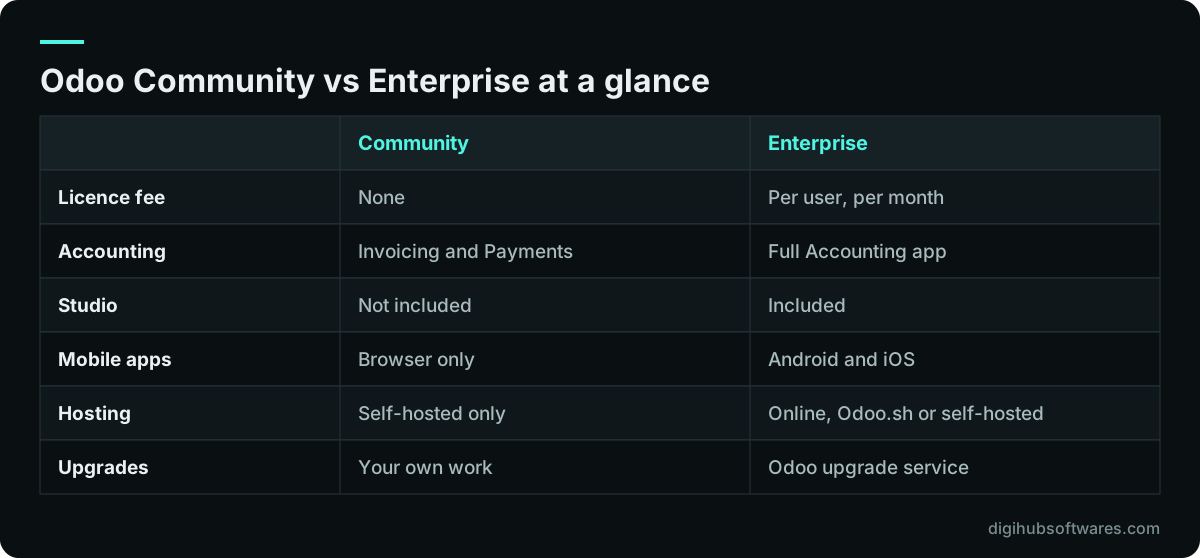
- Community includes Invoicing and Payments, but full Accounting with bank reconciliation and analytic accounts is Enterprise.
- Community has no Odoo upgrade service, so budget for upgrade work from day one.
- Community must be self-hosted; Odoo Online and Odoo.sh run Enterprise only.
- You can move from Community to Enterprise later by installing the Enterprise modules on the same database.
Part of our guide: Odoo implementation guide: how to implement Odoo ERP from scoping to go-live
Odoo Community vs Enterprise: what is the difference?
Odoo Community is the free, open-source edition of Odoo, and Odoo Enterprise is Community plus extra apps, extra features inside shared apps and a set of services sold as a per-user subscription. Odoo's own editions comparison (opens in a new tab) puts it plainly: Community is the core on which Enterprise is built. That is why a Community database can be switched to Enterprise later without starting again.
The practical question in Odoo Community vs Enterprise is not which edition is better. It is which of the Enterprise-only parts your processes need, and what it costs to fill each gap another way. Some companies lose nothing they use. Others discover after go-live that the bank reconciliation screen their accountant expected is not there.
This article is part of our Odoo implementation guide, which covers the decisions to make before scoping a project.
Which apps are Enterprise only?
Based on Odoo's editions page for the current release, Odoo 20, these apps and features appear only in Enterprise. Many core apps exist in both editions, but some of them have Enterprise-only features inside, which is where comparisons often go wrong.
| Area | In both editions | Enterprise only |
|---|---|---|
| Finance | Invoicing, Payments, Expenses | Accounting (ledger, bank reconciliation, analytic), Payroll, Documents, Spreadsheet, Sign, ESG, expense OCR |
| Sales | CRM, Sales, Point of Sale | Subscriptions, Rental, Amazon Connector |
| Websites | Website Builder, eCommerce, Blog, Forum, Live Chat, eLearning | None listed |
| Supply chain | Inventory, Manufacturing, Purchase, Maintenance | Barcode, Shopfloor, MRP scheduling, PLM, Quality |
| HR | Employees, Recruitment, Time Off, Fleet | Appraisals, Referrals |
| Marketing | Email Marketing, SMS Marketing, Events, Surveys | Social Marketing, Marketing Automation |
| Services | Project, Timesheet | Field Service, Helpdesk, Planning, Appointments, timesheet grid and validation |
| Productivity | Discuss, To-Do, Calendar | Approvals, VoIP, IoT, Knowledge |
| Platform | Web browser interface | Studio, Android and iOS apps, Odoo hosting, upgrades, functional support |
Can you run your accounts on Odoo Community?
You can invoice customers, record payments and track bills on Odoo Community, but the full Accounting app is Enterprise. Odoo's comparison lists the general ledger, bank statement reconciliation and analytic accounting under Enterprise, while Invoicing and Payments are in both editions.
For a small business that keeps its books in separate accounting software and uses Odoo for sales and stock, that may be fine. For a company that wants Odoo to be the finance system, it is the biggest gap. The usual workarounds are community-built accounting modules, such as those maintained by the Odoo Community Association (opens in a new tab), or a link from Odoo to an external accounting package. Both work, but both add something you have to test, host and carry through each upgrade.
Tax localization adds weight to this decision. UK VAT reporting under Making Tax Digital, UAE VAT and Corporate Tax, and Pakistan FBR sales tax all live in the accounting layer. If those reports matter, check exactly which localization features run on the edition you choose, and confirm the result with your tax adviser. Our Odoo accounting team can map your reporting needs to either route.
What do you lose beyond the apps?
Beyond apps, Community users lose Studio, the official mobile apps, Odoo's functional support, Odoo's hosting and Odoo's upgrade service. These are easy to overlook in a feature checklist because they are not screens, but they shape the running cost of the system for years.
- Studio: Enterprise admins can add fields, views and automations without code. On Community, the same change needs a developer and a custom module.
- Mobile apps: the Android and iOS apps are Enterprise only. Community users work in the mobile browser.
- Hosting: Odoo Online and Odoo.sh run Enterprise. Community has to be self-hosted on your own server or cloud account.
- Upgrades: Enterprise subscribers can use Odoo's upgrade service. Community upgrades rely on community-maintained scripts or your own developers.
- Support: Enterprise includes functional support from Odoo. Community support comes from forums, the community or a paid partner.
Why do upgrades matter more on Community?
Upgrades matter more on Community because nobody upgrades the database for you, and Odoo gives each major version three years of standard support. Odoo 20 was released in September 2026, Odoo 19 in September 2025 and Odoo 18 in October 2024, according to Odoo's standard and extended support page (opens in a new tab). A Community database that skips several versions gets harder to bring forward each year.
On Enterprise, Odoo migrates the standard data model and you port your own custom modules. On Community, you also own the migration of the standard data, which is often the larger task. Our guide to planning an Odoo version upgrade explains how to test and stage the work for either edition.
When is Odoo Community enough?
Odoo Community is enough when your processes sit inside the apps it includes, your accounting lives elsewhere or is simple, and you have reliable technical help for hosting and upgrades. In those cases the licence saving is real and the trade-offs are manageable.
When you weigh Odoo Community vs Enterprise for your own company, Community tends to fit these profiles:
- A trading or retail business using Sales, Purchase, Inventory, Point of Sale and Invoicing, with a separate accountant or accounting package.
- A company with an in-house developer or a long-term partner who will host, patch and upgrade the system.
- A website or eCommerce project where Website Builder and eCommerce cover the need.
- A pilot or proof of concept where you want to test Odoo's core flows before buying licences.
When does Enterprise pay for itself?
Enterprise pays for itself when you would otherwise rebuild its missing parts, because a custom module costs money to build and more money at every upgrade. If Odoo will run your books, if field staff need the mobile app or barcode scanning, or if you rely on Helpdesk, Field Service, Planning or Quality, rebuilding those features on Community usually costs more than the subscription over a few years.
Enterprise also opens Odoo Online and Odoo.sh, which removes the server work. Our comparison of Odoo Online, Odoo.sh and self-hosting explains which hosting fits which project, and our guide to budgeting an Odoo implementation shows how to put licences, hosting and custom work side by side.
Can you switch from Community to Enterprise later?
Yes. Odoo documents how to switch from Community to Enterprise (opens in a new tab) on a self-hosted server: back up the database, add the Enterprise modules, install the web_enterprise module and enter your subscription code. Your data stays in the same database.
The switch itself is short. The planning around it is not. Any community modules you installed to fill gaps, such as third-party accounting, may overlap with the Enterprise apps you now have, so decide which to keep before you switch and test the result on a copy. Odoo's upgrade documentation also notes that a version upgrade does not include switching editions, so treat them as two separate steps.
If you are weighing the two editions now, our Odoo consulting service maps your processes to each edition, and our Odoo implementation team can deliver on either one.
Sources and further reading
Official documentation and guidance if you want to read more about this topic.
- Odoo editions comparison: Community and EnterpriseOdoo (opens in a new tab)
- Switch from Community to EnterpriseOdoo documentation (opens in a new tab)
- Standard and extended support for Odoo versionsOdoo documentation (opens in a new tab)
- Odoo Community AssociationOdoo Community Association (opens in a new tab)
Related guides and services
Questions readers ask
Is Odoo Community really free?
Odoo Community has no licence fee and can be downloaded and used without a subscription. It is not free to run, though. You pay for hosting and server care, for any work to fill gaps such as full accounting or Studio-style changes, and for upgrades between versions. Whether it costs less than Enterprise overall depends on how many of those gaps your business needs filled.
Does Odoo Community include accounting?
Odoo Community includes Invoicing and Payments, so you can send invoices, record bills and register payments. The full Accounting app, with the general ledger, bank statement reconciliation and analytic accounting, is listed as Enterprise only on Odoo's editions page. Community users who need full accounting usually add community-built modules or connect Odoo to separate accounting software.
Can I use Odoo Community on Odoo Online or Odoo.sh?
No. Odoo Online and Odoo.sh host Enterprise databases. Hosting is listed as an Enterprise benefit on Odoo's editions page, and the Odoo.sh pricing page notes that the hosting price does not include the Enterprise licence. Odoo Community has to be self-hosted on your own server, a virtual machine or a cloud account, which means someone has to install, patch, back up and monitor it.
Can I move from Odoo Community to Enterprise without losing data?
Yes. The switch keeps your existing database. Odoo's documented steps are to back up the Community database, add the Enterprise modules, install the web_enterprise module and enter your subscription code. Test it on a copy first, especially if you installed community modules that overlap with Enterprise apps, and plan it separately from any version upgrade.
Which Odoo edition is better for a small business?
Neither edition is better for every small business. Community suits a small team that uses Sales, Inventory, Purchase and Invoicing and keeps its books elsewhere, with technical help for hosting. Enterprise suits a small business that wants Odoo to run its accounts, needs the mobile app or Studio, or prefers Odoo to host and upgrade the system. Compare against your actual processes.