

Key takeaways
- Check crawling and indexing first: a page Google cannot fetch or has excluded will not rank, however good the copy is.
- Give every service and location page one canonical URL, one clear H1 and a place in your internal links and XML sitemap.
- Judge speed by field data for LCP, INP and CLS on mobile, and fix it template by template.
- Use structured data that Google still supports, such as Organization, LocalBusiness and BreadcrumbList, and drop the idea that FAQ markup will win rich results.
- Connect Search Console and conversion tracking before you change anything, so you can prove which fixes brought leads.
What is technical SEO, and why do service businesses need a checklist?
Technical SEO is the work that lets search engines fetch, render, understand and index your pages, and lets visitors use them without friction. It covers server responses, robots rules, URLs, redirects, canonical tags, sitemaps, page speed, mobile layout, structured data and security. It does not cover what you say on the page or who links to you, although it decides whether either of those can help.
Service businesses have a particular shape of website. A law firm, clinic, contractor, accountant or software house usually has a home page, ten to fifty service pages, a few location pages, a contact page and a blog. Revenue comes from a small number of pages that must rank for commercial searches such as a service plus a city. That makes a technical SEO checklist unusually valuable: one broken template, a staging site left indexable or a wrong canonical can hide the exact pages that bring calls.
The checklist in this guide is ordered by dependency. Nothing else matters if Google cannot crawl a page, so crawling comes first, then indexing, then the signals that help Google choose and rank the right page. We follow the same order in every technical SEO audit, because it stops teams from polishing page speed on URLs that are not even in the index.
The technical SEO checklist at a glance
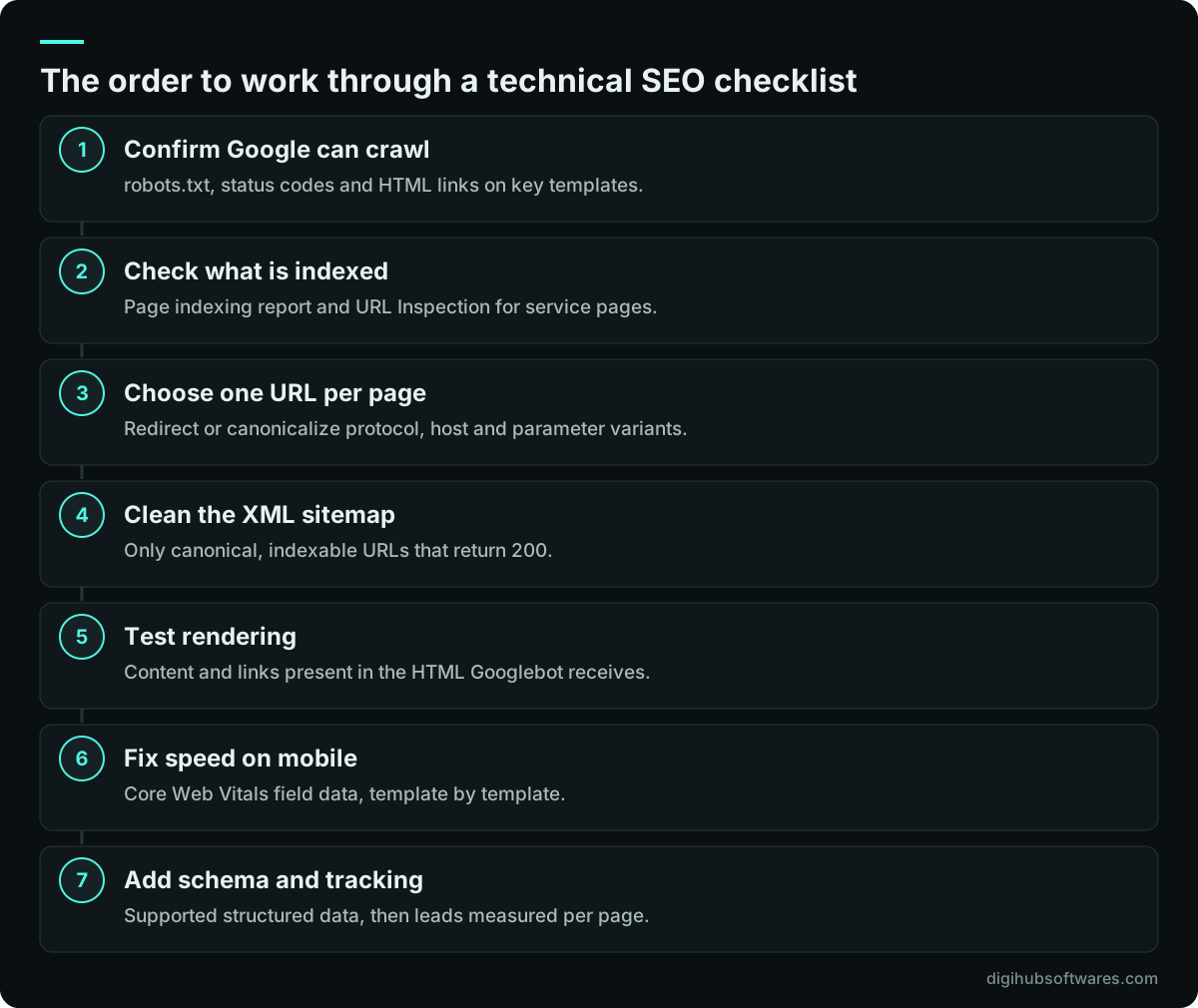
Run this technical SEO checklist in order, and record the result of each one before fixing anything. Most can be done with Google Search Console, a browser and a crawler such as Screaming Frog or Sitebulb. For a site under a few hundred pages, a first pass usually fits into a working day; the fixes take longer, depending on who controls the CMS and hosting.
- Crawling: robots.txt allows your important sections, key pages return a 200 status, and internal links are real HTML links.
- Indexing: the Page indexing report shows your service and location pages as indexed, and thin, duplicate or test pages are excluded on purpose.
- Canonicals and duplicates: one preferred URL per page, with HTTP, non-www or www, trailing-slash and parameter variants redirected or canonicalized to it.
- Sitemaps: an XML sitemap lists only canonical, indexable URLs and is submitted in Search Console.
- Rendering: the main content, links, title and meta description exist in the HTML Google receives.
- Performance: field data passes Core Web Vitals on mobile for the templates that earn leads.
- Mobile and security: the mobile page has the same content as desktop, and the whole site runs on HTTPS with no mixed content.
- Structured data: Organization or LocalBusiness, BreadcrumbList and other supported types are valid and match what the page shows.
- Local and international: location pages, service areas and hreflang (if you serve several countries) are consistent with your Google Business Profile.
- Measurement: Search Console, GA4 and conversion tracking are connected, so you can see which pages produce enquiries.
Can Google crawl your service pages?
Google can crawl a page when it can find a link to it, is allowed to fetch it by robots.txt, and gets a successful response from your server. Check all three on your most valuable templates before anything else.
Start with robots.txt at the root of your domain. It controls crawling, not indexing. A URL blocked in robots.txt can still appear in results if other pages link to it, just without a description, and Google cannot see a noindex tag on a page it is not allowed to fetch. A common mistake is a developer adding a blanket Disallow during a rebuild and nobody removing it at launch. Another is blocking the folders that hold CSS and JavaScript, which stops Google rendering the page the way visitors see it.
Next, crawl the site yourself and look at status codes. Every service page should return 200. Old URLs should return a single 301 to the closest current page, not a chain of three hops or a redirect to the home page. Pages that are truly gone should return 404 or 410. Watch for soft 404s, where a page says it is not found but returns 200, which wastes crawling and confuses reports.
Finally, check how pages link to each other. Google follows links written as an anchor element with an href attribute. Menus built from buttons and JavaScript click handlers, or service lists that only appear after a filter is clicked, may never be followed. Google's Search Central guidance on making links crawlable is short and worth sharing with whoever builds your templates. Every service page should be reachable within a few clicks of the home page, through descriptive anchor text rather than generic labels.
Are the right pages indexed, and the wrong ones kept out?
The goal of indexing work is a clean index: your service, location, case and article pages are in it, and thin, duplicate or private pages are not. The Page indexing report in Search Console shows both sides, and URL Inspection tells you exactly what Google knows about a single URL.
Read the excluded reasons carefully, because they mean different things. Crawled, currently not indexed usually means Google fetched the page and decided it was not worth indexing yet, often because it is thin or very similar to another page. Discovered, currently not indexed means Google knows the URL but has not fetched it, which on a small site often points to weak internal linking. Duplicate without user-selected canonical means Google found near copies and picked one itself.
Use a noindex robots meta tag (or an X-Robots-Tag header for PDFs and other files) for pages that should exist but not rank: thank-you pages, internal search results, tag archives with two posts, staging copies and login areas. Remember that noindex only works when the page is crawlable. For staging sites, password protection is safer than noindex, because it also stops people finding unfinished work.
Service businesses often create near-duplicate location pages by swapping the city name in the same copy. Google may index one and ignore the rest. If you serve several areas, write each location page around what is actually different there: the team, travel time, local rules, examples of typical jobs and directions or service-area details. If you cannot say anything different, one strong service page with a clear list of areas served is usually the better choice.
How should canonical tags and redirects work together?
A canonical tag tells Google which URL you prefer when several addresses show the same content; a 301 redirect sends visitors and crawlers to that preferred URL. Use redirects for variants nobody should land on, and canonical tags for variants that must keep working, such as URLs with tracking parameters.
Pick one version of the site, normally HTTPS with or without www, with a consistent trailing-slash rule, and redirect every other combination to it in one hop. Then make each page's canonical tag point to its own preferred URL as an absolute address. Google treats rel=canonical as a strong hint rather than an order, so it works best when every other signal agrees: internal links, the sitemap and hreflang should all use the same preferred URL. Google explains the signals it weighs in its Search Central guide to consolidating duplicate URLs.
Watch for three errors that show up often on service sites. Templates that set every canonical to the home page, which can drop the inner pages from the index. Paginated blog archives canonicalized to page one, which hides older posts. And CMS plugins that output two different canonical tags, leaving Google to guess. A crawl that extracts the canonical from every page finds all three in minutes.
What should your XML sitemap and site structure look like?
An XML sitemap is a list of the canonical URLs you want indexed, which helps Google discover and recrawl them. It does not force indexing, and it cannot make up for pages that are not linked from anywhere on the site.
Keep the sitemap clean. It should contain only URLs that return 200, are indexable and are the canonical version. Leave out redirects, noindexed pages, parameter URLs and staging addresses. Google ignores the priority and changefreq fields, but it does use lastmod when the dates are consistently accurate, so set lastmod to the date the main content last changed rather than the date the sitemap was generated. A single sitemap file can hold up to 50,000 URLs, which is far more than a service business needs. Reference the sitemap in robots.txt and submit it in Search Console so you can see how many listed URLs are indexed.
Site structure matters as much as the sitemap. A simple, shallow hierarchy works well for service businesses: a services hub, one page per service, location pages where they are justified, and supporting articles that link up to the relevant service. Breadcrumbs reinforce that hierarchy for visitors and for Google. Group related services under clear parent pages rather than leaving forty services as flat links in the footer.
Does your content exist without JavaScript?
Your service content should be present in the HTML that the server sends, not only after JavaScript runs in the browser. Google can render JavaScript, but rendering can happen later than crawling, and many other crawlers, including several AI crawlers, do not run JavaScript at all.
To test, open URL Inspection in Search Console and view the crawled HTML and screenshot, or compare the page source in your browser with what you see on screen. If the H1, the service description, internal links or the title tag are missing from the raw source, the page depends on client-side rendering. Frameworks such as Next.js, Nuxt or Astro solve this with server-side rendering or static generation. On WordPress, the usual culprits are page-builder tabs, accordions that load content on click and sliders that inject text with scripts.
Check the details that JavaScript often breaks: the title and meta description should be set on the server, not rewritten after load; each route in a single-page app should have its own URL and return a real 404 for missing pages; and lazy-loaded content should appear without a scroll or click from the visitor.
How fast is fast enough? Core Web Vitals for service pages
A service page is fast enough when it passes Core Web Vitals in real-user data on mobile: Largest Contentful Paint of 2.5 seconds or less, Interaction to Next Paint of 200 milliseconds or less, and Cumulative Layout Shift of 0.1 or less, each measured at the 75th percentile of visits. These thresholds are published on web.dev (opens in a new tab). INP replaced First Input Delay as a Core Web Vital in March 2024, so any tool still reporting FID is out of date.
Speed is one of many signals, and Google says relevance comes first. The commercial case is simpler: a visitor on a phone who waits for a hero image or fights a jumping cookie banner is less likely to call. On service sites, the usual causes are oversized hero images, page builders that load large scripts on every page, chat widgets and tag managers stacked with third-party tags, and web fonts that shift the layout as they arrive.
Fix speed per template, not per URL. The service template, the location template and the article template cover almost every page on a service site. Our guide on how to improve Core Web Vitals walks through LCP, INP and CLS fixes in detail, including what to do on WordPress and Shopify.
Mobile-first indexing, HTTPS and site security
Google indexes and ranks the mobile version of your pages, so the mobile page must carry the same main content, headings, links, structured data and metadata as the desktop page. Hiding a section of service detail on mobile to save space can remove it from what Google evaluates.
Check that tap targets are usable, text is readable without zooming, and pop-ups do not cover the main content on arrival. Click-to-call and WhatsApp buttons should be easy to reach on a phone, because for many service businesses they are the conversion.
HTTPS is the baseline. Every page, image, script and form should load over HTTPS with a valid certificate, HTTP should redirect to HTTPS in one hop, and HSTS should be enabled once you are confident the setup is stable. Security also affects search directly: a hacked site that serves spam pages or redirects visitors can be flagged in Search Console's Security issues report and lose trust with visitors. Keep the CMS, theme and plugins updated, remove unused plugins and admin accounts, and use two-factor authentication on every login that can change the site.
Which structured data still matters for service businesses?
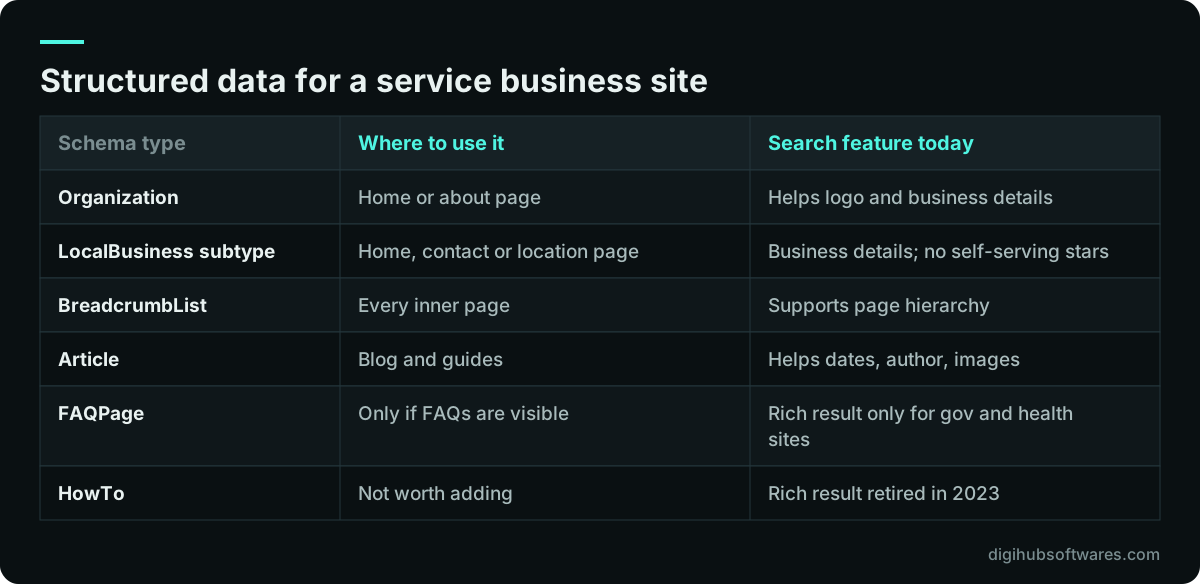
Structured data is code, usually JSON-LD, that describes the page in the schema.org vocabulary so search engines can understand entities such as your business, address, opening hours and services. For a service business, the useful core is Organization or a specific LocalBusiness subtype, BreadcrumbList and, on articles, Article.
Be realistic about rich results. In August 2023 Google limited FAQ rich results (opens in a new tab) to well-known, authoritative government and health websites, and it stopped showing How-to rich results entirely in September 2023. FAQPage markup on a typical service page will not produce expandable questions in search results anymore. It does no harm if it matches the visible content, but it should not be the reason you add an FAQ section. Write FAQs because they answer real questions buyers ask.
Star ratings are another common misunderstanding. Google does not show review stars for LocalBusiness or Organization markup when a business publishes reviews about itself on its own site. Your star rating in search comes mainly from your Google Business Profile reviews instead.
Whatever you mark up must match what the page shows, use the same name, address and phone as your Google Business Profile, and pass the Rich Results Test or the Schema Markup Validator. Markup that describes content visitors cannot see risks a manual action and adds nothing.
Location pages, Google Business Profile and multi-country sites
For local searches, your website and your Google Business Profile work as a pair. The profile should link to the most relevant page (the home page for a single location, or the matching location page for each branch), and that page should show the same business name, address or service area, and phone number.
Technical checks here are simple but often skipped: location pages are indexable and in the sitemap, each has unique content and its own LocalBusiness markup where there is a real address, and an embedded map does not slow the page down. Our Google Business Profile checklist covers the profile side, including categories, service areas and reviews.
If you sell to several countries, for example the UK, the UAE and Pakistan, decide whether you really need separate country pages. Separate pages make sense when prices, regulations, currency or contact details differ. Then use hreflang annotations so Google shows the right version, make sure each version links back to the others, and avoid automatic redirects based on IP address, which can stop Googlebot reaching some versions. Our SEO services for UK businesses page shows how we handle a country-specific version.
What does technical SEO change for AI Overviews and AI answers?
For Google's AI Overviews and AI Mode, nothing special: a page must be indexed and eligible to appear in Search with a snippet, and Google states that there are no additional technical requirements. Its page on AI features and your website (opens in a new tab) says standard SEO best practices still apply.
In practice that puts more weight on the basics in this checklist. Pages that block snippets with nosnippet or a very low max-snippet setting limit how Google can quote them. Content hidden behind scripts may be invisible to crawlers that do not render JavaScript, which matters for assistants beyond Google. Check your robots.txt deliberately for crawlers such as OAI-SearchBot and PerplexityBot, and decide which ones you want to allow, rather than inheriting a rule copied from a template.
Structure also helps. Pages that answer the question in the first lines of each section, use clear headings, and present comparisons as real tables are easier to quote accurately. Our guide to structuring service pages for AI search covers the content side of this in detail.
How do you measure whether technical fixes worked?
Measure technical SEO by its effect on indexing, impressions and enquiries, not by an audit tool's score. Before you change anything, note the indexed page count, impressions and clicks for your service pages in Search Console, and how many leads each page produced.
Search Console shows the search side. GA4 and your ads account show what happened after the click, but only if forms, calls and WhatsApp clicks are tracked as key events. Many service sites track a thank-you page view and nothing else, so phone calls and chats, often the bulk of enquiries, are invisible. Our guide on how to track form, call and WhatsApp conversions sets this up properly, including Consent Mode v2.
Allow time for changes to show. Recrawling and reprocessing can take days for important pages and several weeks for the rest, and Core Web Vitals field data uses a rolling 28-day window. Annotate the date of each fix so you can match it to changes in the reports.
How often should you run a technical SEO audit, and when should you get help?
Run a full technical SEO audit before and after any redesign, migration or platform change, and a lighter check every quarter. Between audits, glance at Search Console's Page indexing and Core Web Vitals reports each month, and set up its email alerts so a sudden drop in indexed pages does not go unnoticed for weeks. Redesigns carry the most risk; our website redesign SEO checklist covers redirects and launch-day checks.
Technical SEO also shapes how you spend on ads. While organic visibility is weak, paid search can fill the gap, and a sound site lowers the cost of both because the same landing pages serve them. Our comparison of Google Ads vs SEO explains how to split a budget between the two.
You can do much of this checklist yourself with Search Console and a crawler. Bring in help when the fixes need template or server changes, when the site runs on a custom stack, or when rankings dropped and the cause is unclear. Our technical SEO services cover audits and the developer work to fix what they find, and the wider digital marketing services cover content, local SEO and ads. Published prices are on our digital marketing pricing page: a basic SEO audit for sites under 50 pages is $199 and a full audit is $449, as one-off projects.
Sources and further reading
Official documentation and guidance if you want to read more about this topic.
Related guides and services
Questions readers ask
What should a technical SEO checklist include?
A technical SEO checklist should include crawling (robots.txt, status codes, HTML links), indexing (Page indexing report, noindex use), canonical URLs and redirects, a clean XML sitemap, rendering without JavaScript, Core Web Vitals on mobile, HTTPS and security, valid structured data, location and hreflang setup, and conversion tracking. Work through them in that order, because each check depends on the ones before it.
How long does a technical SEO audit take for a small business site?
A first technical SEO audit of a site with under a few hundred pages usually takes one to three working days, including the crawl, Search Console review and a prioritized fix list. The fixes themselves take longer and depend on access: changing a theme or server setting is quick when you control the hosting and slow when a third party manages the site.
Is FAQ schema still worth adding to service pages?
FAQ schema will not earn expandable rich results for most service businesses, because since August 2023 Google shows them only for well-known, authoritative government and health websites. The markup does no harm if it matches visible questions, and the FAQ content itself can still help visitors and AI answers. Add FAQs for readers, not for the rich result.
Does page speed directly affect Google rankings?
Page speed matters, but it is not the main ranking factor. Core Web Vitals are part of Google's page experience signals, and Google says it still aims to show the most relevant content even when page experience is weaker. Its bigger effect for a service business is on conversions: slow, jumpy pages on a phone lose callers before they contact you.
Do I need technical SEO if my site is on WordPress or Wix?
Yes. Website builders and WordPress handle some basics, such as HTTPS and sitemaps, but they do not stop duplicate location pages, wrong canonicals, slow page-builder templates, plugins blocking resources or a forgotten noindex setting. A short audit after launch and after every major plugin or theme change catches most of these before they cost rankings.