

Key takeaways
- Export your top landing pages and backlinks before design starts, so the new structure keeps the pages that earn traffic.
- Write a one-to-one 301 redirect map for every URL that changes and test it on staging before launch.
- Keep titles, headings and body copy close to the originals for the first weeks after a redesign.
- Remove staging noindex tags and robots.txt blocks on launch day, then submit the new sitemap.
- Compare clicks, indexed pages and errors weekly for at least two months after launch.
Part of our guide: WordPress vs Shopify vs headless: choosing a website platform
Why do rankings drop after a website redesign?
Rankings drop after a redesign when Google can no longer find, read or trust the pages that used to rank. The new site may look better, but if old addresses return errors, key copy disappears or internal links change, the signals built up over years stop reaching the pages that need them.
The usual causes are plain. URLs change without redirects. Thin new pages replace long, detailed ones. A staging noindex tag ships to production. Navigation drops links to pages that were well linked before. Page speed gets worse because of a heavy new theme. Each problem is easy to prevent and slow to diagnose after launch, which is why the work belongs before go-live.
Some movement is normal. Google says in its guide to site moves with URL changes (opens in a new tab) that medium-sized sites can take a few weeks or more for the new URLs to be picked up. A temporary wobble is expected; a steady decline is a sign something on this list was missed.
What should you record before the redesign starts?
Before any design work, record a baseline of what the current site does well. You cannot protect pages you have not listed, and you cannot judge the result without numbers from before.
Crawl the whole site with a crawler to capture every URL, title, meta description, H1, canonical tag and status code. Export the last twelve months of pages and queries from Google Search Console, and your landing page report from analytics. Pull the list of pages with external backlinks. Save a copy of the robots.txt file, the XML sitemap and any structured data in use. Store all of it in one folder that the designer, developer and content writer can read.
- Full crawl export: URLs, status codes, titles, descriptions, H1s, canonicals.
- Search Console: top pages and queries by clicks over twelve months.
- Analytics: top landing pages and the pages that produce leads or sales.
- Backlink list: pages that other sites link to.
- Copies of robots.txt, sitemap.xml and structured data.
- Current Core Web Vitals for the main templates.
The website redesign SEO checklist for planning and build
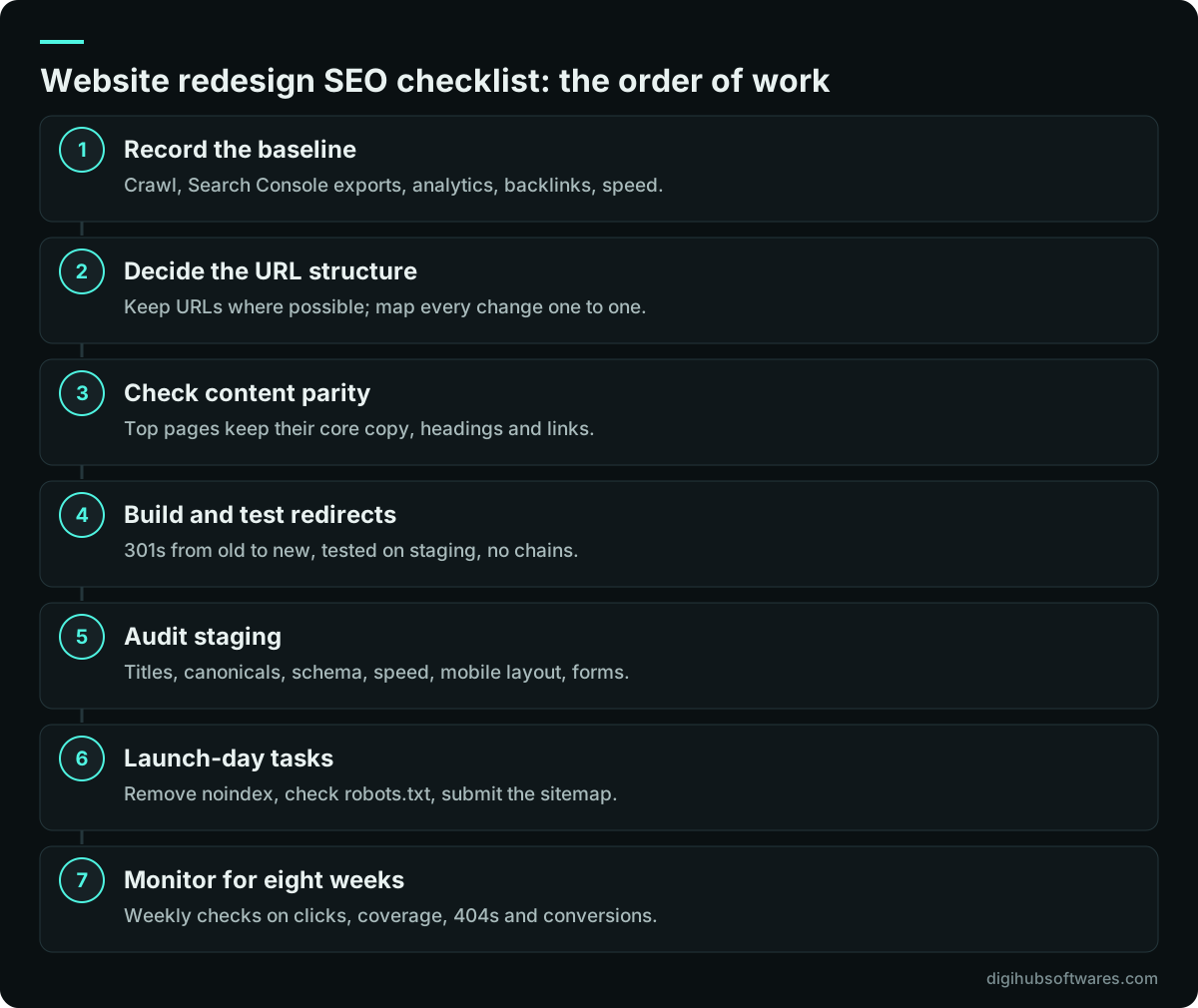
During planning and build, the website redesign SEO checklist has one goal: every page that earns traffic today has a clear home on the new site, with equal or better content. The figure below shows the order we work in.
Start with the URL decision. Keeping existing URLs is the safest option and often possible, even on a new platform. When URLs must change, for example when moving to Shopify's fixed /products/ pattern, plan the new structure so each old page maps to one new page that covers the same topic. Our comparison of WordPress, Shopify and headless platforms explains how each platform shapes your URLs.
Then check content parity. Designers often trim copy to fit a cleaner layout. That is fine for low-value pages, but the pages in your top-traffic list should keep their core text, headings and internal links. Rewrite only where you can make the page clearly better, and track each change in the planning sheet so you can trace any ranking change later.
How do you build a 301 redirect map that works?
A working 301 redirect map is a spreadsheet with one row per old URL, the matching new URL, and a status column you fill in after testing. It should send each old page to the closest equivalent, not to the homepage.
Google recommends server-side permanent redirects, such as 301 or 308, and advises keeping them for as long as possible, generally at least a year. In practice, keep them indefinitely: they cost little and old links keep arriving from emails, bookmarks and other sites for years.
Test the map on staging with a crawler set to list mode. Every old URL should return a single 301 to a page that returns 200. Fix chains, where one redirect leads to another, and loops. Include old versions you may have forgotten: http and https, www and non-www, trailing slashes, uppercase variants and URLs with tracking parameters that appear in your backlink list.
| Column | Purpose |
|---|---|
| Old URL | Every URL from the crawl, backlinks and Search Console |
| New URL | Closest matching page on the new site |
| Reason | Kept, merged, renamed or retired |
| Monthly clicks | Priority order for testing |
| Test result | Single 301 to a 200 page, or the fault found |
What should you check on staging before launch?
On staging, check that the new site gives search engines everything the old site did, and keep staging itself out of the index. Protect it with a password rather than relying on a noindex tag alone, so it cannot leak into results.
Crawl the staging site and compare it with the baseline. Look for missing titles and descriptions, duplicate H1s, wrong canonical tags pointing to staging addresses, missing structured data and broken internal links. Test the main templates on a phone. Run lab tests for speed on the homepage, a service or category page and an article or product page, and compare them with the old figures. Our guide on how to improve Core Web Vitals lists the fixes that matter most before launch.
Do not forget the pages that make money. Submit every form, run a test order if you sell online and confirm that analytics and conversion tags fire on the new templates. Losing tracking at launch hides the real result of the redesign.
What has to happen on launch day?
On launch day, switch on the redirects, make the site indexable and tell Google about the new structure. These tasks take an hour or two, but they decide how quickly the new site is picked up.
Remove any site-wide noindex tag and check robots.txt in the browser. Confirm that redirects work on the live domain with a short sample from your map. Submit the new XML sitemap in Search Console. If the domain itself changed, use the Change of Address tool in Search Console, which Google offers only for moves between domains or subdomains. Inspect a handful of important URLs to confirm Google sees the live version.
- Remove noindex and staging password protection.
- Check robots.txt allows the pages you want crawled.
- Spot-test 20 to 30 redirects on the live domain.
- Submit the new sitemap in Search Console.
- Use Change of Address only if the domain changed.
- Confirm forms, checkout and analytics on live.
How do you monitor SEO after the new site goes live?
After launch, compare the new site with your baseline every week for at least eight weeks. Watch clicks, indexed pages, crawl errors and conversions, and act on problems as soon as a trend appears.
In Search Console, the pages report shows URLs Google cannot index and why. A rise in 404 errors usually points to gaps in the redirect map, so add the missing rows. A rise in pages marked as duplicates often means canonical tags are wrong. In analytics, compare landing pages that used to perform with their new equivalents. If a page lost traffic, check whether its content, title or internal links changed and restore what was lost.
Keep the old crawl and redirect map for at least a year. They are the fastest way to answer questions from the team or from a future developer about where an old page went.
When should you get help with a redesign?
Get help when the site earns a meaningful share of your leads or sales from search, when URLs will change, or when you are also changing platform. Those are the cases where a missed step costs real revenue.
Digihub's website redesign service runs this website redesign SEO checklist as part of the project, from the baseline crawl to the post-launch reviews. If you are moving platforms, our website migration service handles redirects, data and launch. Published prices for redesigns and new builds are on our website pricing page. For WordPress sites, pair the redesign with the maintenance routine in our WordPress plugin security guide so the new site stays healthy.
Sources and further reading
Official documentation and guidance if you want to read more about this topic.
Related guides and services
Questions readers ask
Will a website redesign hurt my SEO?
A website redesign does not have to hurt SEO. Rankings usually hold when URLs stay the same or are redirected one to one, key content is kept, and the new site is at least as fast and crawlable as the old one. Short fluctuations while Google recrawls are normal. Lasting drops normally come from missing redirects, removed content or a noindex tag left on.
How long should I keep 301 redirects after a redesign?
Keep 301 redirects for as long as possible. Google's site move guidance says generally at least one year, so signals have time to pass to the new URLs. Many teams keep them permanently because they are cheap to maintain and old links from emails, bookmarks and other websites keep arriving for years after the change.
Should I redirect old pages to the homepage?
No, redirect each old page to the closest matching new page instead. Sending many unrelated URLs to the homepage confuses visitors and Google may treat them as soft 404 errors, so their value is lost. If a page has no equivalent and no traffic or links, letting it return a 404 or 410 is acceptable.
How long does it take for rankings to recover after a redesign?
If the migration was done well, rankings usually settle within a few weeks, though medium and large sites can take longer while Google recrawls every URL. Track clicks and indexed pages weekly. If figures are still falling after a month, review redirects, content changes and technical errors rather than waiting for a recovery on its own.