

Key takeaways
- List every way a visitor can contact you, then give each one its own event name before touching any tags.
- Track forms on confirmed success, not on the submit button click, so failed or spam submissions are not counted.
- Use Google Ads call conversions with a minimum call length where forwarding numbers are available, and phone-link click events everywhere else.
- Treat a WhatsApp click as intent, not a lead, and confirm real chats in your CRM or WhatsApp Business account.
- Set Consent Mode v2 with ad_user_data and ad_personalization, and test the banner before trusting any conversion numbers.
Part of our guide: Technical SEO checklist for service businesses
Why do most service businesses undercount their leads?
Most service sites only measure the form, and many measure even that badly. Visitors also tap the phone number, open WhatsApp, click an email address or call straight from a Google ad, and none of those load a thank-you page. When those actions go untracked, reports say the site produces few leads, Google Ads bidding optimizes on a fraction of the real results, and good campaigns get switched off.
Fixing it is mostly a planning job. Before opening Google Tag Manager, write down every contact action, where it appears on the site and what counts as success. That list becomes your measurement plan, and it is the first thing we ask for when a client wants to track WhatsApp conversions or calls. It also forces a decision about which actions are true leads and which are only signals of interest.
Good tracking is also the foundation for everything in our technical SEO checklist for service businesses, because it is how you prove which pages and fixes bring enquiries rather than just traffic.
What should you track, and what should count as a key event?
Track every contact action as an event, and mark only the ones that represent a likely lead as key events. In GA4, a key event is an event you flag as important to the business; it was called a conversion until Google renamed it in 2024. A standard GA4 property lets you mark up to 30 events as key events, according to Google's help page on marking events as key events (opens in a new tab), which is plenty for a service site.
Use Google's recommended event name generate_lead for form submissions where it fits, and clear custom names for the rest. Keep names lowercase with underscores and add parameters for detail, such as form_name, page location or the button's position, rather than creating a new event for every variation.
| Action | Event name | Key event? | What counts as success |
|---|---|---|---|
| Contact or quote form | generate_lead | Yes | Server confirms the submission |
| Tap or click on phone number | click_phone | Yes, on mobile | Click on a tel: link |
| Call from a Google ad | Ads call conversion | Yes | Call longer than your minimum length |
| Click on WhatsApp button | click_whatsapp | Usually yes | Click on a wa.me or WhatsApp link |
| Click on email address | click_email | Optional | Click on a mailto: link |
| Booking or calendar confirmation | book_appointment | Yes | Booking confirmed by the tool |
How do you track form submissions reliably?
Fire the form event only when the submission succeeds. Button clicks overcount, because they include failed validation, double clicks and spam bots. GA4's automatic form interaction measurement is a rough signal and often fires on forms that did not send.
The most reliable options, in order of preference, are these. First, push a dataLayer event from the site's own code after the server accepts the form, with the form name as a parameter. Second, redirect to a dedicated thank-you URL and fire on that page view, making sure the page is noindexed and cannot be reached by bookmarking or refreshing to inflate counts. Third, use the form plugin's own success callback in Google Tag Manager. Avoid triggers that depend on CSS classes or button text, which break the next time someone edits the design.
For Google Ads, turn on enhanced conversions for leads if you can collect consent and the form captures an email address or phone number. The tag sends a hashed version of that data, which helps Google attribute the lead to an ad click, and it lets you later import whether the lead became a sale.
How should you track phone calls from ads and the website?
Google Ads can count calls in several ways, and a service business usually needs two or three of them. Calls from ads track calls made from call assets, location assets and call-only ads, counted when the call lasts longer than a minimum length you set. Calls to a phone number on your website use a Google forwarding number that replaces your number for visitors who arrived from an ad, which lets Google measure the call itself and its duration. Google's guide to tracking calls to a phone number on a website (opens in a new tab) explains the setup.
Google forwarding numbers are available only in certain countries, so check Google's current list for your market before planning around them. Where they are not available, track clicks on tel: links instead. That records intent, not a completed call, so set the value lower than a form lead and compare totals with your phone records each month.
Pick a minimum call length that filters out wrong numbers and sales calls to you. Base it on how long a genuine first enquiry takes in your business, then adjust once you have reviewed a few weeks of call details. If you use a third-party call tracking platform, import its qualified calls into Google Ads rather than running two systems that each count the same call.
How do you track WhatsApp conversions from a website?
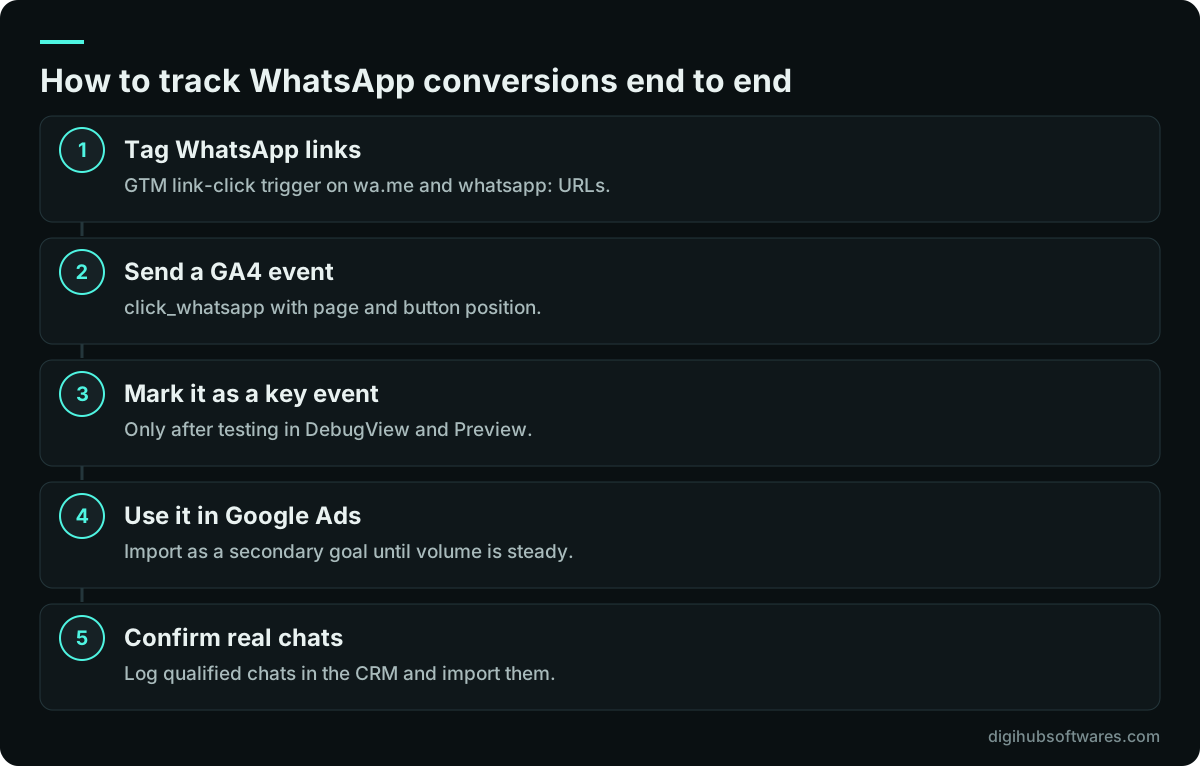
To track WhatsApp conversions from a website, fire an event when a visitor clicks any link that opens a chat, usually a wa.me link or a floating WhatsApp button, then mark it as a key event and, if you advertise, import it into Google Ads. WhatsApp's click to chat feature builds these links from your number in full international format.
In Google Tag Manager, create a Click trigger on Just Links where the Click URL contains wa.me, api.whatsapp.com or whatsapp:, and send a click_whatsapp event with the page location and button position as parameters. Chat widgets that open WhatsApp through JavaScript rather than a normal link may not trigger a link click, so test each one in Preview mode and use the widget's own callback if it has one.
A WhatsApp click is the start of a conversation, not a completed enquiry. Some visitors close the app without typing. To get closer to real numbers, add a short prefilled message per page, such as the service name, so you can match chats to pages in WhatsApp Business. For ad optimization, the strongest setup records which chats became qualified leads in your CRM and imports those back into Google Ads as offline conversions using the click ID.
What does Consent Mode v2 change for conversion tracking?
Consent Mode v2 lets your consent banner tell Google tags what each visitor has agreed to, using four signals: ad_storage, analytics_storage, ad_user_data and ad_personalization. The last two were added in the v2 update, and Google needs them to use conversion and audience data for visitors in the European Economic Area. Google's consent mode documentation also calls out the UK and Switzerland for regional handling.
There are two implementations. In basic mode, Google tags do not load until the visitor accepts, so nothing is sent before consent. In advanced mode, tags load with consent denied by default and send cookieless pings, which Google uses for conversion modeling. Advanced mode recovers more measurement but needs careful legal review; basic mode is simpler to explain. Google's developer guide to setting up consent mode (opens in a new tab) shows both.
Test it in a private browser window from a UK or EU connection if you serve those markets. Deny everything and check in Tag Assistant that tags respect it; then accept and check that events fire. A banner that sets defaults after the tags have already loaded is a common, quiet failure. This setup is configured to support your compliance with rules such as the UK GDPR and PECR; confirm the final wording and choices with your legal adviser.
Should Google Ads use GA4 key events or its own conversion tags?
For most service businesses, use the Google Ads tag for the main lead conversions and GA4 for reporting across all channels. The Ads tag records conversions on its own attribution model and supports enhanced conversions and call tracking directly. Importing GA4 key events into Ads works well too, and keeps definitions identical, but do not do both for the same action, or Ads will count each lead twice.
Set each lead conversion to count One per click, not Every, so a visitor who submits the form twice is one lead. Mark only real leads as primary goals for bidding. Keep softer actions, such as WhatsApp clicks while volume is low or email clicks, as secondary goals that you can see in reports without letting them steer bids. Our Google Ads management work starts with exactly this audit, because bidding on the wrong goal wastes budget quickly.
If you are deciding how much to put into ads at all, our guide to Google Ads vs SEO uses these conversion numbers to compare the cost per lead from each channel.
How do you test tracking and keep it accurate?
Test every action yourself before trusting the data, then compare it with your own records each month. Tags break quietly when a developer changes a button, a plugin updates or a new landing page goes live.
- Use Tag Manager Preview and GA4 DebugView to watch each event fire once, with the right parameters.
- Submit a real test form and confirm the event appears only after the success message.
- Tap the phone and WhatsApp buttons on a real phone, not only in desktop emulation.
- Check Google Ads conversion action status and look for duplicate counts after a day.
- Each month, compare leads in GA4 and Ads with your inbox, call log and WhatsApp chats.
- Link Search Console to GA4 so you can see which organic landing pages produce key events; our Google Search Console optimization service sets this up and reviews it monthly.
Sources and further reading
Official documentation and guidance if you want to read more about this topic.
Related guides and services
Questions readers ask
Can Google Analytics track WhatsApp messages?
No. Google Analytics can track the click that opens WhatsApp, but not whether the visitor sent a message, because the chat happens inside the WhatsApp app. To track WhatsApp conversions more accurately, use a prefilled message per page, log qualified chats in your CRM or WhatsApp Business, and import those confirmed leads into Google Ads as offline conversions.
What is the difference between a GA4 event and a key event?
An event is any interaction GA4 records, such as a page view, scroll or button click. A key event is an event you have marked as important to the business, such as a form lead or phone click. Key events were called conversions in GA4 until 2024. Google Ads still uses the word conversion for the actions it optimizes bids toward.
How do I track phone calls if Google forwarding numbers are not available in my country?
Track clicks on tel: links as an event in GA4 and as a Google Ads conversion for clicks on a phone number on your mobile website. This measures intent, not completed calls. Compare the totals with your phone records monthly. A third-party call tracking service with local numbers is another option where it is available and lawful in your market.
Do I need Consent Mode v2 if my business is outside Europe?
You need it if you advertise to, or measure, visitors in the European Economic Area, and it is sensible if you serve the UK or Switzerland. A business in Pakistan or the UAE that targets UK customers falls into that group. If all your traffic is outside those regions, check your local privacy law, which may still require a consent banner.
Why do Google Ads and GA4 show different conversion numbers?
They count differently. Google Ads credits conversions to the date of the ad click and uses its own attribution, while GA4 reports on the date of the event and across every channel. Consent choices, modeling, ad blockers and count settings add further gaps. Expect them to differ, and investigate only when the gap changes suddenly.