

Key takeaways
- Start from field data in Search Console or PageSpeed Insights, not from a single lab score.
- Fix LCP by making the main image or heading load early: fast server response, no lazy-loading on it and a high fetch priority.
- Fix INP by cutting and deferring JavaScript, especially third-party tags, chat widgets and page-builder scripts.
- Fix CLS by reserving space for images, embeds, ads and banners, and by loading fonts carefully.
- Set a performance budget per template and check it before every release.
Part of our guide: WordPress vs Shopify vs headless: choosing a website platform
What are Core Web Vitals, and what are the current thresholds?
Core Web Vitals are three Google metrics for real-user experience: Largest Contentful Paint (LCP) for loading, Interaction to Next Paint (INP) for responsiveness, and Cumulative Layout Shift (CLS) for visual stability. A page passes when each metric is in the good range for at least 75 percent of visits, measured separately on mobile and desktop.
INP replaced First Input Delay (FID) as a Core Web Vital on March 12, 2024. FID only measured the delay before the first interaction was handled. INP looks at interactions across the whole visit and reports one of the slowest, so it is a much harder test for script-heavy sites. If an old report or plugin still shows FID, treat it as out of date.
The thresholds below come from web.dev's Web Vitals guide (opens in a new tab). Google also counts Core Web Vitals among its page experience signals, but its page experience documentation (opens in a new tab) says Search seeks to show the most relevant content even when page experience is weaker. Good vitals help visitors stay and convert, which is reason enough to work on them.
| Metric | Good | Needs improvement | Poor |
|---|---|---|---|
| LCP (loading) | 2.5 s or less | 2.5 s to 4 s | Over 4 s |
| INP (responsiveness) | 200 ms or less | 200 ms to 500 ms | Over 500 ms |
| CLS (visual stability) | 0.1 or less | 0.1 to 0.25 | Over 0.25 |
Should you trust lab scores or field data?
Trust field data first. Field data comes from real Chrome users through the Chrome UX Report, and it is what Search Console's Core Web Vitals report and the top section of PageSpeed Insights show. Lab data, such as a Lighthouse score, is a single simulated load and is best used to debug and to test fixes.
A common pattern is a page that scores well in Lighthouse yet fails INP in the field. The lab test never clicks a menu, opens a filter or types into a form, so it cannot see slow interactions. The reverse also happens: a poor lab score on a page that real visitors, on faster devices and warm caches, experience as fine.
Smaller sites may not have enough traffic to appear in the Chrome UX Report. In that case, add a small real-user monitoring script, such as Google's open-source web-vitals library, and send the values to your analytics so you have your own field data.
How to improve Core Web Vitals: diagnose before you fix
The fastest way to improve Core Web Vitals is to fix templates, not pages. Search Console groups URLs with similar problems, and on most business sites a handful of templates (home, service or category page, article or product page) account for nearly every failing URL.
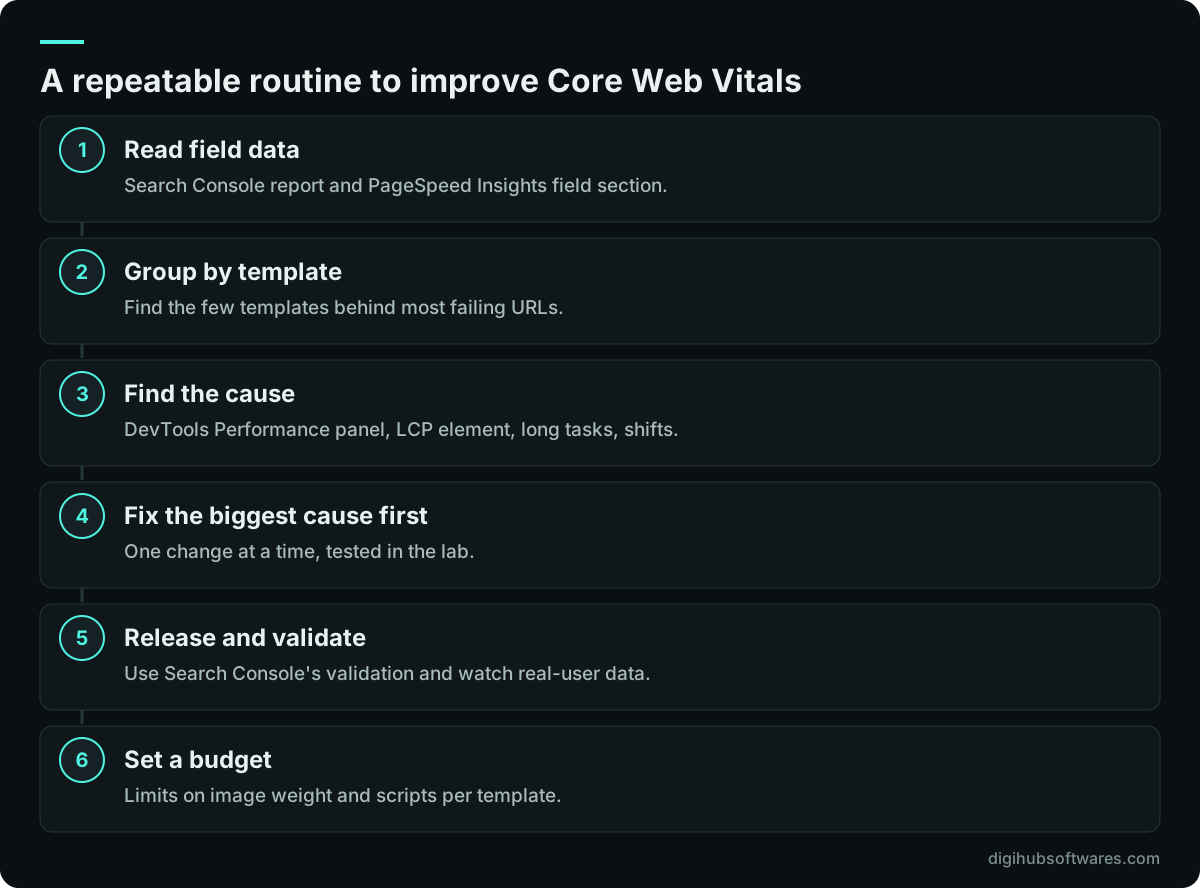
For each failing group, open one example in PageSpeed Insights and in Chrome DevTools. Note which metric fails, on which device, and what the LCP element is. Record the third-party scripts the page loads. Then work through the process in the figure below, one metric at a time, and re-test after every change so you know what helped.
How do you improve LCP?
You improve LCP by getting the largest visible element, usually a hero image or a large heading, onto the screen sooner. Web.dev breaks LCP into four parts: time to first byte, resource load delay, resource load duration and element render delay. Fix whichever part is largest.
Slow server response is common on cheap shared hosting and on WordPress sites without page caching. Add full-page caching and a CDN, and remove redirects on the path to the page. If the LCP element is an image, make sure the browser discovers it in the HTML, not only through CSS or JavaScript, and do not lazy-load it. Add fetchpriority="high" to that image, serve it in a modern format such as WebP or AVIF and size it for the screen. If text is the LCP element, render-blocking fonts or CSS are the usual cause.
- Cache full pages at the server or CDN to cut time to first byte.
- Put the hero image in the HTML with fetchpriority="high" and without loading="lazy".
- Serve correctly sized WebP or AVIF images through srcset.
- Inline critical CSS and defer the rest; preload the main font if text is the LCP element.
- Avoid sliders and carousels as the first thing on the page.
How do you improve INP?
You improve INP by keeping the browser's main thread free, so it can respond when someone taps, clicks or types. Every interaction has three phases: input delay, processing duration and presentation delay. Long JavaScript tasks inflate all three.
Start with an inventory of scripts. Chat widgets, tag managers loaded with many tags, heatmap tools, A/B testing scripts and page-builder libraries are frequent causes. Remove what nobody uses, load the rest after the page is interactive, and ask whether each tag still earns its place. For your own code, break long event handlers into smaller tasks and yield to the main thread so the screen can update first. Very large pages with thousands of DOM elements also slow rendering after each interaction, so trim deep nesting from page-builder layouts.
The web.dev guide to optimizing INP (opens in a new tab) explains yielding techniques in detail for developers.
How do you fix Cumulative Layout Shift?
You fix CLS by reserving space for anything that loads late, so the content a visitor is reading does not jump. Most shifts come from images without dimensions, embeds and ads, cookie or promo banners pushed in at the top, and web fonts that swap in at a different size.
Give every image and video width and height attributes, or a CSS aspect ratio. Reserve a fixed slot for ads and embeds. Show cookie banners as an overlay rather than inserting them above the content. For fonts, choose a fallback font with similar metrics and use the font-display and size-adjust settings so the swap barely moves the text. Animate with transform rather than changing height or top, which forces a layout.
What should you fix first on WordPress, Shopify and headless sites?
The first fix depends on the platform, because each one tends to fail in its own way. Our guide to choosing between WordPress, Shopify and headless covers the wider trade-offs; the table below is the performance view.
When a site is redesigned, these problems often arrive with the new theme. Run the checks in this article on staging before launch, as part of the website redesign SEO checklist, so you do not trade better design for worse vitals.
| Platform | Common cause | First fix |
|---|---|---|
| WordPress | No page cache, page builders, plugin scripts | Page caching, CDN, remove unused plugins |
| Shopify | Stacked apps injecting JavaScript | Audit apps, remove leftovers, lighter theme |
| Headless | Large client-side bundles, slow API calls | Server rendering, code splitting, cache API responses |
When is it worth getting expert help?
Most teams can improve Core Web Vitals on their own up to a point. Get help when the easy wins are done and a metric still fails, or when the cause sits in theme code, hosting or third-party scripts you cannot remove without breaking something. That is usually where developer time pays back.
Digihub's website performance optimization service starts with field data, fixes the templates that fail and sets a budget for future releases. It pairs well with a technical SEO review that checks crawling and indexing at the same time. Fixed-price speed optimization add-ons for WordPress sites and online stores are listed on our website pricing page.
Sources and further reading
Official documentation and guidance if you want to read more about this topic.
- Web Vitalsweb.dev (Google) (opens in a new tab)
- Interaction to Next Paint becomes a Core Web Vital on March 12web.dev (Google) (opens in a new tab)
- Understanding page experience in Google Search resultsGoogle Search Central (opens in a new tab)
- Understanding Core Web Vitals and Google search resultsGoogle Search Central (opens in a new tab)
Related guides and services
Questions readers ask
What replaced FID in Core Web Vitals?
Interaction to Next Paint (INP) replaced First Input Delay (FID) as a Core Web Vital on March 12, 2024. FID measured only the delay before the first interaction was processed. INP measures responsiveness across interactions throughout the visit, and a good score is 200 milliseconds or less at the 75th percentile of page loads.
How long does it take for Core Web Vitals fixes to show in Search Console?
Expect several weeks. Search Console's report uses field data collected from real Chrome users over a rolling period, so a fix released today is blended with older visits for a while. Use lab tools to confirm the fix works straight away, then start validation in Search Console and watch the trend rather than single days.
Do Core Web Vitals affect Google rankings?
Core Web Vitals are part of the page experience signals Google uses, but they are not the main ranking factor. Google says Search seeks the most relevant content first. Good vitals still matter because faster, stable pages keep visitors on the site and convert better, and they can make a difference when competing pages are otherwise similar.
Can a plugin fix Core Web Vitals on WordPress?
A caching or optimization plugin can fix part of the problem, usually server response time, image formats and some CSS and JavaScript loading. It cannot remove the cost of a heavy page builder, too many plugins or slow hosting. Treat a plugin as one tool, test each setting on staging, and check field data afterwards to confirm real improvement.
Why is my PageSpeed score good but Core Web Vitals failing?
The PageSpeed score is a lab test of one simulated load, while the Core Web Vitals assessment uses real visitors' data. Lab tests do not click or type, so they miss slow interactions that hurt INP, and they use one device profile. Real visitors on slower phones and networks can have a worse experience than the lab shows.