

Key takeaways
- Use your real-world business name with no added keywords or locations, because stuffing it risks suspension.
- Choose the most specific primary category for your main business and add secondary categories only for services you really offer.
- If you visit customers rather than receive them, hide your address and set up to 20 accurate service areas.
- Ask every customer for a review in the same way, never offer incentives, and reply to every review within a few days.
- Tag the website link with UTM parameters so GA4 shows which enquiries came from the profile.
Part of our guide: Technical SEO checklist for service businesses
Why does Google Business Profile matter so much for service businesses?
For searches with local intent, such as an electrician near me or an accountant in Manchester, Google often shows a map with a few business profiles above the regular results. Those profiles carry a call button, directions, reviews and a website link, so a strong profile can produce calls without the searcher ever visiting your website.
Google says local results are mainly based on relevance, distance and popularity, in its help page on improving your local ranking (opens in a new tab). Distance you cannot change. Relevance comes from complete, accurate information. Popularity reflects how well known the business is, including reviews and mentions across the web. This Google Business Profile checklist focuses on the parts you control.
The profile and your website work together. Our technical SEO checklist for service businesses covers the website side: indexable location pages, consistent contact details and LocalBusiness structured data that matches the profile.
Is your name, address and service area set up the way Google allows?
Your profile name must match your real-world business name as it appears on signage, stationery and your website. Google's guidelines for representing your business (opens in a new tab) do not allow adding keywords, locations or taglines to the name, such as Smith Plumbing, Best Emergency Plumber London. Competitors can suggest edits and report stuffed names, and a profile that breaks the rules can be suspended.
The first decision in any Google Business Profile checklist is which type of business you are. A storefront business receives customers at its address. A service-area business visits or delivers to customers and does not serve them at its address, so Google asks it to remove the address from the profile. A hybrid business does both. Many service businesses, from cleaners and builders to IT support, are service-area businesses and should hide their address.
Service areas can be set by city, postal code or region, up to 20 of them. Google's help page says the overall area should not extend beyond about two hours of driving time from where the business is based. P.O. boxes and remote mailboxes are not acceptable addresses, and virtual offices are a common cause of verification failures.
How should you choose categories and list services?
Choose the most specific primary category that describes your core business, then add secondary categories only for other services you really provide. The primary category has a strong effect on which searches the profile can appear for, so a family law firm should pick Family law attorney rather than a general Law firm if that is what it is.
To choose well, search your main service in the area you serve and note the primary categories of the profiles that appear. Tools can reveal competitors' categories, but your choice should still describe your own business accurately. Avoid adding ten loosely related categories, which blurs relevance.
Then fill in the services list with every service you offer, using the same names your customers search for and a short description of each. Add hours, special hours for public holidays, the phone number that is answered during those hours, a booking link if you take appointments, and the attributes that apply to you. Complete information is the easiest relevance gain on the list.
The Google Business Profile checklist
Work through this Google Business Profile checklist once in full, then revisit it every quarter. Each item takes minutes, but together they decide whether a profile looks active and trustworthy.
- Profile is claimed and verified, and at least two people in the business have owner or manager access.
- Business name matches the real-world name, with no added keywords or locations.
- Address shown only if customers visit; otherwise address hidden and accurate service areas set.
- Most specific primary category chosen, with relevant secondary categories only.
- Services listed with plain names and short descriptions.
- Regular hours, special hours and holiday closures are correct.
- Phone number is answered during listed hours; the website link points to the best matching page.
- Business description explains what you do, for whom and where, without links or promotional claims.
- Recent photos of the team, vehicles, premises and finished work, uploaded by the business.
- Updates posted when there is something real to say: a new service, seasonal hours or an offer.
- Every review answered, positive or negative, in a calm and specific way.
- Website link tagged with UTM parameters, and profile performance reviewed monthly.
How do you get more Google reviews without breaking the rules?
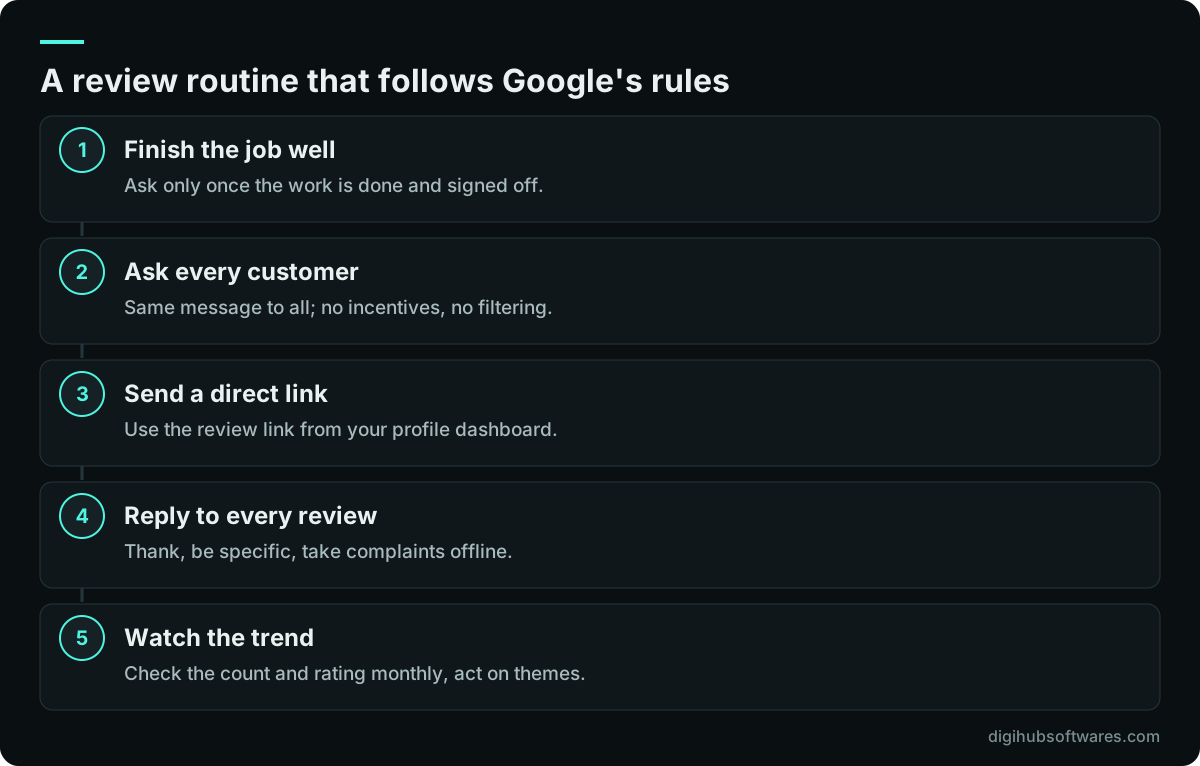
Ask every customer, at the moment the job is finished and they are happy, with a direct link to your review form. Make it part of the process: the same email or WhatsApp message after every completed job, sent by the person the customer dealt with.
Google's Maps content policy (opens in a new tab) prohibits offering incentives such as discounts or gifts in exchange for reviews, and it prohibits discouraging negative reviews or selectively asking only happy customers. That second rule catches review gating, where a survey sends satisfied customers to Google and unhappy ones to a private form. Fake reviews, reviews from staff and reviews bought from agencies can lead to removed reviews and restrictions on the profile.
Reply to every review. For praise, thank the person and mention the service so future readers learn what you do. For complaints, acknowledge the problem, avoid sharing private details and offer a way to resolve it offline. Prospective customers read the replies as closely as the reviews.
Do photos and updates help, and how often should you post?
Photos and updates help mainly by persuading the people who already see your profile, and by showing that the business is active. Real photos of your team, vehicles, premises and finished jobs build more trust than stock images or logos alone.
Post updates when there is something useful to say, such as a new service, a seasonal checklist, holiday hours or a time-limited offer. A steady rhythm, for example a couple of times a month, is easier to sustain than a burst followed by silence. Keep the text plain, add a clear call to action and link to the matching page on your website.
How do you know which calls and leads came from your profile?
Use two sources. The profile's own performance view shows calls, website clicks and direction requests over time. GA4 shows what profile visitors did on your website, if the website link carries UTM parameters such as utm_source=google, utm_medium=organic and utm_campaign=gbp.
Without the tags, visits from the profile are mixed into ordinary organic traffic, and you cannot tell whether the profile or your service pages produced the lead. Calls placed from the profile's call button do not pass through your website at all, so ask new customers how they found you and record it in your CRM. Our guide on how to track form, call and WhatsApp conversions covers the website side, including phone and WhatsApp clicks.
What causes suspensions, and when should you get help?
The common causes of a suspended or restricted profile are keyword-stuffed names, addresses the business does not really operate from, duplicate profiles for the same location and sudden changes to key details. If it happens, fix the cause first, gather proof such as a utility bill, business registration and photos of signage, then request reinstatement through Google's support process. Repeated edits during review usually slow it down.
You can manage a single profile yourself with this checklist. Help pays off when you have several locations, a suspension, a profile you cannot claim, or when the website and profile need to be improved together. Our Google Business Profile optimization service handles setup, categories, reviews workflow and monthly updates, and our wider local SEO services add citations and location pages. The Local SEO package on our digital marketing pricing page starts at $299 a month and includes profile setup and monthly updates.
Sources and further reading
Official documentation and guidance if you want to read more about this topic.
- Guidelines for representing your business on GoogleGoogle Business Profile Help (opens in a new tab)
- Tips to improve your local ranking on GoogleGoogle Business Profile Help (opens in a new tab)
- Manage your service areas for service-area and hybrid businessesGoogle Business Profile Help (opens in a new tab)
- Prohibited and restricted contentMaps User Generated Content Policy Help (opens in a new tab)
Related guides and services
Questions readers ask
How long does it take for Google Business Profile changes to show?
Most edits appear within a few days, but some take longer because Google reviews changes to key details such as name, category and address. Service area edits can take up to 48 hours once approved, according to Google's help pages. Changes to ranking from a better profile build over weeks, as reviews, photos and engagement accumulate.
Should a service-area business show its address on Google?
No, not if customers do not visit you there. Google asks service-area businesses to remove the address and set service areas instead, by city, postal code or region, up to 20 areas. A hybrid business that both receives customers and travels to them can show the address and service areas together.
Can I add keywords to my Google Business Profile name?
No. Google's guidelines say the name must reflect your real-world business name as used on signage, stationery and your website. Adding services or locations, such as a city name, breaks the guidelines, can be edited by Google after user reports, and can lead to suspension. Put services in categories, the services list and the description instead.
Is it allowed to offer a discount for a Google review?
No. Google's Maps content policy treats incentivized reviews as fake engagement, whether the reward is a discount, a gift or entry into a prize draw. It also prohibits asking only happy customers. Ask every customer the same way, make it easy with a direct review link, and reply to every review you receive.
Does a Google Business Profile replace a website?
No. A profile helps you appear in the map results and lets people call quickly, but it holds limited information and you do not control its layout. A website with clear service and location pages supports the profile's relevance, ranks for searches that do not trigger a map, and gives you a place to convert visitors.