

Key takeaways
- Pick the hosting model by who will run the server day to day, then pick the provider.
- Size the database and disk first, because slow storage often hurts ERP users more than a slow CPU.
- Treat a backup as unproven until you have restored it to a separate server and opened the application.
- Ship every change through staging with a scripted deployment, so untested code does not reach production.
- Write down who answers an alert at 2 a.m. before go-live, not after the first outage.
What is business application hosting?
Business application hosting is running software that a company depends on, such as an ERP, a customer portal, a booking system or an internal API, on infrastructure that someone is responsible for keeping up, patched and recoverable. It differs from hosting a brochure website in one way that changes everything: the data changes every minute, and losing a day of it means lost orders, invoices and stock movements.
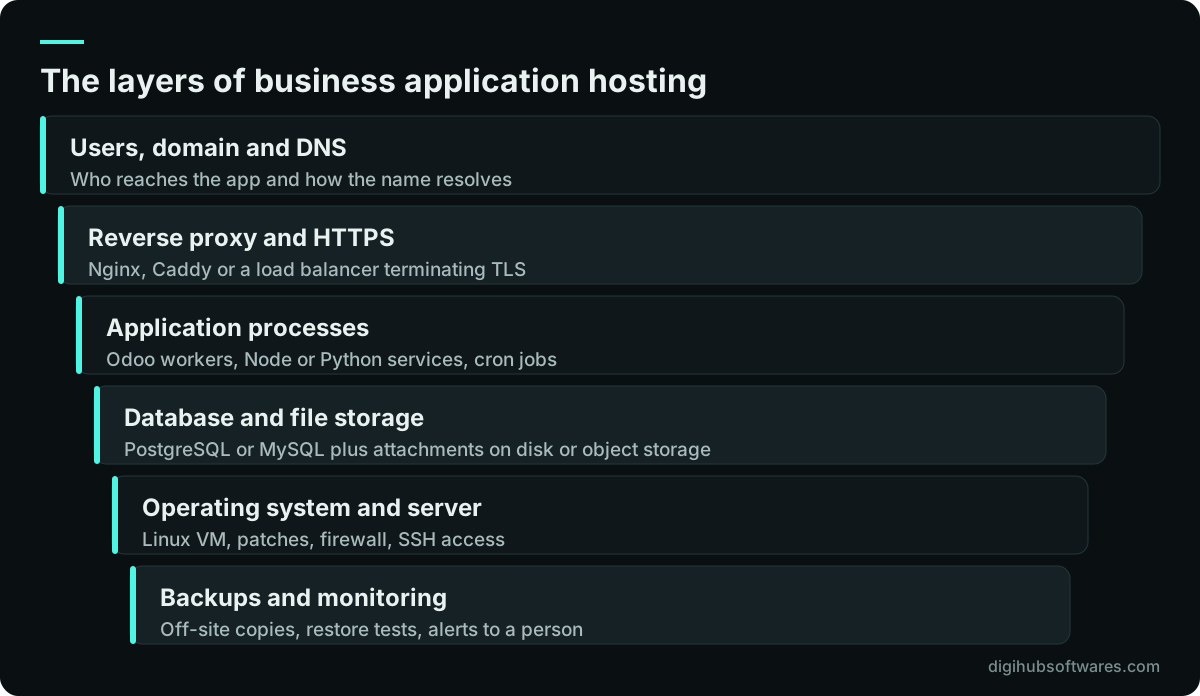
A useful way to think about it is as a stack. Users reach the application through a domain and a reverse proxy that handles HTTPS. The application runs as one or more processes. Those processes talk to a database, usually PostgreSQL or MySQL, and to file storage for attachments. Underneath sit the operating system, the virtual machine and the provider's network. Backups and monitoring wrap around all of it. Each layer can fail on its own, and each needs an owner.
When a business owner asks us about hosting, the first question is not which provider. It is which of these layers you want to own and which you want someone else to own. That answer decides most of the rest.
VPS vs managed cloud vs platform: which hosting model fits?
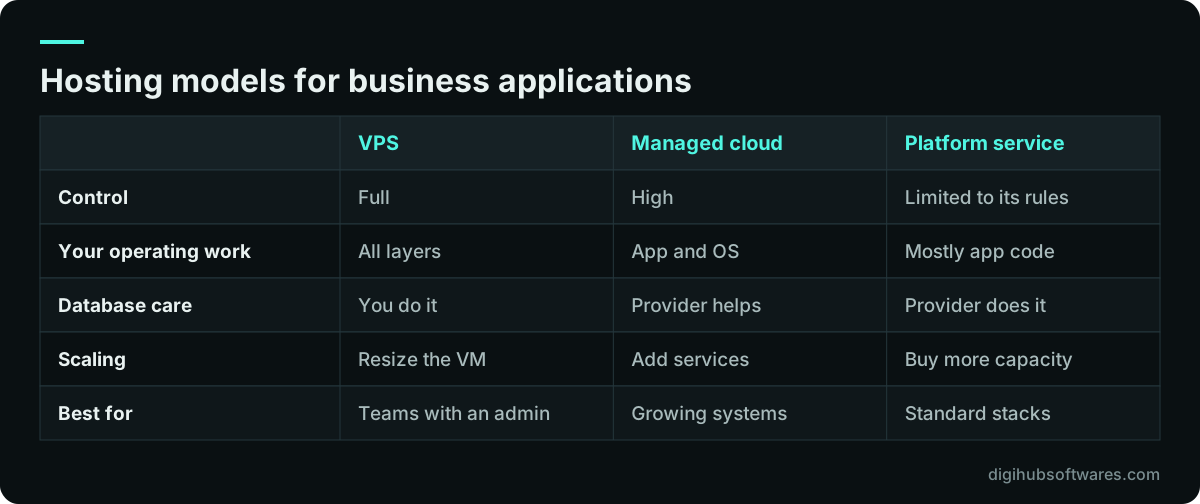
There are four common models, and the right one depends on how much operating work your team can absorb. Shared hosting is cheap but rarely suitable for a business application because you cannot control the runtime, the database version or the background jobs. A virtual private server (VPS) gives you a full Linux machine for a predictable monthly fee. Managed cloud services, such as a managed database plus virtual machines on AWS, Azure or Google Cloud, move some layers to the provider. A platform service runs the application for you, as Odoo.sh does for Odoo, in exchange for less freedom.
The VPS vs managed cloud question is mostly about the database. On a VPS you install, tune, patch and back up PostgreSQL yourself. On a managed database service the provider handles minor version patches, automated snapshots and often point-in-time recovery, which removes a large share of the risk for a small team. The trade-off is cost and some loss of control over extensions and configuration.
For Odoo specifically, we compare the three hosting routes in detail in Odoo Online vs Odoo.sh vs self-hosted. The general rule carries across other applications: a platform service is the simplest if your application fits its rules, and a self-managed server is the most flexible if you have someone to run it.
How do you size a server for an ERP or web application?
Size a business application server from the number of people working at the same time and the heaviest things they do, not from the total number of user accounts. Fifty named users who log in twice a week need far less than fifteen warehouse staff scanning all day. Start by listing concurrent users, the busiest hour, the reports that run long and the scheduled jobs that run overnight.
Odoo publishes a useful worked example in its on-premise deployment documentation (opens in a new tab). It gives a rule of thumb of (CPU cores × 2) + 1 for the maximum number of workers, estimates that one worker serves around six concurrent users, and estimates light workers at about 150 MB of RAM and heavy ones at about 1 GB. Those numbers are Odoo's estimates for Odoo, but the method works for any application: estimate concurrent requests, multiply by the memory each process needs, then leave room for the database and the operating system.
Storage matters more than most buyers expect. Databases read and write small blocks constantly, so an ERP on slow disks feels sluggish even with plenty of CPU. Ask for SSD or NVMe storage, check the provider's stated disk performance, and keep the database and its backups on separate volumes. Plan for growth in attachments too, because scanned invoices and product images grow faster than the database itself.
- Concurrent users at the busiest hour, not total accounts.
- Heaviest operations: month-end reports, imports, large exports.
- Scheduled jobs and when they run.
- Database size today and expected growth over a year.
- Attachment and file growth, kept on its own volume or object storage.
What does an application hosting security checklist include?
A secure hosting baseline closes the common doors before the application goes live: remote access, open ports, default credentials, unencrypted traffic and missing patches. None of these is advanced, and most breaches of small business servers start with one of them.
The UK National Cyber Security Centre's cloud security guidance (opens in a new tab) is a sound reference for what to ask a provider, and Odoo's own deployment guide gives application-level advice, such as turning off the public database manager on internet-facing servers. We apply the same baseline to every server we set up through our cloud security service, then adjust it to the application.
- SSH with keys only, password login disabled, and root login turned off.
- A firewall that exposes only ports 80 and 443 to the internet; the database listens on a private network or localhost.
- HTTPS everywhere with automatic certificate renewal, and HTTP redirected to HTTPS.
- Unique strong passwords for application admin accounts, stored in a password manager, with two-factor login where the application supports it.
- Automatic security updates for the operating system and a monthly window for application updates.
- Brute-force protection such as fail2ban or rate limiting at the proxy.
- Separate staging and production servers, so a test mistake cannot touch live data.
- Secrets in environment files or a secrets manager, never in the code repository.
How should backups work for hosted business applications?
Backups for a business application need to cover the database, the uploaded files and the configuration, be stored away from the production server, and be restored on a schedule to prove they work. A snapshot of the virtual machine on the same provider account is helpful but not enough on its own, because an account compromise or a billing problem can remove both the server and its snapshots together.
Two numbers frame the design. The recovery point objective (RPO) is how much recent data you can afford to lose; the recovery time objective (RTO) is how long you can be down while you restore. A nightly database dump gives an RPO of up to a day. Continuous archiving of the database's write-ahead log can bring that down to minutes. The right target is a business decision: ask how much a lost day of orders or invoices would cost to re-key.
The step most teams skip is the restore test. Our guide to backup restore testing sets out a routine you can run monthly: restore the latest backup to a clean server, open the application, check recent records and time the whole exercise. Under UK GDPR the ICO also expects organizations to be able to restore access to personal data in a timely way after an incident, which a tested backup supports.
How do you deploy changes without breaking production?
Deploy changes by running the same scripted steps on a staging copy first, checking the result, and then running exactly those steps on production with a way back if something fails. The danger in most small setups is not the code itself. It is a person logging in over SSH and running commands from memory, slightly differently each time.
A small pipeline fixes this. Code lives in Git. Every push runs automated checks. A merge to the main branch deploys to staging. Production deploys are triggered on purpose, after a human looks at staging, and every deploy is recorded. For database changes, the pipeline takes a fresh backup immediately before the migration runs.
You do not need a large platform for this. GitHub Actions or GitLab CI is enough for most small teams, and our guide to CI/CD for small teams walks through a pipeline that two or three developers can maintain without a dedicated DevOps engineer. If you would rather hand the setup to someone, our CI/CD pipelines service builds and documents it for you.
Should you run business applications in Docker?
Docker is worth using when you want the same application setup on a developer laptop, on staging and on production, and when you run more than one application on a server. It packages the application with its exact dependencies, so an upgrade of the operating system does not quietly change the runtime underneath your code.
Containers do not remove operating work; they move it. Someone still has to update base images, manage volumes for the database and files, and make sure data lives outside the container so it survives a rebuild. A common mistake is a working Docker setup that keeps the database inside a container with no named volume and no backup, which loses everything the first time the container is recreated.
For an ERP, the details matter. Our guide to Odoo Docker deployment covers the official image, the PostgreSQL version Odoo 20 requires, the reverse proxy and the settings that close the database manager. For other stacks, see our Docker containerization service.
What should you monitor, and who answers the alert?
Monitor what users feel and what is about to fail, then send alerts to a named person who can act. Google's site reliability engineering book describes four golden signals for user-facing systems: latency, traffic, errors and saturation. For a small business application that translates into a short list.
An uptime check from outside your network tells you the site responds. Response time on the login page and one heavy page tells you users are not waiting. The error rate in the application log tells you something broke after a deploy. Disk space, memory and database connections tell you what will fail next week. Certificate expiry and backup job success close the list.
The harder part is the human side. Decide who receives alerts during and outside office hours, what they are allowed to do, and when they escalate. If nobody is named, alerts go to a shared inbox and get read on Monday.
- External uptime check every minute or few minutes.
- Response time for login and one heavy page.
- Application error rate after each deploy.
- Disk, memory and CPU with alerts well before limits.
- TLS certificate expiry.
- Success or failure of every backup job.
Where should your data live: UK, UAE or Pakistan?
Host data in a region that suits your users' location and your legal obligations, and document that choice. For latency, a data center close to most users helps, although for a typical ERP the difference between nearby regions is small compared with a slow database.
The legal side varies by sector and country. UK organizations processing personal data must meet UK GDPR security duties, and transfers outside the UK need a lawful basis. Businesses in the UAE and Pakistan may face sector rules, for example in finance or health, that set expectations on where data sits. We configure hosting to support your compliance, and you should confirm the requirements with your legal or tax adviser before choosing a region.
Whichever region you pick, record it, record where the backups go, and check that the backup location meets the same rules as the primary copy. An overlooked off-site backup in another jurisdiction is a common gap. Teams in the UK can read more about how we work with them on our UK page.
What does business application hosting cost to run?
The running cost of business application hosting has two parts: what the provider bills you for infrastructure, and the hours someone spends looking after it. Buyers often compare only the first and are surprised by the second.
Infrastructure cost depends on server size, the database model (self-managed or managed), storage and backup volume, outbound traffic and any extras such as a load balancer. Provider prices change often, so check the current pricing pages of the providers on your shortlist rather than relying on old comparisons.
Operating cost depends on how much of the stack is yours. Patching, backup checks, certificate renewals, monitoring and small fixes add up to a few hours a month for a simple setup and more for busy systems. Our cloud and DevOps pricing lists our managed server plans: Essential is $400 (£300) a month for one or two servers with daily backups and up to 8 engineering hours, and Pro is $1,200 (£900) a month for larger estates with up to 30 hours. Your provider bills you directly for the servers.
| Driver | What raises it | What lowers it |
|---|---|---|
| Server size | Many concurrent users, heavy reports | Right-sizing after a month of monitoring |
| Database | Managed service with high availability | Self-managed on the app server |
| Storage and backups | Long retention, large attachments | Lifecycle rules, object storage |
| Operating hours | Manual deploys, no monitoring | Pipelines and clear alerts |
| Incidents | Untested backups, no staging | Restore tests and staging |
A business application hosting checklist before go-live
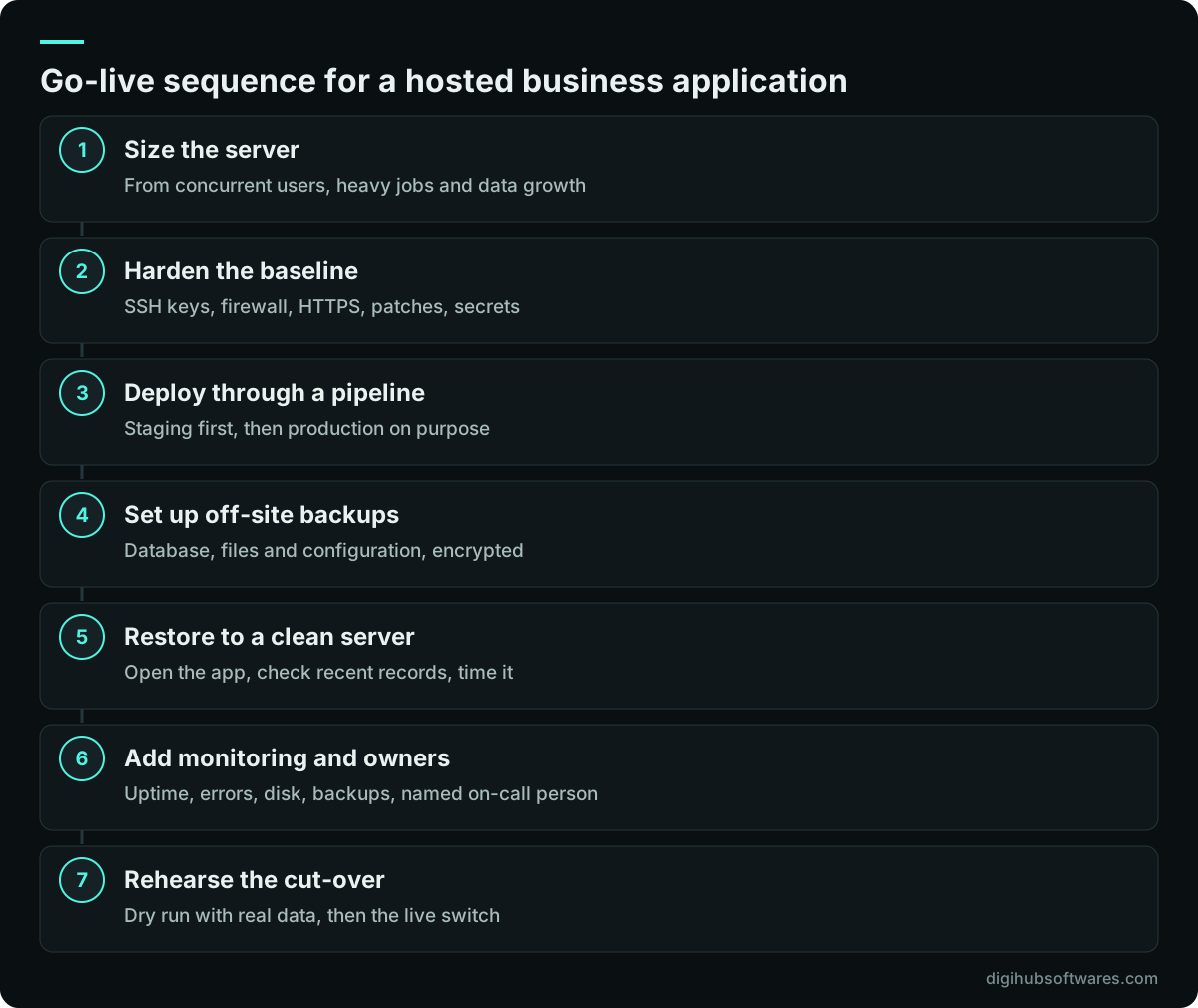
Before go-live, run through a fixed sequence that proves the server is secure, recoverable and observable, then do a dress rehearsal of the cut-over. The order matters: there is no point testing performance on a server you have not yet hardened, and no point going live before a restore has worked.
We run this sequence on every hosting project, and we keep the results as a short handover document so the next person to look after the server knows what was set up and why.
Should you run the server yourself or use managed server hosting?
Run it yourself if you have someone with Linux and database skills who has time for routine work and can be reached when things break. Use managed server hosting for business systems if that person does not exist, or if they would rather spend their time on the application than on patches and backups.
A middle path works well for many small companies: an outside team sets up the server, pipeline, backups and monitoring, documents them, and then either hands over to your staff or stays on a small monthly plan. That is how our server management service is structured, and it is part of our wider cloud and DevOps work. We are a Hostinger Partner, and we also work on AWS, Azure and DigitalOcean accounts that you own, so you keep control of the infrastructure and the bills.
Whichever route you choose, insist on three things in writing: who owns the provider account, where the backups go and when they were last restored, and who answers alerts. If those are clear, the rest of business application hosting becomes routine work rather than a source of surprises.
Sources and further reading
Official documentation and guidance if you want to read more about this topic.
Related guides and services
Questions readers ask
What is the best hosting for a business application?
The best hosting is the one your team can actually run. A platform service suits standard stacks with no server skills in-house. A VPS suits teams with an administrator who wants full control. Managed cloud suits growing systems that benefit from a managed database. Choose the model first by who will operate it, then compare providers on region, storage performance, backups and support terms.
Is a VPS good enough for ERP hosting?
Yes, a VPS is good enough for ERP hosting for many small and mid-sized companies, provided it has fast SSD or NVMe storage, enough RAM for the application and database, and someone who patches it, monitors it and tests the backups. The risk with a VPS is not the hardware. It is that all operating work falls on you, including the database.
How much RAM does a business application server need?
It depends on concurrent users and the application. Estimate the number of application processes you need for your busiest hour, multiply by the memory each uses, then add room for the database and operating system. Odoo's deployment guide, for example, estimates about 150 MB for a light worker and about 1 GB for a heavy one. Monitor for a month after go-live and resize.
Do I need a staging server?
Yes, if the application holds data you cannot afford to lose or carries custom code. A staging server is a copy of production where updates, module installs and migrations are tested first. It can be smaller than production. Without staging, every update is tested on live data, and a failed migration becomes an outage rather than a note in a test report.
How often should hosted application backups run?
Run backups at least daily for the database and files, and more often if losing a day of work would be costly. The frequency follows from your recovery point objective, the amount of recent data you can afford to lose. Keep copies off the production server and provider account, and restore one on a schedule, ideally monthly, to prove the backups work.