

Key takeaways
- Start with four stages: check, build, deploy to staging, deploy to production with approval.
- Use the CI service of the Git host you already have, GitHub Actions or GitLab CI, rather than adding another tool.
- Keep production secrets in a protected deployment environment and give the pipeline token only the permissions it needs.
- Take a database backup automatically before any migration runs in production.
- Track DORA's delivery metrics for one application to see whether changes are getting smaller and safer.
Part of our guide: Business application hosting: a practical guide to reliable setups
What does CI/CD for small teams actually need?
A small team needs a pipeline that does three jobs reliably: catch broken changes before they merge, deploy the same way every time, and make going back easy. Continuous integration (CI) is the first job: every push runs automated checks. Continuous delivery or deployment (CD) is the rest: a passing change is packaged and released through staging to production by a script rather than by hand.
The temptation is to copy a pipeline built for a large platform team, with many environments, parallel test matrices and custom tooling. For two to five developers that becomes a second product nobody has time to maintain. Good CI/CD for small teams is boring: one configuration file in the repository, a handful of jobs, and logs anyone on the team can read.
Deployments are one of the five habits in our guide to business application hosting. This article covers how to build that habit with the least ongoing effort.
Which stages belong in a simple CI/CD pipeline?
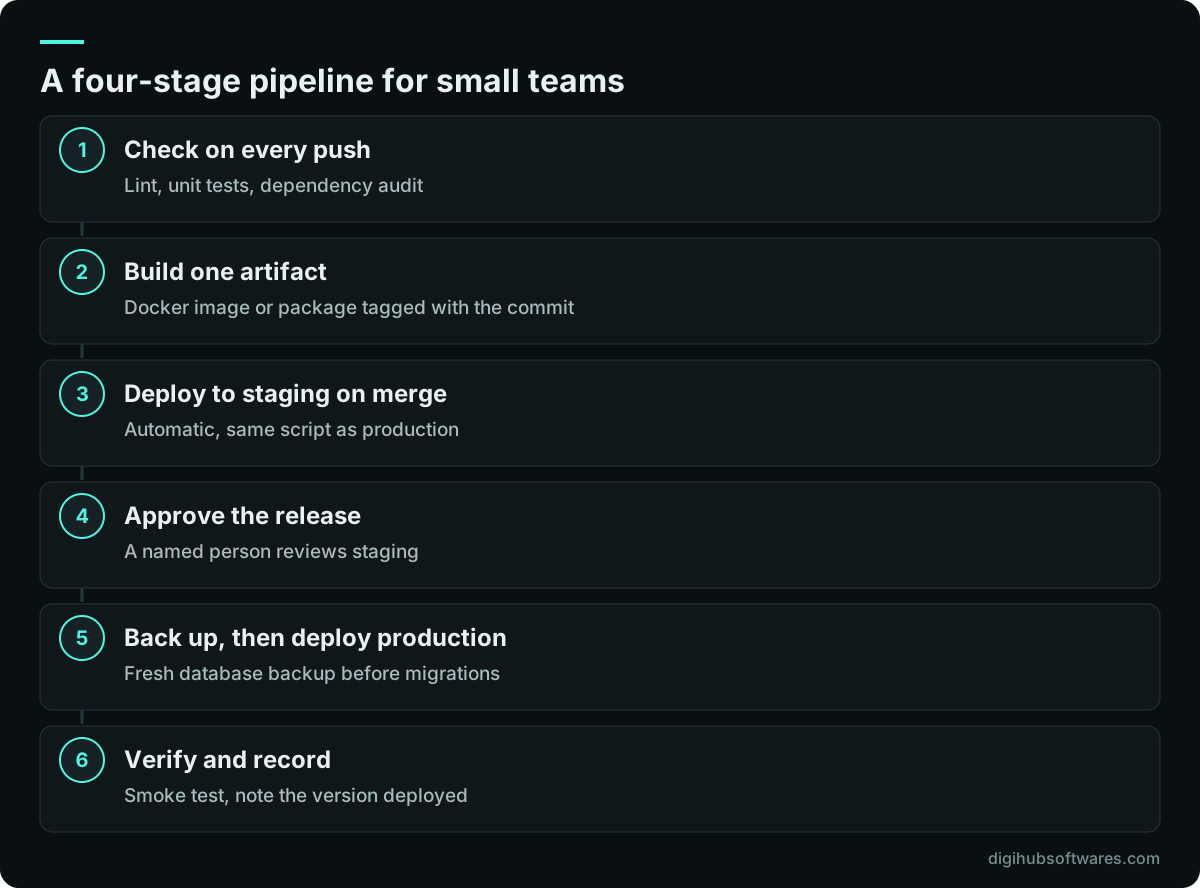
Four stages cover most small business applications: check, build, deploy to staging and deploy to production. Add more only when a real problem asks for it.
The check stage runs linting and automated tests on every push and pull request. The build stage produces one artifact, such as a Docker image tagged with the commit, that every later stage reuses, so production runs exactly what staging tested. The staging stage deploys automatically on merge to the main branch. The production stage runs the same deploy script against production, but only after a person approves.
GitHub Actions vs GitLab CI: which should a small team use?
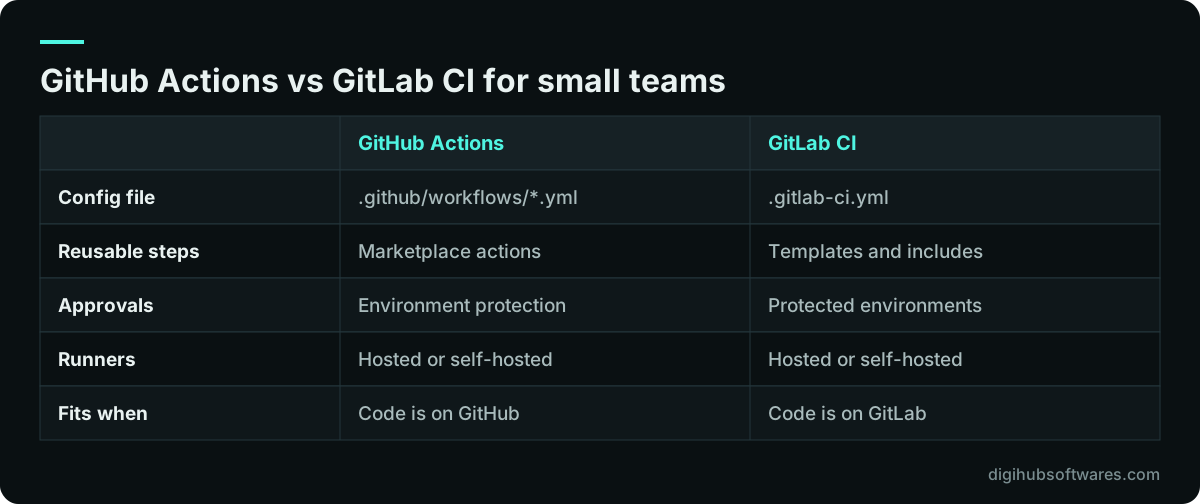
Use the one built into the Git host you already use. Both run pipelines from a YAML file in the repository, both offer hosted runners and self-hosted runners, and both support deployment environments with approvals and scoped secrets. Moving Git hosts to get a CI tool is rarely worth it.
GitHub Actions workflows live in .github/workflows and draw on a large marketplace of reusable actions, which saves time but adds supply-chain risk, covered below. GitLab CI uses a single .gitlab-ci.yml at the project root, as the GitLab CI/CD documentation (opens in a new tab) explains, and keeps more features inside GitLab itself. Feature availability, runner minutes and approval rules vary by plan on both, so check the current plan pages before you rely on a feature.
How much testing is enough before the pipeline deploys?
In CI/CD for small teams, the right amount is enough to catch the failures that have hurt you before, and fast enough that developers do not wait more than a few minutes. A slow pipeline gets bypassed. Start with a small, dependable set and grow it each time a bug reaches staging or production.
- Linting and formatting, so style debates rarely reach code review.
- Unit tests for business rules such as pricing, tax and stock calculations.
- A few integration tests against a real database in a service container.
- A dependency audit that flags known vulnerable packages.
- A smoke test after each deploy: the login page loads and one key screen returns data.
- Database migration run against a recent copy of production data on staging.
How should a small team deploy to production and roll back?
Deploy production from the same artifact and script that staging used, behind a manual approval, and keep the previous version ready to redeploy. In GitHub Actions this is a job that references a production environment; GitHub's secure use reference (opens in a new tab) and its environment documentation describe how environments can require approval, restrict which branches deploy and limit access to secrets. GitLab offers the same idea through protected environments and deployment approvals.
Rolling back code is easy when every build is tagged: redeploy the previous image. Rolling back data is harder. That is why the production job should take a fresh database backup right before any migration and why migrations should, where possible, add columns and tables before removing old ones, so the previous version still works against the new schema. The backup only helps if you have restored one before; our backup restore testing routine covers that.
How do you keep GitHub Actions and GitLab pipeline secrets safe?
Treat the pipeline as a privileged system: it holds the keys to production. GitHub's security guidance notes that anyone with write access to a repository can read the secrets configured in it, so production credentials belong in a protected environment, not as repository-wide secrets.
- Give the GITHUB_TOKEN or GitLab job token only the minimum permissions each job needs.
- Pin third-party actions to a full-length commit SHA, which GitHub describes as the only way to use an action as an immutable release.
- Use OpenID Connect to get short-lived cloud credentials instead of storing long-lived access keys.
- Scope production secrets to the production environment and require approval to use them.
- Protect the main branch: required reviews and passing checks before merge.
- Never print secrets in logs, and rotate any secret that ever appeared in one.
CI/CD for Odoo modules and ERP customizations
ERP code needs one extra stage: an upgrade test against a recent, anonymized copy of production. Custom Odoo modules often change data models, and a module that installs cleanly on an empty database can still fail when it updates a database with years of records.
A practical Odoo pipeline runs the module's tests in a throwaway container with a test database, builds an image with the pinned Odoo version plus your addons, restores last night's anonymized staging copy and runs the module update against it before anyone approves production. The container layout we use is described in our Odoo Docker deployment guide.
How do you know the pipeline is working? Use DORA metrics
Measure delivery with DORA's software delivery metrics for one application at a time. DORA's metrics guide (opens in a new tab) now describes five: three for throughput and two for instability, and it notes that its research finds speed and stability are not trade-offs.
For a small team the point is trend, not benchmark. DORA warns against turning the metrics into targets or comparing very different applications. Read them monthly: if lead time is long, changes are probably too large; if change fail rate is rising, the check stage is missing something.
| Metric | Type | What it measures |
|---|---|---|
| Change lead time | Throughput | Time from commit to running in production |
| Deployment frequency | Throughput | How often you deploy |
| Failed deployment recovery time | Throughput | Time to recover from a failed deploy |
| Change fail rate | Instability | Share of deploys needing immediate fixes |
| Deployment rework rate | Instability | Share of unplanned deploys caused by incidents |
How do you keep CI/CD for small teams maintainable?
Keep the pipeline small, documented and owned. Put a short README next to the configuration explaining each job, keep deploy logic in a script the pipeline calls so it can also be run by hand in an emergency, and review the pipeline when you review the code. When a step has been flaky for a month, fix it or remove it.
If nobody on the team has set one up before, a guided first version saves weeks of trial and error. Our CI/CD pipelines service builds a pipeline like the one above, and the Pipeline Starter package on our cloud and DevOps pricing page is $1,200 (£900) for one application, including Docker setup, staging and production deploys and a short runbook. For wider questions about environments and tooling, see our DevOps consulting service.
Sources and further reading
Official documentation and guidance if you want to read more about this topic.
Related guides and services
Questions readers ask
What is the simplest CI/CD pipeline worth having?
The simplest useful pipeline runs tests on every push, builds one tagged artifact, deploys it to staging automatically when you merge, and deploys the same artifact to production after a person approves. Add a database backup before production migrations and a smoke test after each deploy. That covers most small applications and fits in a single configuration file.
Should a small team use GitHub Actions or GitLab CI?
Use the CI service of the Git host your code already lives on. GitHub Actions suits teams on GitHub and offers many reusable actions. GitLab CI suits teams on GitLab and keeps more features in one product. Both handle tests, builds, environments and approvals well enough for small teams, so switching hosts just for CI is rarely worth the disruption.
Is continuous deployment safe for a small business?
Automatic deployment to staging is safe and saves time. Fully automatic deployment to production suits teams with strong automated tests and easy rollback. For most small businesses, a manual approval step before production is the better balance: the deploy is still scripted and repeatable, but a person checks staging first, especially when database migrations are involved.
What are DORA metrics?
DORA metrics are measures of software delivery performance from Google Cloud's DORA research program. The current model has five: change lead time, deployment frequency and failed deployment recovery time for throughput, plus change fail rate and deployment rework rate for instability. Use them per application to track trends, not as targets or for comparing unrelated teams.
How long does it take to set up CI/CD for a small team?
For one application with existing tests, a first pipeline with staging and production deploys typically takes one to two weeks, including Docker setup and documentation. Our Pipeline Starter package is scoped for that timeline. It takes longer when there are no tests yet, when the hosting itself needs rebuilding or when several applications share one deployment.