

Key takeaways
- Pin a dated image tag such as 20.0-YYYYMMDD in production instead of latest, so updates happen when you choose.
- Use PostgreSQL 16 or newer for Odoo 20, even though the Docker Hub examples still show postgres:15.
- Keep /var/lib/odoo and the PostgreSQL data directory on named volumes, and back up both.
- Put Nginx or another proxy in front, set proxy_mode = True, and route /websocket to the gevent port.
- Set list_db = False, a strong admin_passwd and a dbfilter before the server is reachable from the internet.
Part of our guide: Business application hosting: a practical guide to reliable setups
What does a production Odoo Docker deployment look like?
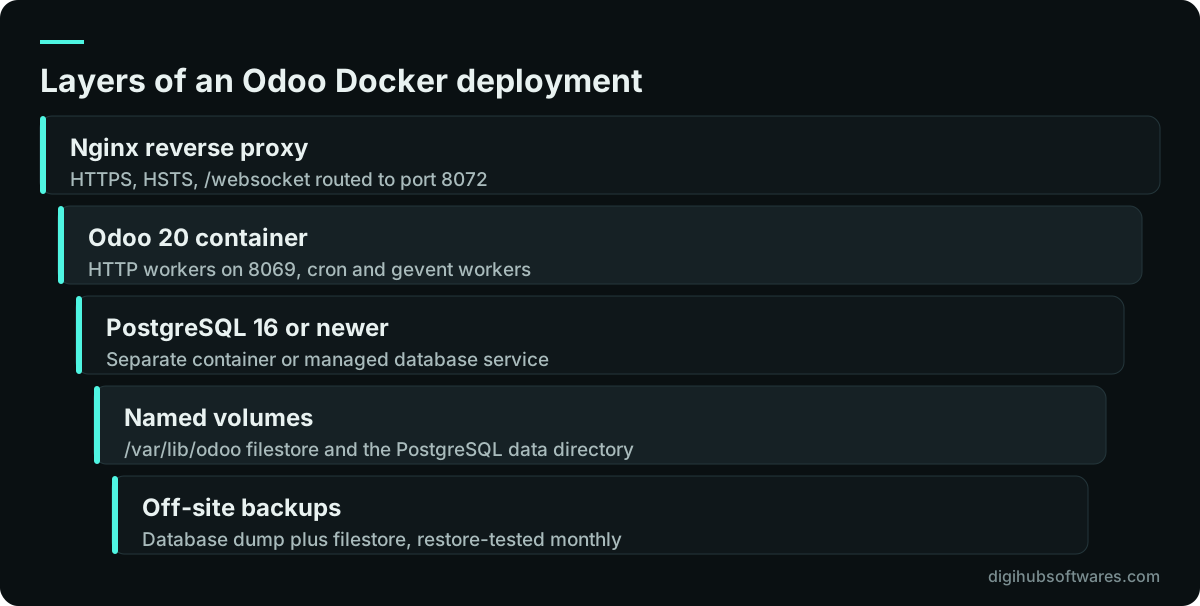
A production Odoo Docker deployment has three parts: a reverse proxy container or host service that terminates HTTPS, an Odoo container running in multi-worker mode, and a PostgreSQL server that is either a second container or a managed database. Data lives on named volumes or external storage, never only inside a container.
This differs from the quick start on the official Odoo image page on Docker Hub (opens in a new tab), which runs Odoo on port 8069 directly with default database credentials. That is fine on a laptop. On a server reachable from the internet it exposes the database manager, sends logins without encryption and keeps passwords that anyone can guess.
Hosting is one decision among several. If you are still choosing between Odoo's own cloud, Odoo.sh and your own server, start with Odoo Online vs Odoo.sh vs self-hosted. For the wider picture of servers, backups and monitoring, see our guide to business application hosting.
Which Odoo image and tags should you use?
Use the official odoo image, which Docker Hub lists as maintained by Odoo, and pin a dated tag in production. At the time of writing the supported tags are 20.0, 19.0 and 18.0, with latest pointing to 20.0, and each also has a dated tag such as 20.0-20260926.
The image page says new builds of each version are produced from Odoo's nightly releases. If your compose file says odoo:20 or latest, a routine pull can bring in a new build without anyone deciding to. Pin the dated tag, test the next one on staging, and move production forward on purpose.
The image ships Odoo Community. Docker Hub notes there is no official Enterprise image, but Enterprise modules can be mounted as an extra addons folder, at /mnt/extra-addons, alongside your own custom modules. Keep the Enterprise code in a private repository or a protected folder, because it is licensed and must not be published.
Which PostgreSQL version does Odoo 20 need in Docker?
Odoo 20 needs PostgreSQL 16 or newer. The Odoo 20 source installation guide records that the minimum moved from PostgreSQL 13 to 16 in version 20. The examples on the Docker Hub page still use postgres:15, so copying them for an Odoo 20 project gives you a database version below Odoo's stated minimum.
There is a second trap. The official postgres image creates the user named in POSTGRES_USER with superuser power, and the Docker Hub Odoo examples connect Odoo with that same user. Odoo's deployment guide advises that the database user Odoo connects with should not be a superuser. In production, keep the superuser for administration and create a separate role for Odoo, with permission to create databases only if Odoo needs to create them.
A managed PostgreSQL service is worth considering if nobody on the team wants to look after the database. It takes care of minor patches and snapshots, though you still need your own off-site dump and a restore test. Our PostgreSQL technology page covers how we tune and run it.
How should you lay out volumes, config and addons in Odoo Docker Compose?
Give every piece of state a fixed home outside the container, so you can delete and recreate containers without losing anything. Docker Hub shows the pattern: the filestore at /var/lib/odoo, which must match data_dir in the configuration, the configuration file at /etc/odoo/odoo.conf and extra modules at /mnt/extra-addons.
- Named volume for /var/lib/odoo: attachments, sessions and the filestore.
- Named volume for the PostgreSQL data directory, set through PGDATA.
- Read-only bind mount of a version-controlled odoo.conf at /etc/odoo.
- Bind mount of your custom and Enterprise addons at /mnt/extra-addons, deployed from Git.
- Database password passed with PASSWORD_FILE and a Docker secret, not as plain text in the compose file.
- Ports 8069 and 8072 published only on the private network or 127.0.0.1, never on the public interface.
How many Odoo workers should a Docker container run?
Set workers from your CPU count and concurrent users, using Odoo's own rule of thumb as the ceiling. Odoo's on-premise deployment guide (opens in a new tab) gives (CPU cores × 2) + 1 as the theoretical maximum and estimates that one worker serves about six concurrent users. With workers left at 0, Odoo runs in its threaded mode, which suits development rather than a team in production.
Memory follows the worker count. The same guide estimates around 150 MB of RAM for a light worker and about 1 GB for a heavy one, assumes a mix of 80% light and 20% heavy requests in its example, and sets limit_memory_soft and limit_memory_hard so that a runaway process is recycled. Remember to leave room for PostgreSQL if it runs on the same machine.
The guide's worked example is a 4-core, 8-thread server for 60 concurrent users. It calculates 10 workers needed and 9 as the theoretical maximum, then settles on 8 HTTP workers plus 1 cron worker and recommends monitoring CPU load. Treat it as a starting point and adjust after watching real traffic.
| Input or result | Value |
|---|---|
| Server | 4 CPU cores, 8 threads |
| Concurrent users | 60 |
| Workers needed (60 ÷ 6) | 10 |
| Maximum workers ((4 × 2) + 1) | 9 |
| Chosen setting | workers = 8, max_cron_threads = 1 |
How do you set up Nginx and Odoo proxy_mode?
Put a reverse proxy in front of Odoo, terminate HTTPS there, set proxy_mode = True in odoo.conf and pass the forwarding headers. Odoo's documentation is direct about the reason: Odoo transmits authentication information in cleartext, so a secure deployment must use HTTPS.
The proxy needs two upstreams. Normal requests go to port 8069. Requests whose path starts with /websocket go to the gevent port, 8072 in Odoo's sample, which serves live chat and real-time notifications in multi-worker mode. If you skip the second route, the interface loads but real-time features fail quietly.
Odoo's sample Nginx configuration also redirects HTTP to HTTPS, sets the X-Forwarded-Host, X-Forwarded-For, X-Forwarded-Proto and X-Real-IP headers, and adds a Strict-Transport-Security header. Only enable proxy_mode when Odoo really sits behind a proxy, because it tells Odoo to trust those headers.
Odoo Docker deployment security checklist
Before the server is reachable from the internet, close the database manager, set a strong master password and limit Odoo to the intended database. Odoo's guide strongly recommends disabling the database manager on internet-facing systems because it is a development tool and may expose dangerous features.
- list_db = False in odoo.conf, which hides the database list and blocks the management screens.
- A long random admin_passwd, stored in a password manager.
- dbfilter set so each hostname matches one database.
- Odoo's PostgreSQL role is not a superuser.
- Only the proxy is published on ports 80 and 443; SSH uses keys only.
- fail2ban or proxy rate limiting on failed logins, which Odoo writes to its log.
- Staging on a different machine from production, with the same precautions.
How do you back up and upgrade Odoo in Docker?
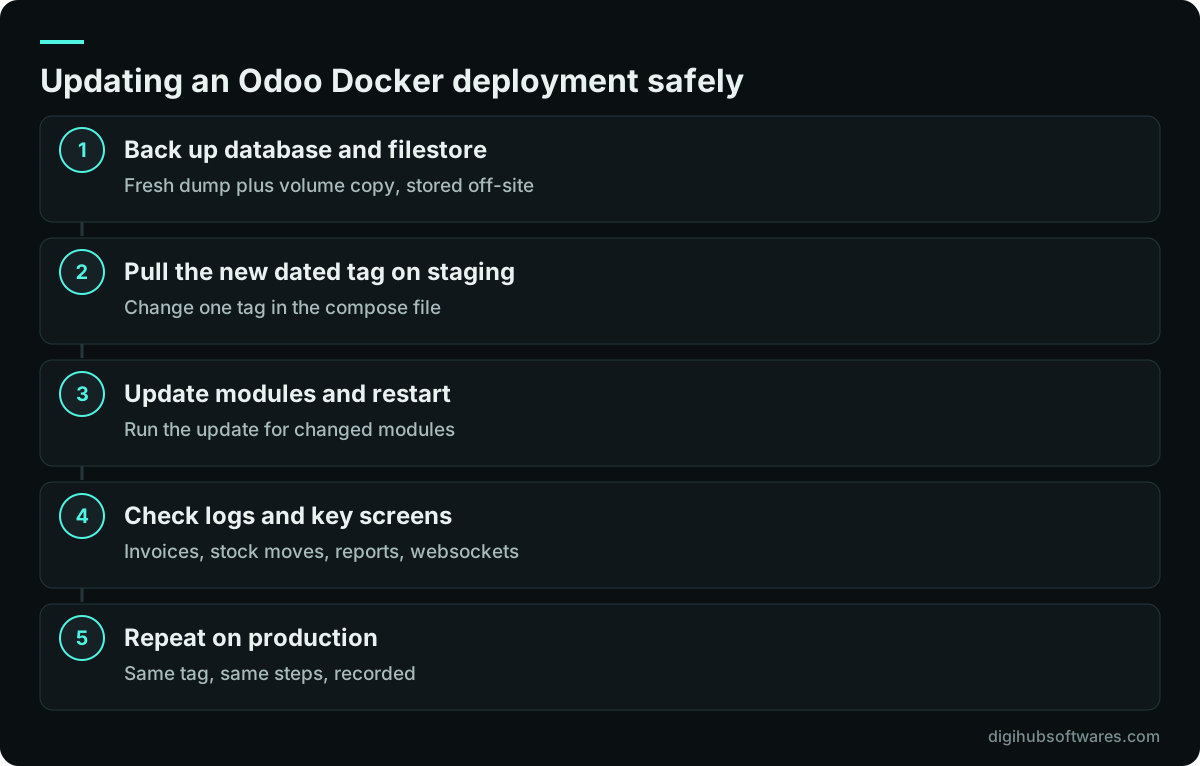
Back up the PostgreSQL database and the filestore together, and treat minor image updates and major version upgrades as two different jobs. A database dump without the filestore volume restores records with missing attachments, so script both into the same backup run and test the result with the routine in our backup restore testing guide.
Moving to a newer dated build of the same major version, such as one 20.0 build to the next, is mostly a matter of pulling the new tag on staging, updating modules and checking logs. Docker Hub is clear that moving between major versions is a more complex process that needs migration scripts, through Odoo's upgrade service or the community OpenUpgrade project. Plan a major upgrade as its own project with a test database.
Automating these steps keeps them consistent. A small pipeline can build your addons, run tests and deploy to staging on every merge; our guide to CI/CD for small teams shows one that works for Odoo modules.
Docker, Odoo.sh or a plain server install?
Choose Docker when you self-host and want the same setup on staging and production, or run several Odoo instances on one server. Choose Odoo.sh when you need Enterprise with custom modules but do not want to run servers. Choose a plain package or source install when your team already manages Linux services that way and has no need for containers.
Docker adds a layer to learn, and an Odoo Docker deployment is only as good as its volumes, proxy and backups. If you want help, our Docker containerization service sets up and documents the stack on your own cloud account, and our Odoo.sh hosting and deployment service covers the managed route. Fixed project prices are on the cloud and DevOps pricing page.
Sources and further reading
Official documentation and guidance if you want to read more about this topic.
Related guides and services
Questions readers ask
Is there an official Odoo Docker image?
Yes. Docker Hub lists an official odoo image maintained by Odoo, with tags for supported versions. At the time of writing these are 20.0, 19.0 and 18.0, with latest pointing to 20.0, plus dated build tags. The image contains Odoo Community. There is no official Enterprise image, but Enterprise modules can be mounted as extra addons.
Which PostgreSQL version should I use with Odoo 20 in Docker?
Use PostgreSQL 16 or newer. Odoo's installation documentation for version 20 states that the minimum requirement moved from PostgreSQL 13 to PostgreSQL 16. The examples on the Docker Hub odoo page still show postgres:15, so update the image tag in your compose file rather than copying the sample unchanged, and test the combination on staging first.
Why set list_db = False in Odoo?
Setting list_db = False hides the list of databases and blocks access to the database management screens, where databases can be created, duplicated, dumped or deleted. Odoo strongly recommends disabling the database manager on internet-facing servers. Set it once dbfilter matches a single database per hostname, and keep a strong admin_passwd as well.
Do I need Nginx in front of Odoo in Docker?
For production, yes, or another reverse proxy that terminates HTTPS. Odoo sends login details in cleartext, so its documentation says a secure deployment must use HTTPS. The proxy also routes /websocket traffic to the gevent port for real-time features. Enable proxy_mode = True in odoo.conf so Odoo reads the forwarded host, protocol and client IP correctly.
Can I run Odoo Enterprise in Docker?
Yes. Use the official image, which contains Community, and mount the Enterprise addons folder at /mnt/extra-addons, then activate the subscription in the database. You need a valid Enterprise subscription, and the Enterprise code should stay in a private repository. Docker Hub confirms there is no official Enterprise image, so this mounting approach is the documented route.