

Key takeaways
- Agree an RPO and RTO with the business owner first, because they decide how often you back up and how you restore.
- Keep at least one copy outside the production provider account, so one compromised login cannot delete every copy.
- For PostgreSQL, pair a nightly pg_dump with WAL archiving if losing a day of data is not acceptable.
- Restore to a clean server every month, open the application and check the newest records you expect to see.
- Write down how long each restore took and compare it with your RTO.
Part of our guide: Business application hosting: a practical guide to reliable setups
What is backup restore testing and why does it matter?
Backup restore testing means taking a real backup, restoring it somewhere other than production, and checking that the result is a working system with the data you expect. It matters because the failure modes of backups are silent. A job can report success while writing an empty file, skipping a database that was added later, or leaving out the folder where attachments live.
The UK National Cyber Security Centre makes the same point in plain words in its guidance on backing up your data (opens in a new tab): once you have made a backup, you should know how to restore it and check that it contains your important data. For a business application, that check has to go further than opening a file. You need the application running on the restored data.
This article sits inside our wider guide to business application hosting, where backups are one of five habits that keep a system reliable. Here we focus on the routine itself.
How do RPO and RTO set your backup design?
The recovery point objective (RPO) is the most recent data you can afford to lose, and the recovery time objective (RTO) is how long the system can be down while you restore. Every other choice, from backup frequency to storage location, follows from these two numbers.
Set them with the business owner, not the developer. Ask concrete questions. If the system went down at 3 p.m. and came back with this morning's data, what would you have to re-enter, and could you? If it stayed down until tomorrow, what would stop? The answers usually differ by system: a sales ERP may need an RPO of minutes, while an internal wiki can live with a day.
| Target | Typical method | Restore effort |
|---|---|---|
| RPO of a day | Nightly database dump plus file sync | Restore the dump and files |
| RPO of minutes | Base backup plus continuous WAL archiving | Restore base, replay WAL to a time |
| RTO of hours | Documented manual restore to a spare server | A person follows the runbook |
| RTO under an hour | Standby server or scripted rebuild | Mostly automated, tested often |
What is the 3-2-1 backup rule, and is it still enough?
The 3-2-1 rule is a widely used rule of thumb: keep three copies of your data, on two different types of storage, with one copy off-site. For a hosted application that might mean the live database, a nightly backup on a separate volume, and a copy in object storage with a different provider or account.
The rule is a good start but was written before ransomware made attackers target backups directly. If the same administrator login can delete the server, its snapshots and the off-site bucket, the three copies are really one point of failure. The NCSC's principles for ransomware-resistant cloud backups (opens in a new tab) start with exactly this: backups should be resilient to destructive actions, for example by blocking deletion or alteration for a period after a backup is created.
In practice, add two things to 3-2-1. Make one copy immutable or delete-protected for a retention period, using the object lock or versioning features your storage offers. And keep the credentials that can delete that copy away from the production server, so a compromised application cannot reach them.
pg_dump vs point-in-time recovery: which PostgreSQL backup do you need?
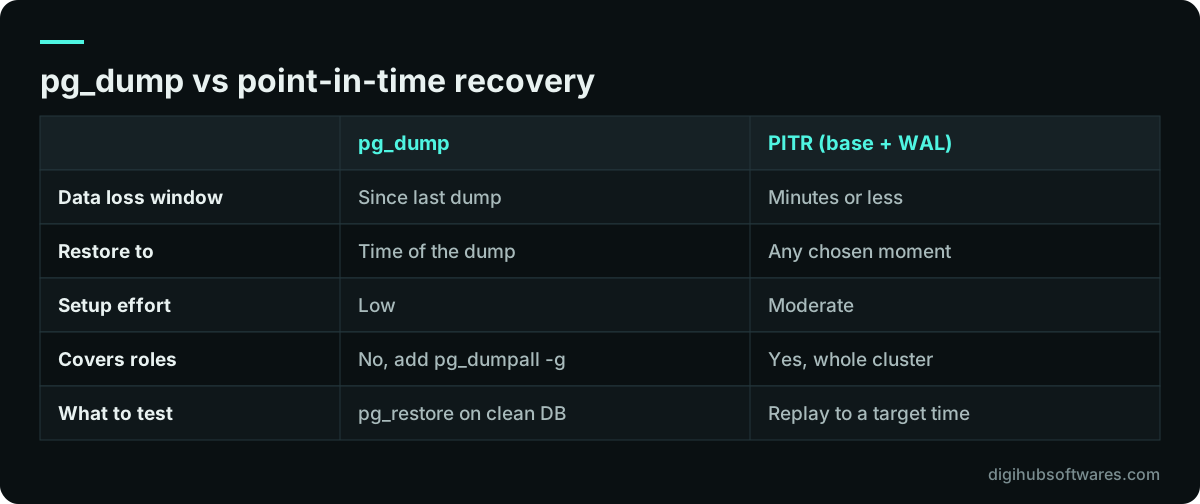
Use pg_dump when losing up to a day of data is acceptable and the database is small enough to restore within your RTO; add point-in-time recovery (PITR) when you need to restore to a specific minute. Many teams run both.
The PostgreSQL documentation on SQL dumps (opens in a new tab) explains that pg_dump produces an internally consistent snapshot of the database as it was when the dump started, without blocking normal reads and writes. Two details catch people out. pg_dump covers one database and does not include roles or tablespaces, so you also need pg_dumpall with the globals-only option to restore user accounts. And a custom-format dump (pg_dump -Fc) is restored with pg_restore, which can run in parallel to shorten restore time.
PITR works differently. PostgreSQL's continuous archiving guide describes taking a base backup, for example with pg_basebackup, and archiving every write-ahead log (WAL) file through archive_command or an archive library. To restore, you put the base backup in place, set a restore_command and a recovery target time, and PostgreSQL replays the log up to that point. It is the method that saves you when someone deletes a batch of invoices at 11:42 and you want the database as it was at 11:41.
What must a backup include besides the database?
A restorable backup includes everything needed to rebuild the running system, not only the database. The usual gaps are files stored outside the database and the configuration that ties everything together.
In Odoo, for example, attachments live in a filestore on disk, so a database dump without the filestore restores invoices with missing PDFs. Our guide to Odoo Docker deployment shows where that folder sits in a container setup. Similar patterns apply to most web applications that store uploads on disk.
- The database dump or base backup, plus archived WAL if you use PITR.
- Database roles and permissions (pg_dumpall --globals-only for PostgreSQL).
- Uploaded files and attachments, such as an Odoo filestore or a media folder.
- Application configuration files and the list of installed modules or packages with versions.
- Reverse proxy and TLS configuration, or notes on how to recreate them.
- Secrets and encryption keys, stored separately in a password manager, never next to the backup they decrypt.
A monthly backup restore testing routine
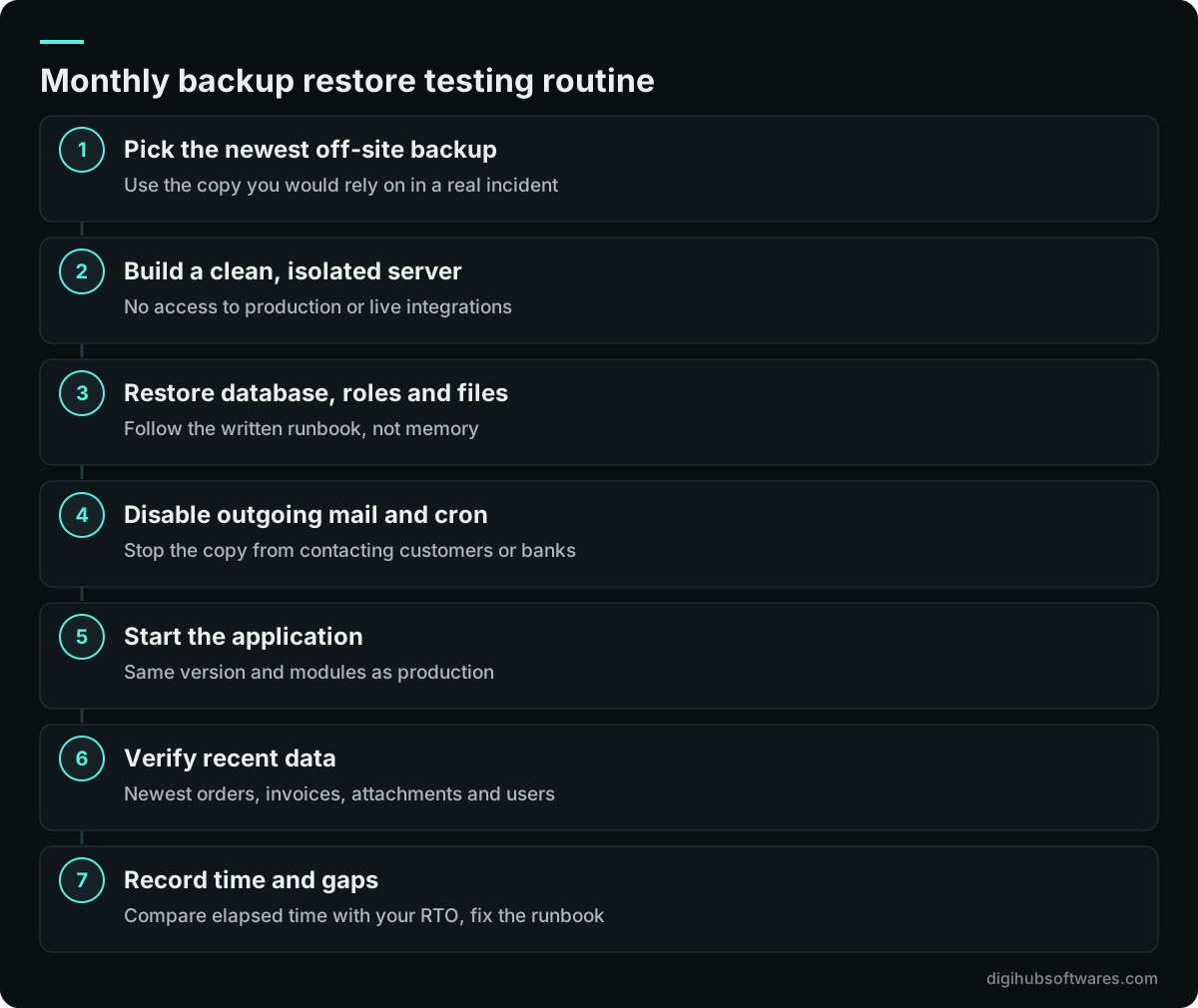
A practical backup restore testing routine restores the latest backup to a clean, isolated server once a month, checks the application end to end and records the time it took. Monthly is a sensible default for most business systems; increase it after any major change to the database, the hosting or the backup job itself.
Isolation matters. The test server must not send emails, run scheduled jobs against real payment gateways or post to live integrations. Turn off outgoing mail and cron jobs on the restored copy before you start the application.
How do you know a restored system is actually correct?
A restore is correct when the application works and the newest data matches what you expected at the backup time. Prepare the checks in advance, so the person running the test does not have to invent them under pressure.
Pick a handful of records created shortly before the backup ran, note their numbers, and look for them on the restored copy. Compare a few totals, such as the count of invoices this month or the stock value of one warehouse, against a report taken from production at the same time.
- Log in as a normal user and as an administrator.
- Find the last few documents created before the backup time.
- Open an attachment on a recent record to prove files restored.
- Run one report and compare its totals with production.
- Check that scheduled jobs are disabled on the copy.
- Note the total elapsed time from start to working application.
Why do restores fail when you need them?
Most restore failures come from gaps that a single test would have exposed: missing pieces, missing access or missing knowledge. A common pattern is a backup job set up at launch that nobody revisited after a second database, a new storage folder or a version upgrade was added.
Other frequent causes are an encryption key stored only on the server that failed, a backup tool that needs a newer PostgreSQL version than the one in the restore environment, and a runbook that only one person understood. Each restore test is a chance to find these while nothing is on fire.
What should you record after each test?
Record the date, the backup used, the time each stage took, what failed and what you changed. Over a few months, these backup restore testing records become evidence that recovery works and a measure of whether your RTO is realistic.
Under UK GDPR, the ICO expects organizations to be able to restore access to personal data in a timely manner after an incident. A log of successful restore tests is a practical way to show that your backup process supports that duty; confirm your specific obligations with your adviser. If you would like a team to run this routine for you, our server management plans include daily backups with periodic restore checks, and our cloud security service covers backup protection and access control. Plans and prices are on our cloud and DevOps pricing page.
Sources and further reading
Official documentation and guidance if you want to read more about this topic.
- Backing up your dataUK National Cyber Security Centre (opens in a new tab)
- Principles for ransomware-resistant cloud backupsUK National Cyber Security Centre (opens in a new tab)
- SQL DumpPostgreSQL (opens in a new tab)
- Continuous Archiving and Point-in-Time Recovery (PITR)PostgreSQL (opens in a new tab)
Related guides and services
Questions readers ask
How often should you test backup restores?
Test a full restore at least monthly for business-critical systems, and again after any change to the database version, hosting provider, storage layout or backup job. Quarterly can suit low-change internal tools. The aim is that no change goes long without a restore proving it, so a broken backup is found by a test rather than by an outage.
What is the difference between RPO and RTO?
RPO, the recovery point objective, is how much recent data you can afford to lose, measured in time. RTO, the recovery time objective, is how long the system can be unavailable while you restore. A nightly backup gives an RPO of up to a day. How fast your team can rebuild and verify the system determines whether you meet the RTO.
Is pg_dump enough for PostgreSQL backups?
pg_dump is enough when losing up to a day of data is acceptable and the database restores within your RTO. It gives a consistent snapshot without blocking normal work. It does not capture roles, so pair it with pg_dumpall --globals-only. If you need to recover to a specific minute, add continuous WAL archiving and a base backup for point-in-time recovery.
Are cloud provider snapshots a substitute for backups?
No. Snapshots are useful for quick rollbacks, but they usually live in the same provider account as the server. If that account is compromised, suspended or misconfigured, both can be lost together. Keep at least one copy in a separate account or provider, protect it from deletion for a retention period, and include it in your restore tests.
Can we test restores without affecting production?
Yes. Restore to a separate, isolated server with no network path to production and no live integrations. Before starting the application, disable outgoing email, scheduled jobs and payment or bank connections on the copy. Use a different hostname so nobody confuses it with the live system, and delete the copy once the test is recorded.