

Key takeaways
- Pick WordPress when content, lead generation and editing freedom matter most, and budget for monthly updates.
- Pick Shopify when you sell physical products and want hosting, checkout and security handled by the vendor.
- Pick headless only when you have a clear reason, such as several channels, heavy integrations or strict speed targets, plus ongoing developer time.
- Compare three-year running costs, not launch prices, because subscriptions, apps, plugins and maintenance add up.
- Plan redirects and tracking before any platform switch so you keep the rankings you already earned.
What are WordPress, Shopify and headless, in plain terms?
WordPress is open-source content management software you install on hosting you choose. Shopify is a hosted commerce service you rent by the month. Headless is not a product at all: it is an architecture where the part visitors see is built separately and pulls content or products from a back end through an API.
With WordPress you own the files and the database. You can move hosts, add any plugin and change any template, but you also carry the work of updates, backups and security. WooCommerce, a free plugin, turns WordPress into a store. Pages are rendered by PHP on your server, and themes control the look.
With Shopify you sign up, pick a theme and start adding products. Shopify runs the servers, the checkout, the payment flow and most of the security patching. You extend it with apps from its app store and edit themes written in Shopify's Liquid template language. The trade is control: you work inside the limits Shopify sets, and you pay a subscription for as long as you trade.
A headless site splits the job in two. A content system (WordPress itself, or a dedicated headless CMS) or a commerce engine (often Shopify) stores the data. A separate front end, usually built with a JavaScript framework such as Next.js, fetches that data and renders the pages. WordPress exposes its content through the WordPress REST API (opens in a new tab), and Shopify exposes products and carts through its Storefront API. The result can be very fast and very flexible, but you now have two systems to build, host and maintain.
WordPress vs Shopify vs headless: the short answer
For most small and mid-sized businesses the WordPress vs Shopify vs headless question resolves quickly once you name the main job of the site. If the site exists to win enquiries through articles, service pages and forms, WordPress is usually the sensible default. If it exists to sell products online, Shopify is usually the faster and lower-risk start. Headless is the right call for a smaller group: businesses with a specific requirement that the first two cannot meet without heavy workarounds.
A useful test is to ask what would break first. A content site on Shopify feels cramped, because blogs and landing pages are secondary features there. A large store on plain WordPress with many plugins can become slow and fragile under traffic peaks unless someone tunes it. A headless build for a ten-page brochure site is money spent on engineering that visitors will not notice.
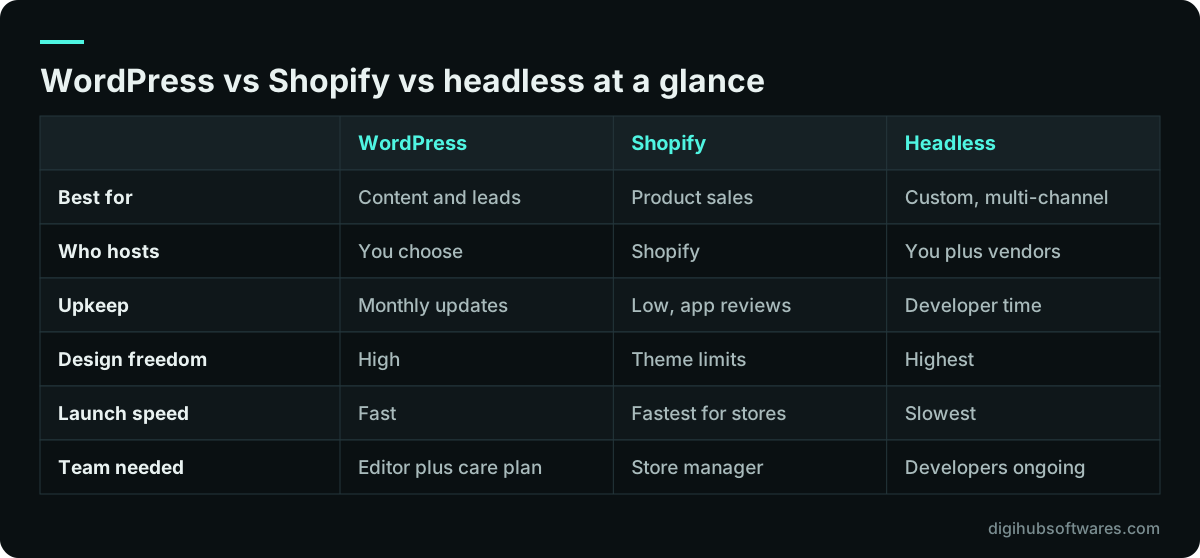
The comparison below summarizes the trade-offs. Treat it as a starting point, then test the cells that matter most for your business against the detail in the rest of this guide.
When is WordPress the right choice?
WordPress is the right choice when publishing is the core activity and your team wants to change pages without a developer. Its editor, categories, tags and huge plugin library make it strong for service businesses, publishers, schools, clinics and professional firms that win work through search.
The flexibility is real. You can add multilingual content, booking forms, membership areas or a small WooCommerce shop on the same install. You can host it anywhere, and you can hand it to another agency later because thousands of developers know it. That portability is a quiet advantage when you compare WordPress vs Shopify for a business that may change direction.
The weakness is the same flexibility. Every plugin is code written by someone else, updated on their schedule. Sites that collect plugins over years tend to slow down and become harder to secure. If you choose WordPress, choose it with a plan: a short list of well-maintained plugins, a staging copy for testing updates and a regular maintenance routine. Our guide to WordPress plugin security sets out that routine step by step.
- Good fit: service firms, B2B lead generation, blogs and resource hubs, sites with frequent new pages.
- Good fit: small catalogs on WooCommerce where content matters as much as the shop.
- Weak fit: owners who want no technical responsibility at all.
- Weak fit: high-volume stores without someone to tune hosting, caching and the database.
When does Shopify make more sense than WordPress?
Shopify makes more sense when selling is the business and you would rather pay a subscription than manage servers. Checkout, payments, tax settings, inventory, discounts, abandoned cart emails and order management are part of the product, and the vendor patches the platform for you.
In the WooCommerce vs Shopify comparison, the deciding factor is usually operations rather than features. WooCommerce can do almost anything with the right plugins, but each one is yours to update and test. Shopify gives you less freedom in exchange for fewer moving parts. For a growing retailer with one or two staff, that trade often wins.
Watch for three costs. First, apps: many stores rely on paid apps for reviews, subscriptions, bundles or advanced search, and each adds a monthly fee. Second, payment fees, which depend on your plan, your country and whether you use Shopify Payments or a third-party gateway; check the current figures on Shopify's own pricing page. Third, theme limits: deeply custom layouts or product builders may need custom app or theme work. When those limits start to block the business, a headless front end on Shopify becomes worth discussing, which our guide on when a headless Shopify storefront makes sense covers in detail.
What does a headless website actually give you?
A headless website gives you full control of the front end while keeping a proven back end for content or commerce. You decide every pixel, every page template and every performance budget, and the same content can feed a website, a mobile app, in-store screens or a partner portal.
This is the honest answer to the headless CMS vs WordPress question: headless is not automatically better, it is more custom. You get speed and freedom because a development team builds and owns the presentation layer. You also get more to manage. Previews for editors, form handling, search, redirects and analytics, which come almost free on WordPress or Shopify, need to be built or configured on a headless stack.
Shopify's own headless documentation describes two routes: its Hydrogen framework with Oxygen hosting (opens in a new tab), or bringing your own framework and hosting while calling Shopify's APIs. WordPress can also run headless, with the classic editor kept for authors and a separate front end serving visitors.
Is headless commerce worth it? It tends to be worth it when at least one of these is true: you sell through several channels from one catalog, you need integrations that would strain a theme, your brand needs interactions a theme cannot deliver, or you have measured that your current site is too slow and cannot be fixed in place. If none of these apply, the extra build and running cost rarely pays back.
- You need one content source for a website, an app and other channels.
- You need complex integrations with an ERP, PIM or custom pricing engine.
- You have a design or interaction requirement that themes cannot meet.
- You have budget for developers after launch, not only for the build.
How do the costs compare over three years?
Compare total cost over three years, because launch prices hide most of the spend. A cheap build on a platform that needs constant fixes costs more than a well-planned build with a predictable monthly bill.
The main cost drivers are the same across platforms: number of page templates, custom design versus a theme, product count and variants, integrations, languages and how much content needs writing or moving. What changes is where the running costs land. WordPress puts them into hosting, premium plugins and maintenance time. Shopify puts them into the subscription, apps and payment fees. Headless puts them into developer time and the hosting of two systems.
For reference, Digihub publishes fixed packages on its website pricing page. At the time of writing, a Starter WordPress site of 5–7 pages on a premium theme is $799, a Business site with custom design on WordPress or Next.js is $1,799, and a Corporate build on Next.js with a headless CMS is $3,999. Store packages start at $1,299 for Shopify Starter, with headless or fully custom commerce from $7,999. Subscriptions, apps, plugins and hosting are paid to their providers on your own accounts.
| Cost area | WordPress | Shopify | Headless |
|---|---|---|---|
| Hosting | Your host, scales with traffic | Included in subscription | Front-end host plus back end |
| Extensions | Premium plugins, yearly renewals | Apps, monthly fees | Custom code or SaaS services |
| Payments | Gateway fees | Plan and gateway fees | Depends on commerce engine |
| Maintenance | Updates and testing each month | App and theme reviews | Developer retainer |
| Change requests | Often done by your team | Theme edits or apps | Usually needs a developer |
Which platform is fastest for Core Web Vitals?
Any of the three can pass Core Web Vitals, and any of the three can fail them. Speed depends far more on images, scripts, fonts and hosting than on the platform name on the invoice.
Google's Core Web Vitals are Largest Contentful Paint (LCP) for loading, Interaction to Next Paint (INP) for responsiveness and Cumulative Layout Shift (CLS) for visual stability. According to web.dev's Core Web Vitals guide (opens in a new tab), a good experience means LCP within 2.5 seconds, INP of 200 milliseconds or less and CLS of 0.1 or less, measured at the 75th percentile of page loads. INP replaced First Input Delay as a Core Web Vital in 2024.
In practice, WordPress sites slow down through heavy page builders and plugin scripts. Shopify stores slow down through stacked apps that each inject JavaScript. Headless sites start with an advantage because developers control every request, but they can lose it with large client-side bundles. Whatever you choose, set a performance budget before design starts and measure real-user data after launch. Our step-by-step guide on how to improve Core Web Vitals explains what to fix first on each platform.
Which platform is easiest to keep secure?
Shopify is the easiest to keep secure for a non-technical owner, because the vendor patches the platform and runs checkout. WordPress can be kept secure with discipline. Headless reduces the public attack surface but adds API keys and more services to protect.
On WordPress, most risk comes from outdated or abandoned plugins and weak admin accounts, not from the core software. A short plugin list, prompt updates tested on staging, two-factor login for admins, least-privilege user roles and offsite backups cover the common attacks. WordPress's own hardening guidance recommends deleting plugins you do not use and keeping everything updated.
On Shopify, your job shifts to app permissions, staff accounts and theme code. Review what each app can read and remove apps you no longer use. On headless builds, keep private API tokens on the server, never in browser code, rotate them when people leave and monitor the front-end host and the back end separately.
- WordPress: you own patching, backups, user roles and plugin choice.
- Shopify: the vendor owns the platform; you own staff access, apps and custom code.
- Headless: you own the front end, its hosting and the secrets that connect it to the back end.
Can you switch platforms later without losing SEO?
Yes, you can switch platforms without losing much ranking, provided you treat it as a site move and map every old URL to its new home. Most traffic losses after a migration come from missing redirects, changed page content and lost internal links, not from the new platform itself.
Shopify uses fixed URL patterns such as /products/ and /collections/, so moving a WooCommerce store onto it changes most product addresses. A headless rebuild lets you keep existing URLs exactly, which is one quiet benefit of the approach. Moving from Shopify to WordPress means exporting products, customers and orders and deciding what history you need to keep.
Before any move, crawl the current site, export the top landing pages from Search Console, write a redirect map and keep titles, headings and body copy close to the originals for the first weeks. Our website redesign SEO checklist walks through each step, and our website migration service handles the move for you if you would rather not run it in-house.
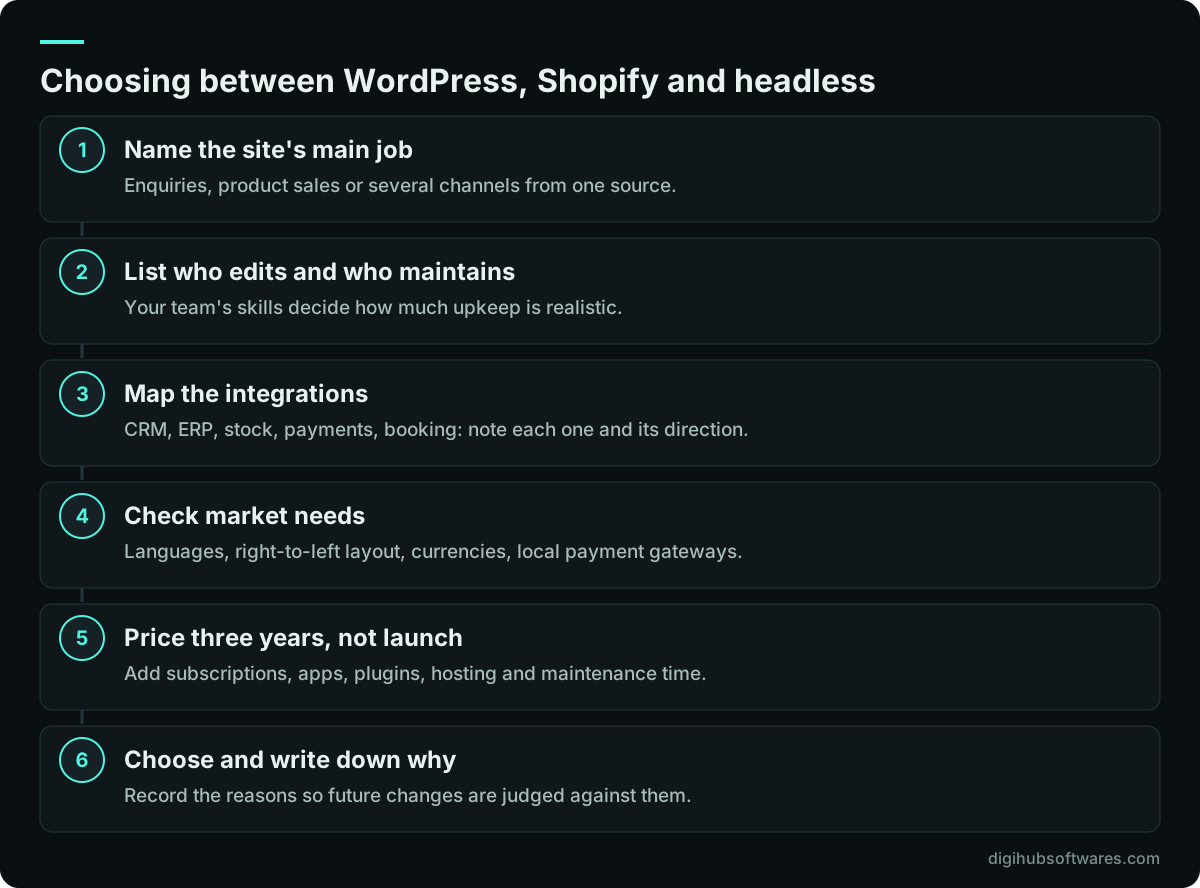
A decision process you can run in one meeting
You can settle WordPress vs Shopify vs headless in one working session if the right people are in the room: the owner, whoever will edit the site day to day and whoever will maintain it. Work through the steps below in order and write down each answer.
The order matters. Teams that start with design inspiration often fall for a look that one platform makes expensive. Teams that start with operations, money flow and integrations usually reach an answer that still makes sense two years later.
If your answers point in two directions, for example a content-heavy brand that also sells a large catalog, the common pattern is a hybrid. Shopify runs the store and checkout while a headless front end or a WordPress blog handles content. That costs more than either platform alone, so test it against your three-year budget before you commit.
Does your market change the answer in the UK, UAE or Pakistan?
Your market changes the details more than the decision. Payment gateways, languages and tax settings differ by country, and those details can rule a platform in or out.
In the UK, both WordPress with WooCommerce and Shopify connect to the major card processors, and VAT settings are well supported. Our UK website development page describes how we deliver for British clients. In the UAE, an Arabic version usually matters, so check how well your chosen theme handles right-to-left layout before you buy it, and confirm which local gateways the platform supports. In Pakistan, check whether your preferred card and wallet providers have a working plugin or app for the platform you pick, because Shopify Payments is only available in some countries.
Whichever market you serve, test the full checkout with a real local card and a real address during development, not after launch. Tax and invoice settings should be configured to support your compliance; confirm them with your tax adviser.
How Digihub helps you choose and build the right platform
We start with the WordPress vs Shopify vs headless decision, not the build. In a short call we walk through the steps above with you, then recommend one platform and explain what would change our mind. We have no partner agreement with Shopify or any CMS vendor, so the recommendation follows your requirements.
From there our website development team builds on the platform you choose: WordPress development for content-led sites, Shopify development for stores and headless CMS development when a custom front end is justified. Ownership of custom code passes to you on full payment, every launch includes 30 days of free fixes, and optional care plans cover updates and monitoring afterwards.
Sources and further reading
Official documentation and guidance if you want to read more about this topic.
Related guides and services
Questions readers ask
Is WordPress or Shopify better for a small business?
WordPress is usually better for a small business that wins work through content and enquiries, while Shopify is usually better for one that sells products online. WordPress gives more editing freedom and lower fixed costs but needs regular updates. Shopify costs a monthly subscription and app fees, yet it handles hosting, checkout and platform security, which suits owners with little technical time.
Is headless commerce worth it for a small store?
Headless commerce is rarely worth it for a small store with one sales channel and a standard catalog. A good Shopify theme will usually be faster to launch and cheaper to run. Headless starts to pay back when you sell through several channels, need complex integrations, or have proven speed and design limits that a theme cannot fix, and when you can fund developers after launch.
Can WordPress be used as a headless CMS?
Yes, WordPress can run as a headless CMS. Editors keep the familiar WordPress admin, and a separate front end, often built with Next.js, reads content through the WordPress REST API or a GraphQL plugin. This keeps publishing simple while giving developers control of speed and design. You still maintain WordPress itself, so updates and security work do not disappear.
Which platform is best for SEO?
No platform is best for SEO on its own. WordPress, Shopify and headless sites can all rank well when pages are fast, well structured and useful. WordPress offers the most freedom over URLs and content. Shopify uses fixed URL patterns but covers the technical basics. Headless gives full control, but your developers must build sitemaps, metadata and redirects correctly.
How long does it take to move from WooCommerce to Shopify?
Moving from WooCommerce to Shopify usually takes a few weeks for a small catalog and longer for large or complex stores. The time goes into exporting products and customers, rebuilding the theme, replacing plugins with apps, testing checkout and mapping redirects from old product URLs to Shopify's patterns. Planning the redirects early is what protects your search traffic.