

Key takeaways
- Go headless for a specific requirement a theme cannot meet, not for speed alone, because a lean theme can also be fast.
- Expect to rebuild things a theme gives you for free: page editing, app features, search, previews and redirects.
- Check each app you rely on for headless support before you commit.
- Hydrogen with Oxygen hosting is Shopify's own route; Next.js or another framework calling the Storefront API is the alternative.
- Budget for ongoing developer time, plus quarterly Storefront API version updates.
Part of our guide: WordPress vs Shopify vs headless: choosing a website platform
What is a headless Shopify storefront?
A headless Shopify storefront is a custom-built front end that shows your products and runs your cart, while Shopify stays in charge of products, inventory, orders, customers and checkout behind the scenes. The theme layer is replaced by your own application, which talks to Shopify through APIs.
The main API is the Storefront API. According to Shopify's Storefront API reference (opens in a new tab), it is available only in GraphQL and gives access to products and collections, carts, customers, menus, metafields and metaobjects. It is versioned quarterly, so a headless store needs a small amount of work each year to stay on a supported version.
When a buyer is ready to pay, the cart returns a checkout URL that sends them through Shopify's web checkout. That means payments, fraud checks and order creation stay on Shopify, which keeps much of the hard and sensitive work off your own servers.
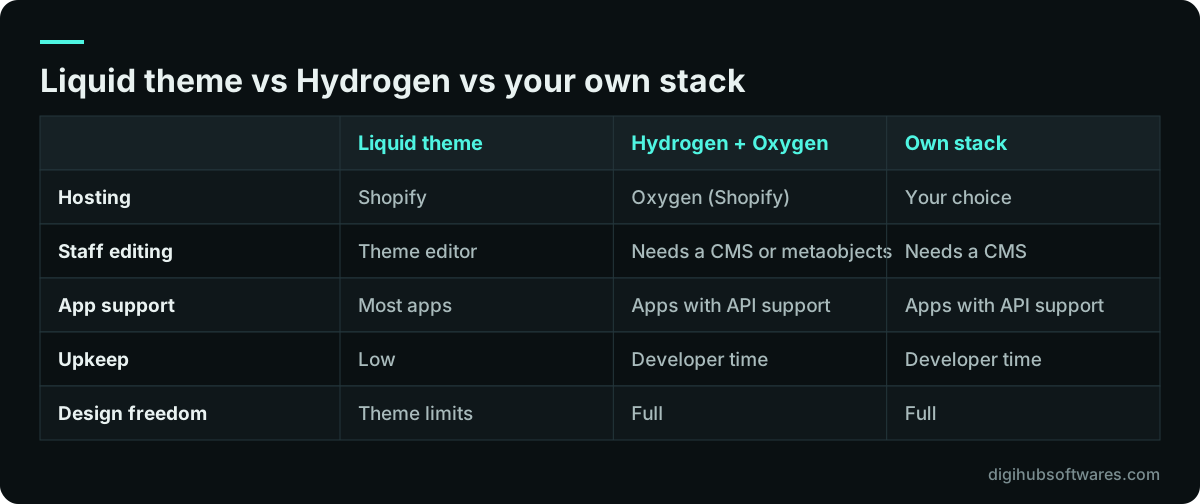
Hydrogen and Oxygen, or bring your own stack?
Shopify supports two routes to a headless Shopify storefront. You can use Hydrogen, its own framework, hosted on Oxygen, or you can use any framework and hosting you like and call Shopify's APIs.
Hydrogen is built on React Router and comes with commerce components, cart handling and Storefront API helpers already wired up. Shopify's headless documentation (opens in a new tab) describes Oxygen as its global edge hosting platform, with continuous deployment, preview links and rollbacks included at no extra cost. For a team starting fresh, it is the shortest path.
Bringing your own stack, often Next.js on a host such as Vercel or your own cloud, makes sense when the storefront is part of a larger site, when content comes from a separate headless CMS, or when your team already runs a framework in production. You take on more setup, but you keep one codebase and one hosting model for everything.
When does a headless Shopify storefront make sense?
A headless Shopify storefront makes sense when there is a clear business requirement that a theme cannot meet without fragile workarounds. Speed on its own is rarely enough, because a lean, well-built theme can pass Core Web Vitals too.
The strongest cases share a pattern: the store is one part of a bigger digital product. A brand that publishes heavy editorial content alongside products, a retailer that runs a website, a mobile app and in-store screens from one catalog, or a business with custom pricing and stock rules driven by an ERP will often find the theme model too narrow.
- You sell through several channels and want one front-end codebase or one content source for all of them.
- You need product configurators, bundles or account areas beyond what theme customization supports.
- Your catalog, pricing or stock data comes from an ERP or PIM that needs custom logic on the front end.
- Content and commerce are equally important and live in a separate headless CMS.
- You have, or will hire, developers to look after the storefront after launch.
When is a headless Shopify storefront a mistake?
Headless is a mistake when it is chosen for prestige or for a speed problem that a theme fix would solve. You pay more to build and run it, and staff lose the simple tools they had.
The hidden costs are mostly about features you used to get for free. On a theme, staff can edit pages, banners and menus in the theme editor. On a headless store, that needs a CMS or Shopify metaobjects wired into the front end. Many apps add features through the Online Store theme and do not work on a custom front end, so reviews, upsells, search or loyalty may need an API-based alternative or custom code. Redirects, sitemaps, structured data, analytics and consent banners must be built and tested by your developers.
If your current store is slow, fix it first: audit the apps, compress images and trim the theme. Our guide on how to improve Core Web Vitals lists the usual Shopify fixes. Only if those fail does a rebuild make sense on speed grounds.
What does a headless Shopify build cost to run?
A headless Shopify build costs more than a theme in three places: the initial build, the team that maintains it and the extra services around it. Your Shopify subscription stays, because Shopify still runs the back end and checkout.
The initial build replaces a theme with an application, so expect custom design, development and testing for every template. After launch you need someone to upgrade framework versions, move to new Storefront API versions each year, fix bugs and add features. If you use your own hosting or a separate CMS, those carry their own subscriptions. Check current Shopify plan prices and any plan requirements on Shopify's own site, because they change.
For reference, Digihub's published Custom Commerce package for headless or fully custom stores starts at $7,999, with a typical timeline of 10 to 16 weeks, as shown on our website pricing page. A Shopify theme store starts at $1,299. The gap between those two figures is the clearest way to judge whether headless is worth it for you.
How should a headless Shopify project be planned?
Plan a headless Shopify project around the parts that are easy to forget: content editing, apps, SEO and checkout testing. The visible storefront is the easy part to scope.
We start by listing every feature the current store uses, including what each app does, then mark how each one will work headless: built in, replaced by an API-based service, or custom code. Next comes the content model, so staff know where they will edit banners, landing pages and product stories. Then the URL plan and redirects, especially when the move also changes platform. The website redesign SEO checklist applies here in full.
- Feature and app inventory with a headless plan for each.
- Content model for staff editing, in a CMS or metaobjects.
- URL structure, redirects, sitemap and structured data plan.
- Private Storefront API token kept on the server only.
- Checkout, discount and market tests with real cards and addresses.
- Performance budget per template and real-user monitoring.
How do you decide between headless and a theme?
Decide by listing your top five requirements and checking each against a good theme first. If a theme plus a few custom sections or apps covers them, stay on a theme. If two or more need custom front-end work, headless is worth pricing.
If you are still choosing a platform at all, start with our broader comparison of WordPress, Shopify and headless. Once Shopify is settled, our Shopify development team can build either route, and our headless CMS development service covers the content side when it lives outside Shopify. We are not a Shopify partner, so our advice is not tied to a sales target.
Sources and further reading
Official documentation and guidance if you want to read more about this topic.
Related guides and services
Questions readers ask
Is Shopify Hydrogen free to use?
Hydrogen is Shopify's open framework, so there is no charge for the framework itself, and Shopify says deploying to its Oxygen hosting comes at no extra cost. You still pay your Shopify plan, and you pay for the development work to build and maintain the storefront. Check Shopify's documentation for current plan requirements before you start.
Can I use Next.js instead of Hydrogen for headless Shopify?
Yes. Shopify supports bringing your own framework, so Next.js, Astro or another stack can call the Storefront API and hand buyers to Shopify's checkout. This suits teams that already run Next.js or combine the store with a separate content system. You host it yourself and take on the setup that Hydrogen and Oxygen would otherwise provide.
Does a headless Shopify store still use Shopify checkout?
Yes, in the standard setup the headless storefront builds the cart through the Storefront API, then sends the buyer to Shopify's web checkout using the cart's checkout URL. Payments, taxes, fraud checks and order creation stay on Shopify. This keeps sensitive payment handling off your servers and means checkout features follow your Shopify plan.
Do Shopify apps work on a headless storefront?
Some do and many do not. Apps that add features through the Online Store theme, such as widgets placed with theme blocks, usually will not appear on a custom front end. Apps that offer APIs or headless SDKs can be connected by your developers. Check every app you depend on before deciding, because replacing several can change the budget.