

Key takeaways
- Measure accuracy field by field on your own documents, with answers a person has confirmed.
- Use a structured output schema so the format is right, then use business rules to check that the values are right.
- Treat the model's own stated confidence as a weak signal and rely on independent checks to route documents to review.
- Let a document skip review only when every check passes and that document type has a proven record on your test set.
- Feed every correction from the review queue back into the test set.
Part of our guide: Practical AI for business operations: where it pays off first
What does LLM document extraction accuracy really mean?
LLM document extraction accuracy is the share of fields, or whole documents, that a language model extracts correctly when compared with answers a person has verified. The headline number matters less than how you count it. A system can get most fields right and still get the invoice total wrong often enough to be unusable in finance.
Three measures are worth tracking. Field accuracy counts each field separately: supplier name, invoice date, total, tax amount and so on. Document accuracy counts a document as correct only if every required field is right. The straight-through share is the proportion of documents that pass every automatic check and need no human touch. Field accuracy tells you where to improve; document accuracy and the straight-through share tell you what the system saves.
This article is part of our guide to practical AI for business operations, where document processing is one of the most common starting points.
Why do LLMs get document fields wrong?
Most errors come from the input, the instructions or the ambiguity of the document, not from the model being careless. Knowing the cause tells you which fix to apply.
- Poor scans: low resolution, skew or handwriting make text recognition fail before the model sees the content.
- Ambiguous labels: a document shows several dates or several totals, and the instructions do not say which one you mean.
- Line-item tables: rows that wrap across lines or pages get merged or split.
- Number formats: commas and full stops swap roles between countries, and currencies are implied rather than shown.
- Missing values: the model fills a field that is not on the document instead of leaving it empty.
- Instructions inside the document: text in a file can try to steer the model, which OWASP lists as prompt injection.
Does LLM structured output solve accuracy?
Structured output solves the format problem, not the accuracy problem. Features such as OpenAI's Structured Outputs (opens in a new tab) and Google's Gemini structured output let you supply a JSON Schema, so the response comes back with the fields, types and required keys you defined. That removes broken JSON, missing keys and free-text answers where you wanted a number.
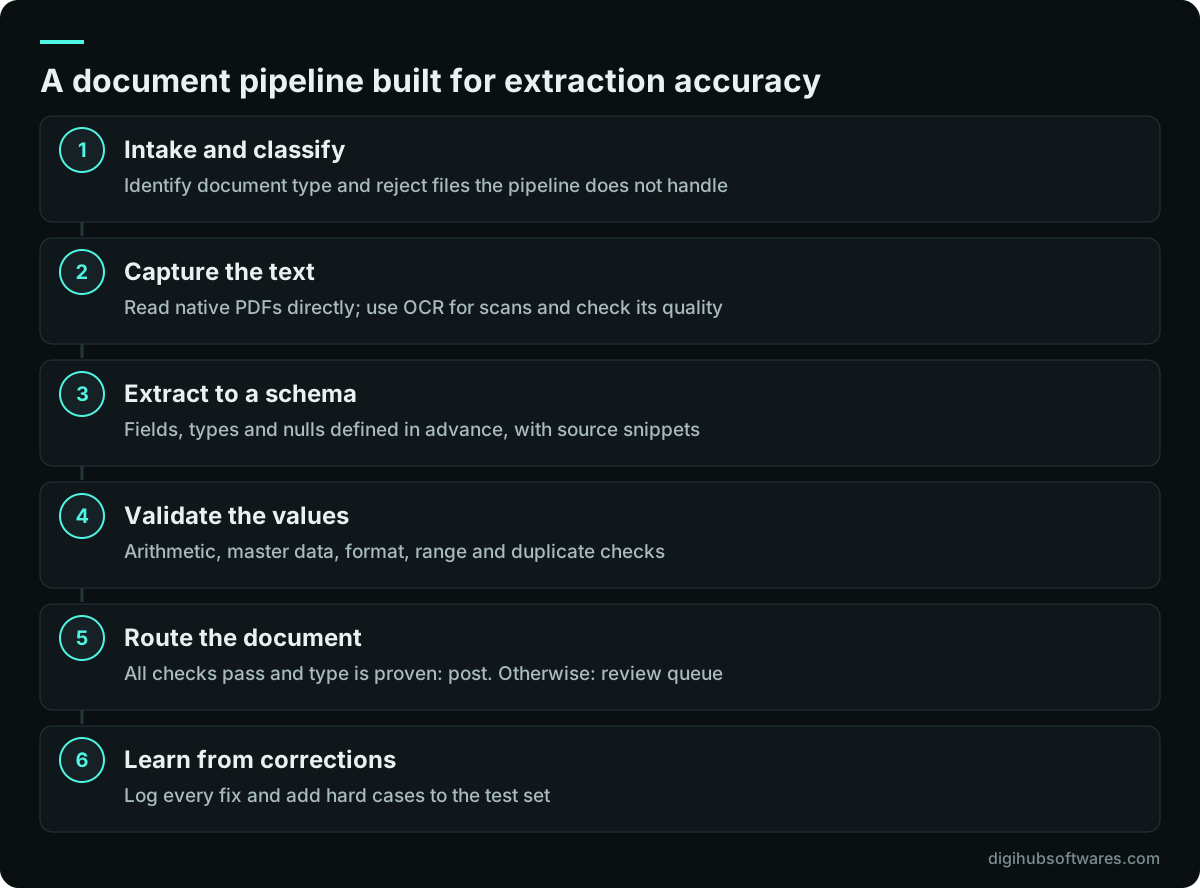
A value can still be wrong while the format is perfect. The schema will happily accept an invoice total of 1,250.00 when the document says 12,500.00. Design the schema to help accuracy anyway: allow null for fields that may be absent so the model is not pushed to invent them, use enums for fixed choices such as currency or document type, and ask for the page or text snippet each value came from so a reviewer can check it quickly.
Which validation rules catch extraction errors?
Validation rules are plain code that checks extracted values against arithmetic, your own records and known formats. They are cheap, predictable and catch many of the errors that matter most. Every rule that fails sends the document to review with a clear reason.
| Check type | Example | What it catches |
|---|---|---|
| Arithmetic | Line totals add up to the subtotal, plus tax equals the total | Misread digits, missed lines |
| Master data | Supplier tax number matches a supplier in the ERP | Wrong or invented supplier |
| Purchase order | Referenced order exists and is open for that supplier | Misread or missing references |
| Format | Dates are valid, bank details pass their checksum | Swapped or garbled characters |
| Range | Invoice date is not in the future or years in the past | Wrong date picked from the page |
| Duplicate | Same supplier, number and amount not already booked | Double entry |
How should a human in the loop review documents?
Send a document to a person when any validation rule fails, when a required field is empty, or when the document type has not yet proven itself on your test set. Let it pass without review only when all of those are clear.
Be careful with confidence scores. A model's own statement that it is confident is not a calibrated probability, so treat it as a weak signal at best. Stronger signals are independent: a validation rule failing, two extraction runs disagreeing, or the source snippet not containing the value. Use those to rank the review queue.
Design the review screen for speed. Show the document beside the extracted fields, highlight the fields that failed a check and the snippet each value came from, and let the reviewer correct and approve in one step. Log every correction with the original value, because those corrections are your best source of new test cases.
How to measure LLM document extraction accuracy on your own files
Measure LLM document extraction accuracy with a test set drawn from your real documents, labeled by a person who knows them, and scored by code. Vendor benchmarks and demos use other people's documents, so they tell you little about yours.
Pick documents that reflect your real mix: your main suppliers, the awkward ones, scans and native PDFs, single and multi-page, and every language you receive. Have someone enter the correct value for every field, and have a second person check a sample of those labels, because label errors make the AI look worse or better than it is. Normalize before comparing, so "12/10/2026" and "2026-10-12" count as the same date when they are.
Be honest about what a small test set can prove. A useful rule from statistics, the rule of three, says that if you see zero errors in n cases, the true error rate could still be as high as about 3 divided by n with 95% confidence. Zero errors on 50 invoices therefore cannot rule out an error rate of around 6%. If you need to show a very low error rate for a field, you need many more cases, or you keep review on that field.
How do you improve AI invoice extraction accuracy?
Improve the weakest field first, using the error log to find the cause. Each fix should be tested on the full set, not only the case that prompted it, because a change that helps one supplier can hurt another.
- Fix the input: better scan settings, or ask suppliers for native PDFs or e-invoices where possible.
- Clarify the instructions: say which date or total you mean and what to return when a field is absent.
- Split the work: classify the document type first, then use instructions written for that type.
- Add examples: include one or two short, correct examples for document types that cause trouble.
- Add a rule: if an error has a pattern, a validation check is often cheaper than more prompting.
- Compare models: run the same test set on another model before assuming the current one is the limit.
How do you keep accuracy high after launch?
Accuracy drifts as inputs change: new suppliers, new layouts, a provider updating its model. Keep measuring by sampling straight-through documents for review each period, tracking the correction rate by field and supplier, and re-running the full test set whenever you change a prompt, a model version or a rule.
Agree in advance what triggers action, such as the correction rate for a field rising above the level you accepted at launch. Our article on how to evaluate an LLM application before launch covers setting those thresholds. If extracted data flows into Odoo, see connecting an AI assistant to Odoo safely for the permission model. Our AI document processing and LLM integration services build pipelines like this, and the Growth package on our AI automation pricing page includes an accuracy test set and review of results with your team.
Sources and further reading
Official documentation and guidance if you want to read more about this topic.
Related guides and services
Questions readers ask
How accurate is AI at extracting data from invoices?
It depends on your documents, so no general figure is reliable. Clean native PDFs from regular suppliers tend to extract well, while poor scans, handwriting and complex line-item tables cause more errors. The only trustworthy answer comes from running the system on a test set of your own invoices, scored field by field against values a person has confirmed.
Can extracted data go straight into the ERP without review?
It can for documents that pass every validation rule and belong to a type with a proven record on your test set. Keep review for anything that fails a check, has an empty required field or comes from a new supplier or layout. Sample a share of straight-through documents each period so you notice drift before it affects your accounts.
Is LLM structured output enough to make extraction reliable?
No. Structured output makes the response match your schema, which fixes formatting and missing keys, but it does not check that the values are correct. You still need validation rules for arithmetic, supplier records, formats and duplicates, plus a review queue. Think of the schema as the container and the rules as the inspection.
How many documents do we need to test extraction accuracy?
Enough to cover your real mix of suppliers, layouts and scan quality, and enough to support the claim you want to make. Zero errors on a small set proves little: by the statistical rule of three, zero errors in 100 cases still allows a true error rate of about 3%. Fields where errors are costly need larger samples or permanent review.
Should we trust the confidence score an LLM gives?
Treat it as a weak signal only. A model stating that it is confident is not a calibrated probability, and it can be confidently wrong. Route documents to review based on independent evidence instead: failed validation rules, empty required fields, disagreement between two extraction runs, or a value that does not appear in the source text.