

Key takeaways
- Collect candidate tasks from the people who do the work, not only from management.
- Score each candidate on volume, error cost, data access, review point and input variety.
- Reject any candidate where you cannot write down what a correct output looks like.
- Agree a written success measure and a stop rule before the pilot starts.
- Choose an internal, back-office task for the first project and keep customer-facing ideas for later.
Part of our guide: Practical AI for business operations: where it pays off first
What makes a good first AI automation project?
A good first AI automation project is one where success is easy to see and failure is cheap. It handles a task that happens many times a week, works mostly with text, has a person who already checks the result, and can be measured against how the work is done today. If the pilot goes badly, the team simply carries on as before.
The first project has two jobs. It should save some time or reduce some errors, and it should teach your organization how AI behaves: where it is reliable, where it drifts, how much review it needs and what it costs to run. The second job matters as much as the first, because every later project builds on what you learn here.
This is part of our guide to practical AI for business operations, which explains where AI tends to pay off and where it does not.
Where do you find AI automation ideas for business?
The best ideas come from the people who do repetitive work every day. Ask each team a few plain questions and write the answers down: what do you copy from one place to another, what do you read only to decide where it goes, and what do you type that is nearly the same every time?
Managers tend to suggest visible projects. Staff tend to suggest painful ones. The painful ones are usually better first candidates because the volumes are real and the people involved want the help. Aim for a long list of ten to twenty tasks before you start filtering.
- Keying data from PDFs, scans or emails into the ERP or a spreadsheet
- Reading incoming requests and deciding which team or person handles them
- Writing first drafts of routine replies, summaries or reports
- Searching policies, manuals or past tickets to answer internal questions
- Checking documents against a list of required items before they move on
- Looking up order, stock or invoice status for colleagues or customers
How to choose an AI project: a simple scoring method
Score each candidate from 1 to 5 on six criteria, with 5 being the most favorable, then add the scores. The scores are a structured way to have the conversation, not a precise calculation. Two people who know the process should score it together, and any criterion that scores 1 deserves a closer look before you go further.
Volume and time per case tell you the size of the prize. Error cost and review point tell you how safe it is. Data access and input variety tell you how hard it will be to build. A candidate that scores high on value but low on safety is a later project, not a first one.
| Criterion | Scores 5 when | Scores 1 when |
|---|---|---|
| Volume | The task happens many times every day | It happens a few times a month |
| Time per case | Each case takes a person several minutes | Each case takes seconds |
| Error cost | A mistake is cheap and easy to fix | A mistake costs money, trust or compliance |
| Review point | Someone already checks the output | Output takes effect with no check |
| Data access | Inputs and systems are reachable by API or export | Data sits in paper files or locked systems |
| Input variety | Inputs follow a few familiar patterns | Every case looks different |
Which tasks should you not automate with AI first?
Avoid tasks where a wrong answer reaches a customer, a regulator or a bank before anyone sees it. Also avoid tasks where nobody can define a correct output, because you will have no way to measure whether the AI is working.
Some ideas are better solved without AI at all. If the logic is fixed, a rule or a short script is cheaper, faster and fully predictable. If the problem is that data lives in two systems, an integration may remove the task entirely. Choosing AI for a problem that does not need it is a common and costly first mistake.
- Final decisions on credit, pricing, hiring or payments with no human approval
- Open-ended customer chat on your website that can promise anything
- Tasks whose rules are clear enough to code as plain logic
- Processes the team itself disagrees about, where there is no agreed right answer
- Work that depends on data you are not permitted to send to an AI provider
How do you define success for an AI pilot project?
Define success as a comparison with today. Before the pilot, measure the current volume, the average time per case and the error rate, even roughly. Then write down what the AI version must achieve to continue, for example an accuracy level on your test set, a target time per case including review, and a running cost the business accepts.
Write a stop rule as well. If the pilot misses the threshold after an agreed period and a reasonable round of fixes, you stop or change scope. A stop rule protects the budget and makes the decision less personal.
You also need a test set: real past cases with answers a person has confirmed. Our guide on how to evaluate an LLM application before launch explains how to build one and how big it needs to be for the decision you are making.
A worked example: scoring three candidates
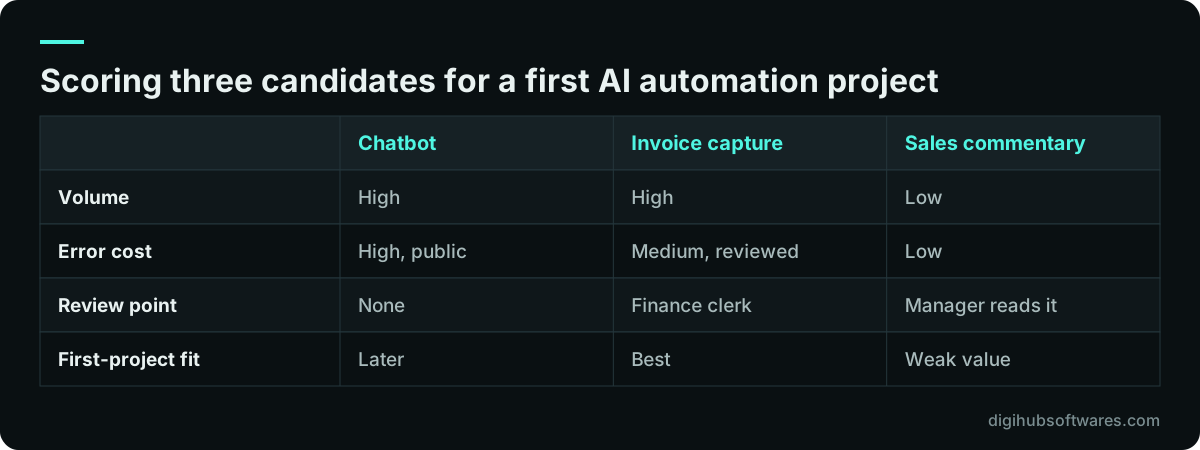
Imagine a distribution company with three ideas: a website chatbot for customers, automatic capture of supplier invoices, and a weekly sales commentary written by AI. Here is how the scoring conversation might go. The scores below are illustrative, to show the reasoning, not measurements from a real company.
The chatbot is visible and popular with management, but customers would see every mistake and the answers depend on stock and pricing data that changes daily. The invoice capture has high volume, a finance clerk who already checks each invoice, and well-defined fields. The sales commentary is low volume and hard to judge objectively. Invoice capture becomes the first AI automation project, and the chatbot moves to a later phase once the team has learned how to test and review AI output. For the extraction side, our article on LLM document extraction accuracy covers the checks to build.
How should the first project run once it is chosen?
Run it as a short, controlled pilot with full human review at the start. The AI does the work, a person checks every output, and every correction is logged. Those corrections show you where the AI fails, and they become new test cases.
Keep the scope tight. If the pilot is invoice capture, do not add purchase order matching in the same phase. Connect the AI to business systems with read-only access first, and add write actions only after the outputs are proven. When the numbers meet the success measure, reduce review gradually, for example by letting high-confidence cases pass and keeping a sample check.
If the process involves your ERP, read our piece on connecting an AI assistant to Odoo safely for the permission model. Our AI workflow automation team builds pilots like this, and our AI agents service covers the multi-step work that often follows. Our AI automation pricing page lists the fixed packages.
What comes after a successful AI proof of concept?
After a successful pilot, harden it before you widen it. Add monitoring, set usage limits, write down who reviews exceptions, and hand the test set to the team so they can recheck results when anything changes. Then go back to your scored list and pick the next candidate, which will now be easier because the building blocks exist.
A proof of concept that never gets this treatment tends to decay quietly. Inputs change, a model version is updated, a new supplier sends a different layout, and nobody notices the error rate creeping up. Plan a regular review of accuracy and cost from day one, and treat the AI like any other system the business depends on. The NIST AI Risk Management Framework (opens in a new tab) places this ongoing tracking under its Measure and Manage functions.
Sources and further reading
Official documentation and guidance if you want to read more about this topic.
Related guides and services
Questions readers ask
What is a good first AI automation project?
A good first AI automation project is a frequent, text-heavy back-office task that someone already reviews, such as capturing supplier invoices or routing a shared inbox. It should have a clear correct output you can test against and a current process you can measure. If it fails, the team should be able to carry on without disruption.
Should our first AI project be a customer chatbot?
Usually not. A customer chatbot is visible, so every mistake is public, and it often needs live pricing and stock data to answer well. Start with an internal task where a colleague reviews the output, learn how AI behaves on your data, then bring a chatbot in later with a narrow scope and a clear hand-over to a person.
How long should an AI pilot project last?
Long enough to process a meaningful number of real cases, including the awkward ones, and short enough to keep focus. For many back-office tasks that means a few weeks of live running after the build. Agree the period and the success threshold in writing before you start, so the decision to continue or stop is based on results.
Do we need clean data before starting with AI?
You need enough real examples with confirmed correct answers to test the AI, and you need access to the inputs it will read. You do not need a perfect data warehouse. In fact, messy text inputs are where language models help most. Gaps in access, such as paper files or locked systems, are the real blockers to fix first.
Who should own the first AI automation project?
The owner should be the manager of the process being automated, not the IT team or the vendor. That person decides what good enough means, approves the success measure and makes the call on continuing or stopping. IT and the builder support them, and the staff who do the work today help build and check the test set.