

Key takeaways
- List your repetitive tasks that involve reading or writing text, then rank them by volume and by the cost of a wrong answer.
- Use plain rules or a script where the logic is fixed, and keep AI for the parts that need judgment about language.
- Build a test set from your own past cases before you build anything else, so you can measure accuracy honestly.
- Give the AI read-only access to business systems first, and add write actions one at a time with a human approval step.
- Budget for running costs and ongoing review, not just the build, because model usage and data change over time.
What does AI for business operations actually mean?
AI for business operations means using language models and related tools to do parts of the routine work that keeps a company running: reading incoming documents, answering standard questions, routing requests, summarizing records and preparing drafts for a person to approve. It is not a robot that runs the company. It is a set of narrow helpers, each placed inside a process you already have.
The useful distinction is between three kinds of automation. Rules-based automation follows fixed logic: if an invoice total is over a limit, send it for approval. Machine learning predicts a number or a class from historical data, such as a demand forecast. Large language models (LLMs) work with unstructured text: they can read a supplier email, work out what is being asked and turn it into structured fields. Most of the recent interest in AI in business operations comes from that third group, because so much office work is reading and writing.
An LLM is a statistical model of language. It produces the most plausible output for the input it receives, which is why it can be fluent and wrong at the same time. Every sound design follows from that fact: you give the model a narrow job, check its output against something you trust and keep a person in the loop wherever an error would cost real money.
This guide is the hub for our AI cluster. It links to deeper pieces on picking your first AI automation project, document extraction accuracy, connecting an assistant to Odoo and evaluating an LLM application before launch.
Where does AI pay off first in operations?
The first wins usually come from tasks that are frequent, text-heavy and already reviewed by someone. Frequency matters because savings scale with volume. Text matters because that is where LLMs beat older tools. Existing review matters because it gives you a safety net and a ready source of correct answers to test against.
The table below lists common AI use cases for operations, with the reason each one tends to suit AI and the main thing to watch. None of these is a promise of savings: the value depends on your volumes, your error costs and how messy your inputs are.
| Use case | Why it suits AI | What to watch |
|---|---|---|
| Supplier invoice and receipt capture | Layouts vary, fields are well defined | Totals and tax amounts must reconcile |
| Sorting the shared inbox | Requests are written in free text | Rare categories get misrouted |
| Drafting customer replies | A person approves before sending | Tone and promises the business cannot keep |
| Internal knowledge assistant | Answers already exist in your documents | Outdated or conflicting documents |
| Order and stock lookups in the ERP | Questions map to known records | Access rights and data exposure |
| Meeting and call summaries | Low cost of a small error | Personal data and consent |
| Quote and proposal first drafts | Repetitive structure, human finish | Pricing must come from your system, not the model |
How do you tell whether a task suits AI?
A task suits AI when the input is language, the expected output can be described clearly, there are enough examples to test with, and a wrong answer is either cheap or caught before it does harm. If any of those is missing, fix it first or pick another task.
Run each candidate through the checklist below. It takes a short meeting with the person who does the work today, and it saves weeks of building the wrong thing.
- Volume: does the task happen often enough that saving minutes per case adds up?
- Input: is it mostly text, scans or messages rather than numbers already in a database?
- Definition: can you write down what a correct output looks like, field by field or rule by rule?
- Examples: do you have at least a few dozen past cases with the right answer recorded?
- Error cost: what happens if the output is wrong, and who would notice?
- Review: is there a natural point where a person can check the output before it takes effect?
- Data: does the task involve personal or confidential data, and may it be sent to an AI provider under your contracts and privacy law?
- Ownership: is there one named person who will decide whether the results are good enough?
Rules, AI or a person: which tool fits each step?
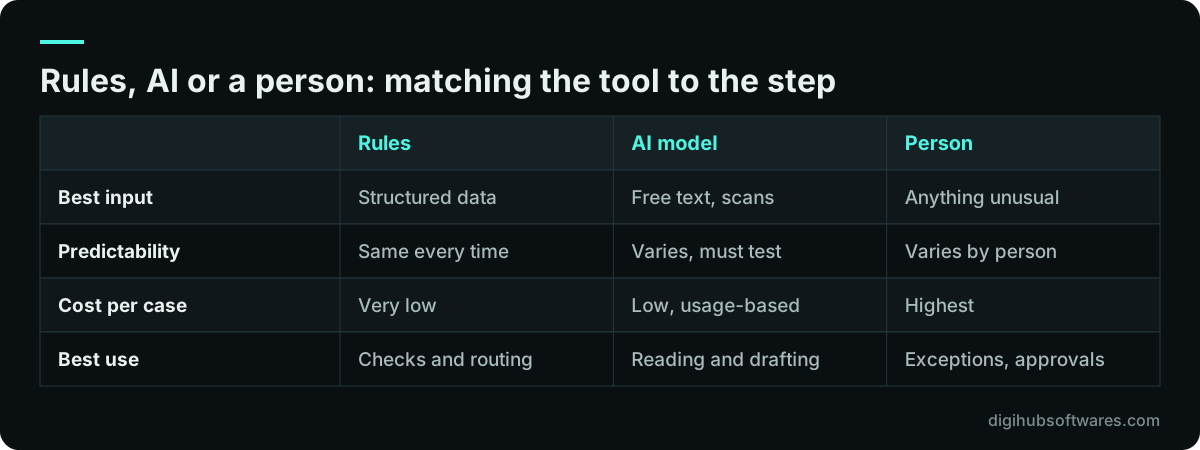
Most processes need all three. Rules handle fixed logic cheaply and predictably, AI handles messy language, and people handle exceptions and decisions with real consequences. A good design splits the process into steps and gives each step to the cheapest tool that does it reliably.
Take supplier invoices. Reading the PDF and finding the supplier, date, lines and totals is a language task, so AI fits. Checking that the lines add up to the total and that the purchase order exists is fixed logic, so a rule fits. Approving a payment that does not match the order is a decision, so a person fits. Teams that give the whole process to the model get errors that a two-line rule would have caught.
Documents and data entry: the most common starting point
Document processing is the most common place to start with AI in operations because the inputs are plentiful, the outputs are well defined and the result is easy to check. Invoices, delivery notes, purchase orders, bank letters, application forms and contracts all carry a known set of fields buried in a varying layout.
Modern models can return those fields as structured data that follows a schema you define. OpenAI, Anthropic and Google all document structured output features for this purpose, and they remove a whole class of formatting errors. They do not make the values correct. A model can return a perfectly formatted invoice total that is wrong, which is why every extraction pipeline needs validation rules, confidence handling and a review queue for doubtful cases.
Accuracy has to be measured on your own documents, field by field, against answers a person has confirmed. Our guide to LLM document extraction accuracy explains how to build that test set, which checks to automate and how to decide what goes straight through and what goes to review. For the build itself, see our AI document processing service.
Connecting AI to your ERP and CRM
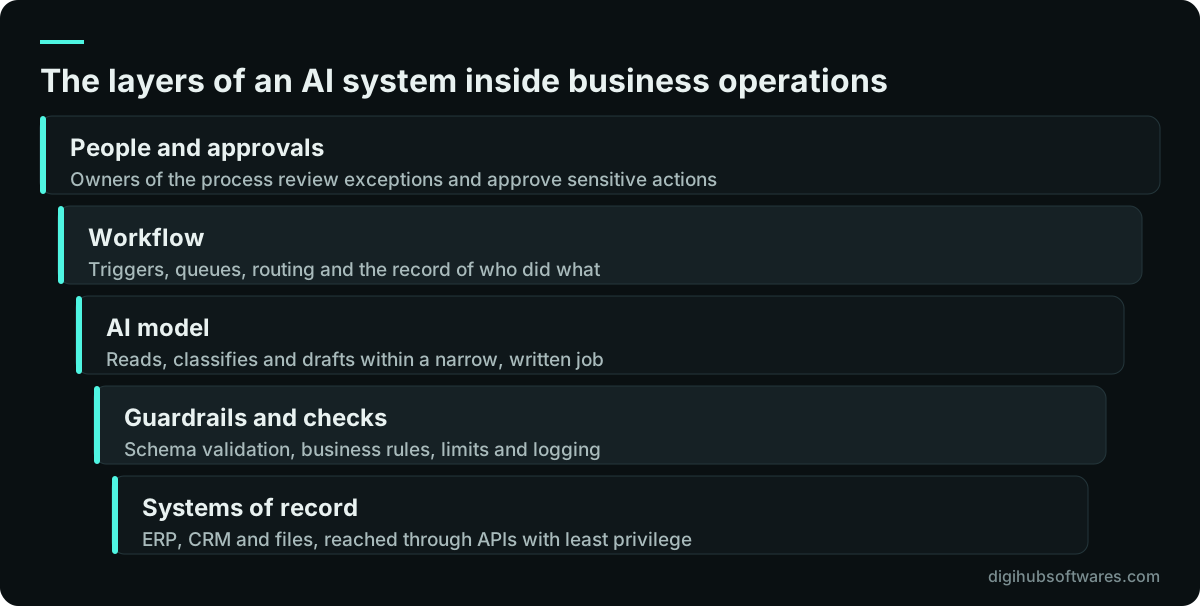
AI becomes far more useful when it can look things up in your systems of record, and far more risky when it can change them. The safe pattern is to connect it through the system's official API, as a dedicated user with the minimum permissions, starting with read-only access.
In practice this means an assistant that can answer "what is the status of order 1042?" or "which invoices from this supplier are overdue?" by calling the ERP, rather than guessing. Each answer is grounded in real records, and the assistant can show which records it used. Writing back, such as creating a draft quotation or updating a delivery date, comes later, one action at a time, with a person approving each change until the error rate is known.
For Odoo users, the current releases provide an external JSON-2 API that authenticates with per-user API keys, and the older XML-RPC and JSON-RPC endpoints are deprecated. Our article on connecting an AI assistant to Odoo safely covers the setup in detail, and the Odoo implementation guide covers the ERP side. If you run another system, our LLM integration team applies the same rules to it.
Where to start with AI in business: picking the first project
Pick a first project that is narrow, measurable and reversible. Narrow means one process with a clear start and end. Measurable means you can count today's volume, time per case and error rate. Reversible means that if the AI performs badly, you can switch it off and the team carries on as before.
A common mistake is to start with the most visible idea, such as a customer-facing chatbot that answers everything, rather than the most suitable one. A back-office task with an internal reviewer teaches the team far more, carries less reputational risk and produces cleaner numbers. Once that works, the same building blocks (document reading, system lookups, review queues) carry over to the next process.
Our guide on how to pick your first AI automation project gives a scoring method for ranking candidates, and our AI workflow automation service covers the build.
How do you test an AI system before it goes live?
You test it the way you would test a new employee: on real examples where you already know the right answer, including the awkward ones. That collection of examples is called an evaluation set, and it is the single most valuable asset in an AI project, because it lets you measure changes instead of arguing about them.
Anthropic's documentation on developing tests recommends defining measurable success criteria first and favoring automated grading, such as exact match or code-based checks, wherever possible, with model-based or human grading for the parts that need judgment. The details differ by task, but the principle is constant: decide what good looks like before you look at the outputs.
Our article on how to evaluate an LLM application before launch walks through building the set, choosing metrics, setting a launch threshold and re-running the tests every time a prompt, model or data source changes.
What are the security and governance risks?
The main risks are that the AI is tricked into doing something it should not, that it reveals data to the wrong person, and that people trust a confident wrong answer. All three are manageable with ordinary engineering discipline, but they have to be designed in from the start.
The OWASP Top 10 for LLM Applications (opens in a new tab) is the best short reference for the technical risks. Its 2025 list includes prompt injection, sensitive information disclosure, improper output handling, excessive agency, system prompt leakage and unbounded consumption. For governance, the NIST AI Risk Management Framework organizes the work into four functions: Govern, Map, Measure and Manage. Neither is a checklist you tick once, but both give you a shared vocabulary with your IT team and auditors.
- Treat every document, email and web page the AI reads as untrusted input that may contain instructions.
- Give the AI its own system user with the least privilege it needs, never an administrator account.
- Validate every output against a schema and business rules before anything acts on it.
- Require human approval for actions that move money, change prices, delete records or contact customers.
- Log inputs, outputs and actions so you can investigate errors and answer questions later.
- Set usage limits and alerts so a loop or an abuse attempt cannot run up a large bill.
- Check that sending the data to an AI provider fits your contracts and privacy obligations, such as UK GDPR or Pakistan and UAE data rules, and confirm with your adviser.
What drives the cost of AI for business operations?
The cost of AI for business operations is driven less by the model and more by everything around it: preparing data, connecting systems, building review screens, testing and maintaining the result. A simple chatbot is cheap to build. An agent that acts inside your ERP costs more because of integrations, permissions and approval steps.
Running costs have three parts. Model usage is billed by the provider per token, and the rates change, so check the current pricing pages of OpenAI, Anthropic or Google rather than relying on old figures. Hosting covers the workflow and any database. Review time is the person-hours spent checking outputs, which should fall as accuracy is proven but rarely reaches zero.
For reference, our own AI automation pricing is published as three fixed packages. Starter is $1,500 (£1,150, AED 5,500) for a chatbot on one channel. Growth is $4,500 (£3,400, AED 16,500) for a knowledge-base assistant or document-processing pipeline with an accuracy test set. Pro is $9,500 (£7,200, AED 35,000) for an AI agent or multi-step workflow integrated with your CRM or ERP. AI model usage, hosting and messaging fees are billed at cost to your own accounts, and an optional care retainer for monitoring and updates is $300 a month.
| Build type | Main cost drivers | Ongoing costs |
|---|---|---|
| FAQ chatbot | Content preparation, hand-over to a person | Model usage, conversation review |
| Document pipeline | Test set, validation rules, review screen | Model usage, exception handling |
| Knowledge assistant | Document cleanup, indexing, access control | Keeping documents current |
| ERP or CRM agent | API integration, permissions, approvals, logging | Monitoring, changes when systems update |
Who needs to be involved, and how does the team change?
Every AI project needs a process owner who decides what good enough means, the people who do the work today, someone responsible for the data and systems, and a builder. Leaving out the people who do the work is the fastest way to build a tool nobody uses.
The team's job shifts from doing every case to reviewing doubtful ones and handling exceptions. That is a real change, and it goes better when people help build the test set, see the accuracy numbers and can flag bad outputs easily. Write down who reviews what, how quickly, and what happens when the AI is unavailable. A process that collapses when an API is down was not designed properly.
For teams in regulated or document-heavy sectors, such as professional services or logistics, plan the review and record-keeping steps before the build, not after the first audit question.
How to use AI in operations without wasting the budget
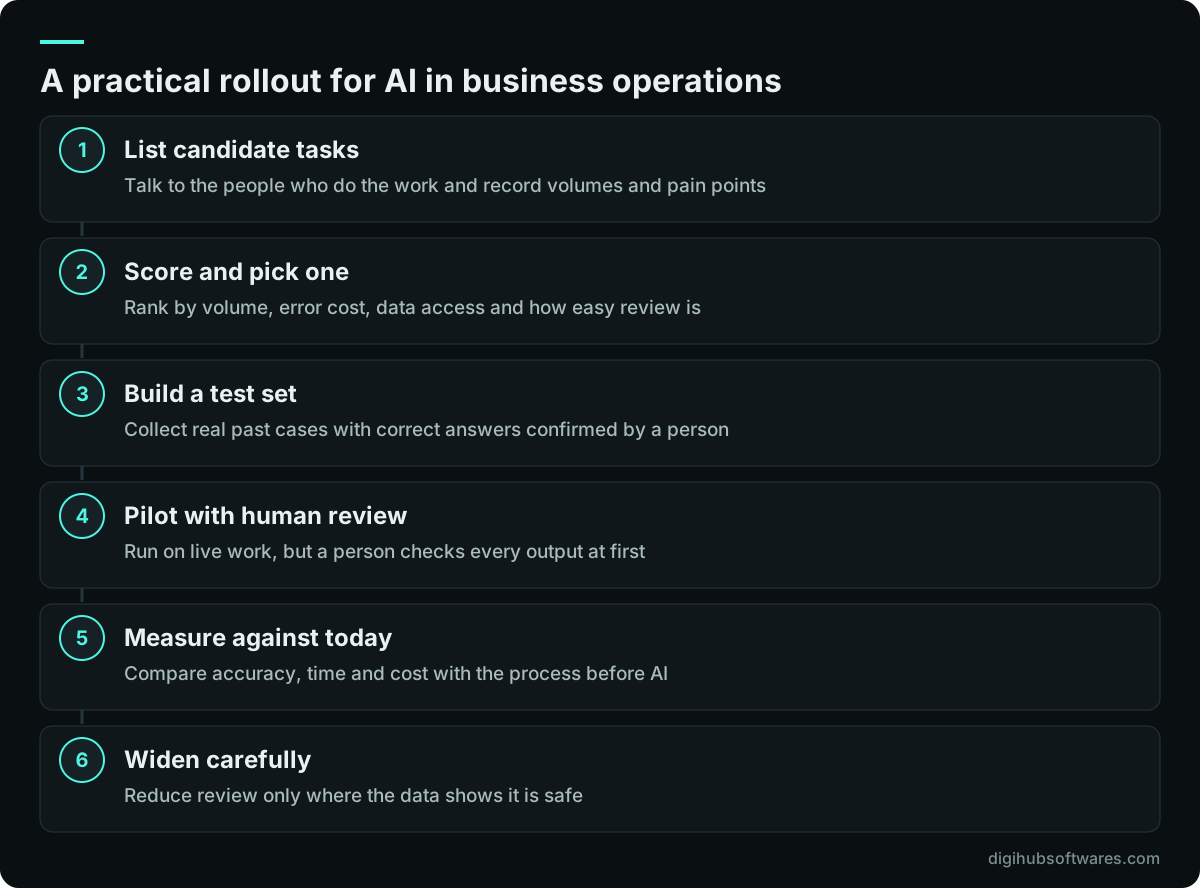
The pattern that works is small, measured steps. Write the job down, collect test cases, build the narrowest version, run it with full human review, measure, then reduce review where the data supports it. The pattern that wastes budget is buying a platform first and looking for problems for it afterward.
When we take on AI work at Digihub, we start with a process mapping session, agree the success measure in writing and build the test set with the client's own staff before writing prompts. We prefer read-only access in the first phase, keep sensitive actions behind approval and hand over the test set with the system, so the client can check future changes themselves. Our AI automation services cover chatbots, document processing, assistants and agents for clients in the UK, the UAE and Pakistan, delivered remotely.
If you want a second opinion on where AI for business operations would pay off in your company, the useful first conversation is about your processes and volumes, not about models.
Sources and further reading
Official documentation and guidance if you want to read more about this topic.
Related guides and services
Questions readers ask
What is the best first use of AI in business operations?
The best first use is usually a back-office task with high volume, text-based inputs and an existing reviewer, such as capturing supplier invoices or sorting a shared inbox. These give clear accuracy numbers, carry little reputational risk and teach your team how AI behaves before you put it in front of customers or let it change records in your ERP.
Is AI automation worth it for a small business?
AI automation can be worth it for a small business when one task takes a noticeable share of someone's week and the inputs are mostly text. The build cost has to be recovered from time saved or errors avoided, so measure the current volume and time per case first. If a task happens only a few times a week, a template or simple rule is often the better choice.
Can AI make decisions on its own in our operations?
It can, but it should only do so where a wrong decision is cheap and easy to reverse. For anything that moves money, changes prices, deletes data or commits the business to a customer, keep a person approving the action. Reduce that review step only when your own test results show the error rate is acceptable for that specific decision.
Is it safe to send company data to an AI provider?
It can be, if you check the provider's data handling terms, choose settings that suit your obligations and send only the data the task needs. Review your client contracts and privacy duties, such as UK GDPR, before sending personal data. Limit what the AI can reach through least-privilege access, and confirm the arrangement with your legal or privacy adviser.
How long does a first AI project take?
A narrow first project, such as a chatbot on one channel or a single document pipeline, typically takes a few weeks including testing. Our published packages range from 2 to 3 weeks for a Starter chatbot up to 6 to 10 weeks for an agent integrated with a CRM or ERP. Building the test set with your team is part of that time, not an extra.