

Key takeaways
- Sort each process into commodity or differentiating before you look at any product or quote.
- Compare five-year total cost of ownership, including licences, changes, integration, hosting and the cost of leaving, not just the first invoice.
- Check the middle options first: configuring a platform or integrating two tools often beats both pure buying and a full build.
- If you build, scope it properly, start with the smallest useful release and make sure you own the code and the data.
- Revisit the decision every year or two, because products improve and your own processes change.
What does build vs buy software actually mean?
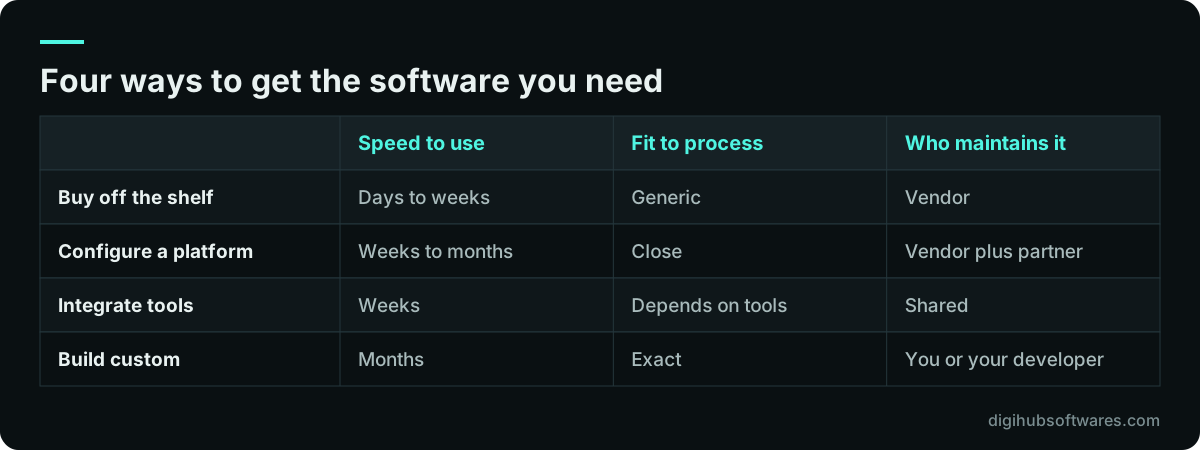
Build vs buy software is the choice between paying for an existing product and paying a team to write software that fits your process exactly. In practice it is rarely a two-way choice. There are at least four options, and the cheapest long-term answer is often one of the two in the middle.
Buying means subscribing to a SaaS product or licensing a packaged system and changing your process to fit it. Configuring means taking a flexible platform, such as an ERP, and setting it up with its own tools and some light extensions. Integrating means connecting two or three bought tools so data flows between them without retyping. Building means commissioning custom software development where you specify every screen and rule, and you own the result.
The question is not whether custom software is good or bad. It is which parts of your operation are worth the extra cost and responsibility of owning code, and which parts you should simply rent from a vendor who spreads that cost across thousands of customers.
- Buy: a ready product used as it is, such as a help desk, payroll or email marketing tool.
- Configure: a platform adapted with settings, workflows and small add-ons, such as Odoo, Salesforce or Microsoft Dynamics.
- Integrate: bought tools joined by APIs so orders, invoices or customer records move automatically.
- Build: software designed and written for you, from a customer portal to a full product.
Which parts of your business deserve custom software?
Custom software deserves a place only where a process is strategic, meaning it is how you win customers, set prices or deliver a service your competitors cannot copy easily. Martin Fowler describes this as the utility vs strategic dichotomy (opens in a new tab): utility functions should be done well enough and cheaply, while strategic functions are where software investment pays back.
Accounting, payroll, email and basic CRM are utility work for almost every company. Your accountant does not want a creative general ledger. A freight broker's quoting engine, a clinic's referral workflow or a manufacturer's job-costing logic might be strategic, because the business competes on doing that one thing better or faster.
A useful way to sort your processes is to ask three questions of each one. Would a customer notice if we did this the same way as everyone else? Do we change this process often because the market changes? Does doing it better make us measurably more money or save significant staff time? Three yes answers point toward building. Three no answers point toward buying.
- Commodity: finance, payroll, HR records, email, file storage, standard e-commerce checkout.
- Often configurable: sales pipeline, inventory, purchasing, manufacturing orders, field service scheduling.
- Candidates to build: pricing and quoting logic, customer portals with your own rules, industry workflows no product covers, and the product itself if you sell software.
When is buying off-the-shelf software the right call?
Buy when a mature product already does at least most of what you need and the remaining gaps can be closed by changing your process rather than the software. Off-the-shelf tools give you a working system in days or weeks, a vendor who handles security patches and hosting, and features you did not have to pay to design.
The hidden advantage of buying is that someone else carries the maintenance. Browsers change, tax rules change, payment providers change their APIs. A good vendor absorbs those changes for every customer at once. When you build, every one of those changes lands on your own roadmap and budget.
- The process is standard in your industry and your team can adapt to the product's way of working.
- You need it running this quarter, not in six months.
- There is a clear market leader with an export function, a documented API and a fair contract.
- Your user count is small enough that per-user pricing stays reasonable as you grow.
- You do not have, and do not want, anyone responsible for maintaining code.
When is custom software worth it?
Custom software is worth it when the process gives you a real edge, when products force costly workarounds, or when licence fees at your scale would exceed the cost of owning a focused system. The signal is usually visible in daily work: people exporting to spreadsheets, retyping data between systems, or running a key process on email and memory because no tool fits.
Building also makes sense when the software is the product. If you are launching a subscription platform, there is nothing to buy, only components to assemble. In that case the question shifts from whether to build to how small the first release can be, which our guide to SaaS MVP features covers in detail.
Be honest about the cost of ownership before you commit. A built system needs hosting, monitoring, security updates, backups, and someone who understands the code. If nobody will own it after launch, a mediocre bought product may serve you better than a good custom one that slowly decays.
- The workflow is a source of competitive advantage and changes as your market changes.
- Every product you trialed needed workarounds that cost staff hours each week.
- Per-user or per-transaction fees would grow faster than your margins at your expected scale.
- You need to own the data model, the integration points or the intellectual property.
- You have a budget for maintenance after launch, not just for the build.
Configure, extend or integrate: the options between buying and building
The middle options give you most of the fit of custom software at a fraction of the risk, so check them before you commission a full build. A configurable platform handles the commodity work out of the box and lets you add custom modules for the part that is truly yours.
An ERP such as Odoo is a good example. Finance, inventory, purchasing and sales come ready, while a developer can add a module for your own pricing rules or approval steps without rewriting the rest. Our Odoo implementation work follows this pattern: configure first, customize only where the standard flow fails, and keep custom code small so upgrades stay manageable.
Integration is the other middle path. Many businesses already own good tools that simply do not talk to each other. Connecting them through their APIs with third-party integrations can remove the retyping that made people want a new system in the first place. If you plan to expose your own data to partners, read our notes on API design best practices before anything is built.
How do you compare the total cost of ownership?
Compare options over five years, not on the first invoice. Total cost of ownership is the full cost of getting a system running, keeping it running and eventually leaving it. Buying usually wins year one. Building can win later if licence fees are high and the system stays stable, but only if you count maintenance honestly.
The UK Government Digital Service gives practical advice here in its guide to choosing technology (opens in a new tab): keep the ability to change your mind later, minimize total cost of ownership, avoid long lock-in contracts, and keep full control of the data you store. Those four points apply just as well to a 30-person distributor as to a government department.
Put each option in a simple spreadsheet with the rows below and fill them with real quotes, not guesses. Vendor prices change, so take them from the vendor's own pricing page on the day you compare. For custom work, ask for a fixed quote against a written scope, which is what our custom software pricing packages are built around.
| Cost line | Buying or configuring | Building |
|---|---|---|
| Upfront | Setup, configuration, data import, training | Discovery, design, development, testing |
| Recurring fees | Licences per user or per transaction, often rising each year | Hosting, monitoring and third-party services |
| Change requests | Limited to what the product allows, or partner fees | Developer time for each new feature |
| Integration | Connectors or middleware, sometimes paid add-ons | Built into the scope or added later |
| Upkeep | Included in the subscription | Security updates, dependency upgrades, bug fixes |
| Leaving | Data export, migration, contract notice period | Handover to a new team, documentation quality |
A build vs buy software decision framework in seven steps
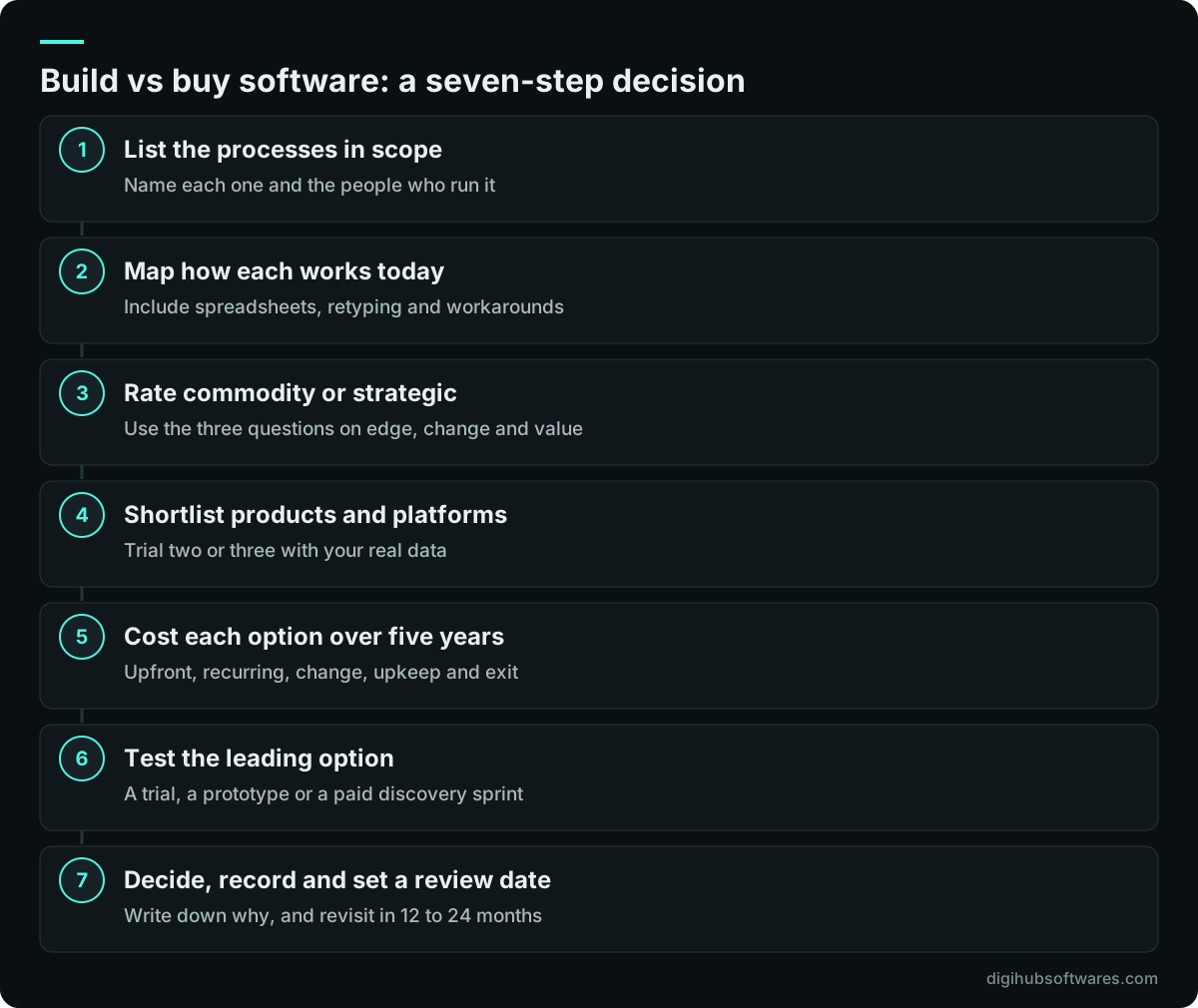
Run the build vs buy software decision as a short, structured exercise rather than a debate. For one area of a mid-sized business the seven steps below usually fit into a few weeks, and they produce a written recommendation that a director or CFO can sign off.
The most important step is the second one. Writing down how the process actually works today, including the workarounds, prevents you from buying a product that solves a problem you do not have or building features nobody will use. GOV.UK suggests techniques such as Wardley mapping for exactly this purpose: to see what you will need to build and what you can buy or get for free.
Why scoping comes before any quote
A quote is only as reliable as the scope behind it, so describe what you need before you ask anyone, vendor or developer, for a price. Two developers quoting on a one-page idea will return numbers that differ wildly, not because one is dishonest but because each imagined a different system.
A good scope names the users and their roles, lists the workflows in order of priority, records the integrations and data sources, and states what is out of scope. It also separates must-have features from nice-to-have ones, which lets you compare a bought product fairly: if it covers every must-have, the nice-to-haves rarely justify a build. Our guide to software project scoping walks through the full document, with a template you can fill in yourself.
If you would rather not write it alone, a short paid discovery phase does the same job with a team. At Digihub, the Discovery Sprint costs $1,200 (about 1 to 2 weeks), produces a written specification, a clickable prototype of the key screens and a fixed quote, and the fee is credited to the build if you go ahead.
What if you already run an old system?
If you already own an aging custom system, the choice is not only build or buy but also how to move away from what you have without stopping the business. Replacing it in one go, the so-called big-bang rewrite, is the riskiest path, because the old system usually holds rules that nobody wrote down.
A safer approach is to replace the system in slices. Pick one capability, such as invoicing or customer self-service, build or buy its replacement, route that traffic to the new part, and retire the old code for that slice only. This is often called the strangler fig pattern. Some slices may end up as bought products and others as new custom services, so the build vs buy software question gets answered one capability at a time.
Our article on incremental legacy modernization explains how to plan those slices, keep both systems in sync during the transition, and decide when the old system can finally be switched off. For hands-on help, see our legacy software modernization service.
What are the risks on each side, and how do you reduce them?
Both paths carry risk; the difference is who controls it. With a bought product, the vendor controls price rises, feature changes and the product's future. With a build, you control those things but carry delivery risk, key-person risk and the duty to keep the code secure.
Most of these risks can be reduced with contract terms and habits rather than technology. For a bought product, check the data export format and the notice period before you sign. For a build, insist on owning the source code and the hosting accounts, ask for documentation and automated tests, and plan maintenance from day one. The OWASP Top 10 (opens in a new tab) is a sensible baseline to ask any developer about, because it lists the most common web application security weaknesses.
| Risk | Applies to | How to reduce it |
|---|---|---|
| Price rises or plan changes | Buy | Negotiate multi-year terms and keep an exit plan |
| Vendor lock-in | Buy | Confirm full data export and a documented API before signing |
| Scope creep and overruns | Build | Written scope, fixed price per phase, small first release |
| Key-person dependency | Build | Code in your repository, documentation, more than one developer familiar with it |
| Security gaps | Both | Vendor security review, or secure coding practices and regular updates |
| Slow decay after launch | Build | Maintenance budget and a named owner for the system |
How we help clients make the build vs buy software call
We start every enquiry by asking whether something already exists that would do the job, because recommending a product you can buy is a better outcome for you than a build you did not need. A common pattern is a business that asks for a custom system and ends up with a configured ERP plus one small custom module and a couple of integrations.
When a build does make sense, we work in fixed-price phases. Our published packages include an MVP web app from $8,500, a business system such as a CRM, inventory or booking tool from $14,000, and a SaaS MVP from $22,000, all listed on the custom software pricing page. Ownership of the custom code passes to you on full payment, and every project includes 30 days of free fixes after go-live.
Digihub is a registered software company in Peshawar, Pakistan, delivering since 2015 for clients in the UK, Pakistan and the UAE. All work is delivered remotely, with on-site visits by arrangement. If you are based in Britain, our page on custom software development in the UK covers time zones, contracts and how we run projects for UK teams.
Sources and further reading
Official documentation and guidance if you want to read more about this topic.
Related guides and services
Questions readers ask
Is it cheaper to build or buy software?
Buying is usually cheaper in the first year, because you pay a subscription instead of a development project. Building can become cheaper over five years when licence fees are high, your user count is large and the custom system stays stable. Compare total cost of ownership, including maintenance, hosting and the cost of leaving, before deciding.
How do I know if my business needs custom software?
You likely need custom software when a process that sets you apart from competitors cannot be handled by any product without costly workarounds. Signs include staff exporting data to spreadsheets daily, retyping between systems, or running a core workflow on email. If the process is standard, such as payroll or accounting, buy a product instead.
Can I start with off-the-shelf software and build later?
Yes, and it is often the safest route. Start with a product, learn which gaps really cost you time or money, then build only for those gaps, either as a module on a platform or as a small separate service connected by an API. Pick a product with a good data export and API so moving later stays possible.
Who owns the code if I commission custom software?
Ownership depends on your contract, so check it before you sign. With Digihub, ownership of the custom code passes to you on full payment, and the source code lives in a repository you can access. Third-party libraries keep their own open source licences, and hosting accounts should be in your company's name.
How long does a build vs buy software evaluation take?
A focused evaluation of one area of the business, such as sales or operations, usually fits into a few weeks of part-time effort. That covers mapping the current process, trialing two or three products, costing the options over five years and testing the leading choice. A paid discovery sprint can run alongside it if building is a serious option.