

Key takeaways
- Pick one core workflow that solves one painful problem for one type of customer, and build that first.
- Treat accounts, tenant separation, payment and a basic admin area as part of the product, not extras.
- Postpone integrations, mobile apps, custom roles and advanced reporting until paying users ask for them.
- Budget for the invisible features: security, backups, monitoring and data protection obligations.
- Decide before launch what you will measure, so the next release is chosen by evidence.
Part of our guide: Build vs buy software: when custom software is worth it
What is a SaaS MVP?
A SaaS MVP is the smallest version of a subscription software product that real customers will use and, ideally, pay for. The term comes from Lean Startup, and the Agile Alliance glossary (opens in a new tab) quotes Eric Ries's definition: the version of a new product that lets a team collect the most validated learning about customers with the least effort.
The word that matters is viable. A clickable prototype or a landing page tests interest; an MVP tests whether people will rely on the product for real work. That means it must be reliable, secure and good at its one job, even if it does very little else.
Because a SaaS product is software you build rather than buy, the build vs buy software question becomes a different one: which components to build yourself, and which to rent, such as payments, email delivery or authentication.
Which SaaS MVP features are essential?
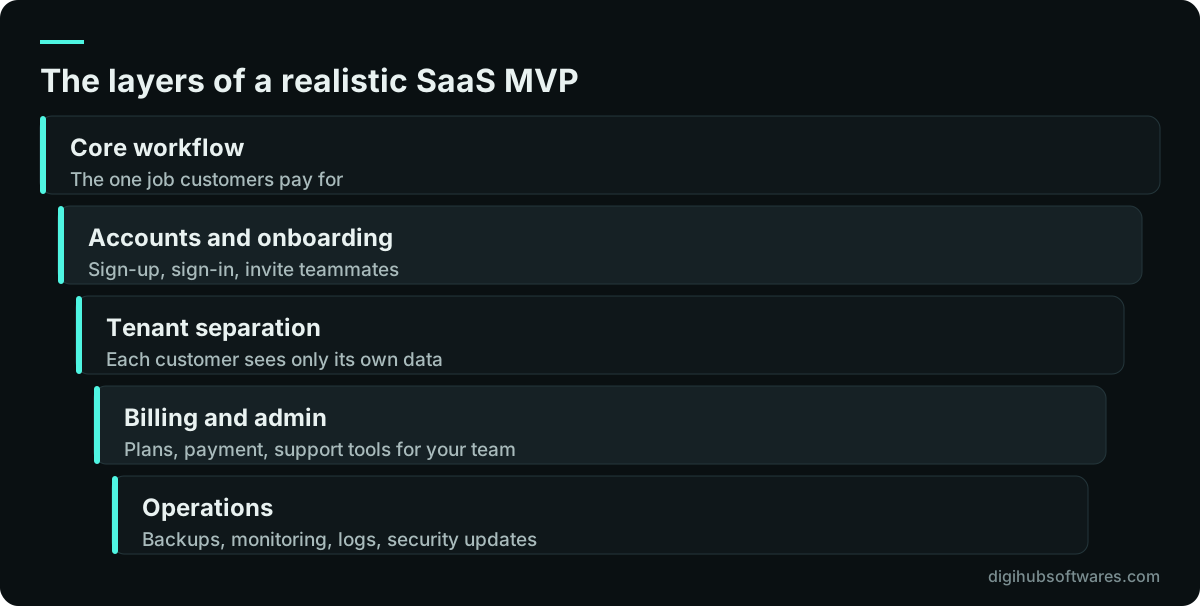
Six SaaS MVP features are close to non-negotiable for any product that charges customers. Without them you either cannot sell the product, cannot support it, or cannot be trusted with customer data.
Notice that only the first item is about what makes your product unique. The rest is plumbing that every SaaS needs. Founders often underestimate it, which is why scope and budget slip; plan for it from the start.
- One core workflow: the job the customer pays you to do, done well from start to finish.
- Sign-up and sign-in: account creation, password reset, email verification and optional two-factor sign-in.
- Tenant separation: each customer organization sees only its own data, enforced on the server.
- Payment: a way to charge, whether hosted checkout from a payment provider or invoices at first.
- Admin area: for your team to see customers, plans and usage, and to help users who are stuck.
- Operational basics: backups, error monitoring, audit logs for key actions and a privacy policy.
How do you choose the one core workflow?
Choose the workflow that removes the most pain for the narrowest group of customers you can name. "Small accounting firms who chase clients for documents every month" is a target. "Businesses that need document management" is not. The narrower the target, the fewer features the first release needs.
Write the workflow as a sequence from the customer's first action to the moment they get value, then cut every step that is not required to reach that moment. If a customer can finish the job with a manual step that your team handles behind the scenes, keep the manual step for now. It costs nothing to build and teaches you how often the step is really needed.
Our guide to software project scoping explains how to rank features as must, should, could and won't. For a SaaS MVP, be strict: anything that is not a must goes on the list for release two.
How should an MVP handle accounts and multi-tenancy?
Design for multiple customer organizations from day one, even if the first customer is the only one. Adding tenant separation later means touching every query and every screen, which is slow and risky. The usual approach for an MVP is a shared database where every record carries a tenant identifier and the server checks it on every request.
For sign-in, follow current guidance rather than habit. The US National Institute of Standards and Technology, in NIST SP 800-63B (opens in a new tab), says services should check new passwords against a blocklist of common or compromised values and should not force composition rules such as mixing character types. Offering sign-in with an existing work account, such as Google or Microsoft, can reduce both friction and password risk.
Keep roles simple at first: an owner who manages billing and users, and members who use the product. Custom roles and fine-grained permissions are a common request from larger customers, which makes them a good release-two feature once you know what those customers need.
Does a SaaS MVP need full subscription billing?
A SaaS MVP needs a way to take money, but not necessarily a complete billing system. The aim is to learn whether customers will pay, and that can be tested with a simple setup before you automate upgrades, proration and dunning.
Many products start with one or two plans and a payment provider's hosted checkout and customer portal, which handle card details so they never touch your servers. Products sold to businesses sometimes start with manual invoices for the first customers. Either way, store the plan and status of each tenant in your own database so the product can enforce limits and your admin area can show who is paying.
Which features should a SaaS MVP leave out?
Leave out SaaS MVP features whose value depends on having many users, and anything a customer has asked for only hypothetically. These features are expensive to build and maintain, and their design is far better once you see how real customers behave.
| Feature | Why it can wait | What to do for now |
|---|---|---|
| Native mobile apps | A responsive web app reaches phones on day one | Build mobile-friendly web screens |
| Many integrations | Each one needs upkeep as other APIs change | Offer CSV import and export, add the most requested integration later |
| Custom roles and permissions | Needs vary by customer size | Owner and member roles only |
| Advanced analytics dashboards | You do not yet know which metrics users value | A few fixed reports and a data export |
| White-labeling and custom domains | Mostly requested by larger accounts | Note interest and price it as a future plan |
| Public API | Contracts are hard to change once published | Design internal APIs cleanly so one can be opened later |
| Microservices | Adds operational cost before scale needs it | One well-structured application |
What are the invisible features customers still expect?
The invisible features are security, backups, monitoring and data protection, and paying customers expect them even though nobody sees them in a demo. They are also the first things a business customer's IT team will ask about before signing.
As a baseline, test the application against a recognized checklist such as the OWASP Application Security Verification Standard. If you handle personal data of UK users, the ICO's UK GDPR guidance sets out your obligations as a controller or processor; similar laws apply in the UAE and elsewhere, so take advice for each market you sell into. We configure the product to support your compliance, but confirm the details with your legal or privacy adviser.
On architecture, Martin Fowler's advice to start with a well-structured monolith rather than microservices suits most MVPs. One application is simpler to deploy, monitor and secure, and it can be split later along boundaries that real usage has revealed. If the product will expose an API to customers, our API design best practices guide covers the contract decisions to make early.
- Daily automated backups, with at least one test restore before launch.
- Error tracking and uptime monitoring that alert a named person.
- Audit logs for sign-ins, permission changes, exports and deletions.
- Encrypted connections everywhere and secrets kept out of the code repository.
- A privacy policy, terms of service and a way for customers to export or delete their data.
How long do SaaS MVP features take to build, and what drives cost?
The time and cost of a SaaS MVP depend mostly on how complex the core workflow is, how many user types it serves, and how many outside systems it must connect to. The essential plumbing described above is fairly predictable; the core workflow is where estimates vary.
As a reference point, Digihub's published SaaS MVP package is $22,000 with a typical timeline of 10 to 14 weeks, covering multi-tenant architecture, subscription billing, customer sign-up and onboarding, an admin area, the core product workflows, and deployment and monitoring. A simpler MVP web app for one main user type is $8,500 over about 6 to 8 weeks. Both are listed on our custom software pricing page, and hosting and payment provider fees are billed to your own accounts.
Our SaaS development team usually starts with a short discovery sprint to fix the core workflow and the must-have list, then builds in fixed-price phases. Ownership of the custom code passes to you on full payment, and launch is followed by 30 days of free fixes.
What should you measure after the MVP launches?
Measure whether customers reach value and come back, not just how many sign up. Decide on these measures before launch, alongside the SaaS MVP features themselves, and build the events that track them into the first release, so the second release is chosen by evidence rather than by the loudest request.
- Activation: the share of new accounts that complete the core workflow at least once.
- Time to value: how long from sign-up to the first completed workflow.
- Retention: how many accounts are still active after one, two and three months.
- Conversion: how many trial or free accounts become paying customers.
- Support themes: the questions and feature requests that come up repeatedly.
Sources and further reading
Official documentation and guidance if you want to read more about this topic.
Related guides and services
Questions readers ask
How many features should a SaaS MVP have?
There is no fixed number, but a realistic SaaS MVP has one core workflow plus the essential plumbing: accounts, tenant separation, payment, a basic admin area and operational basics. If your feature list has more than a handful of items beyond that, some of them are probably release-two features. Rank them strictly and keep only what the core workflow requires.
Should a SaaS MVP include a mobile app?
Usually not. A responsive web app works on phones from day one and avoids app store reviews, two extra codebases and separate release cycles. Build native or cross-platform apps once usage data shows customers need offline access, device features such as the camera, or push notifications that the web cannot provide well enough for your use case.
Is multi-tenancy really needed in an MVP?
Yes, if you plan to sell to more than one customer organization. Retrofitting tenant separation later touches almost every part of the code and risks one customer seeing another's data. Building it in from the start, usually with a tenant identifier on every record checked by the server, adds modest effort at the beginning and avoids a costly rework.
Can I launch a SaaS MVP without automated billing?
Yes. Many business-to-business products invoice their first customers manually, and many others use a payment provider's hosted checkout with one or two plans. What matters is that the product knows each customer's plan and status so it can enforce limits. Automate upgrades, proration and failed-payment handling once you have enough customers to justify it.
How do I stop my MVP growing into a full product before launch?
Write the must-have list down, agree it with everyone involved, and treat every new idea as a candidate for the next release rather than this one. Set a launch date and protect it. A fixed-price phase with a written scope helps, because adding a feature then visibly costs time or money, which makes trade-offs easier to discuss honestly.