

Key takeaways
- Avoid the big-bang rewrite: replace one business capability at a time and keep the old system running meanwhile.
- Put a routing layer in front of the old system so you can send each slice of traffic to old or new code.
- Start with a slice that is valuable, fairly self-contained and painful today, not with the hardest core.
- Plan how old and new systems share data before writing any new feature.
- Give every cutover a rollback plan and a reconciliation check, then retire the old code for that slice.
Part of our guide: Build vs buy software: when custom software is worth it
What is incremental legacy modernization?
Incremental legacy modernization is a way of replacing an aging system in small, separately released steps instead of one large rewrite. Each step moves one business capability, such as quoting, invoicing or the customer portal, onto new software. The old system keeps doing everything else until its turn comes.
A legacy system here means any software the business depends on that has become hard to change: an old desktop application, a heavily customized package that can no longer be upgraded, or a web system built on a framework nobody on the team knows. The problem is rarely that it fails to work. It is that every change is slow, risky and expensive, and the people who understood it have moved on.
The approach applies whether the replacements are custom code, a bought product or a mix. Deciding which for each slice is the same question we cover in our build vs buy software guide, answered one capability at a time.
Why do big-bang rewrites so often go wrong?
Big-bang rewrites fail mainly because the old system contains years of undocumented rules, and a rewrite only finds them after launch. A discount rule added for one customer a decade ago, a rounding habit in the tax calculation, a nightly job that quietly fixes bad data: none of these are in any specification, but the business relies on all of them.
A rewrite also delivers no value until the very end. For months the team builds a parallel system while the old one still needs fixes and new features, so the target keeps moving. When launch day comes, everything changes at once, and if something breaks there is no easy way back.
| Criterion | Big-bang rewrite | Incremental replacement |
|---|---|---|
| When value arrives | Only at final launch | After each slice goes live |
| Risk on cutover day | Whole business at once | One capability at a time |
| Hidden rules discovered | Late, often in production | Slice by slice, with the old system still available |
| Ability to stop or change course | Low once committed | High after each slice |
| Coordination effort | Lower during the build | Higher, because two systems run side by side |
How does the strangler fig pattern work?
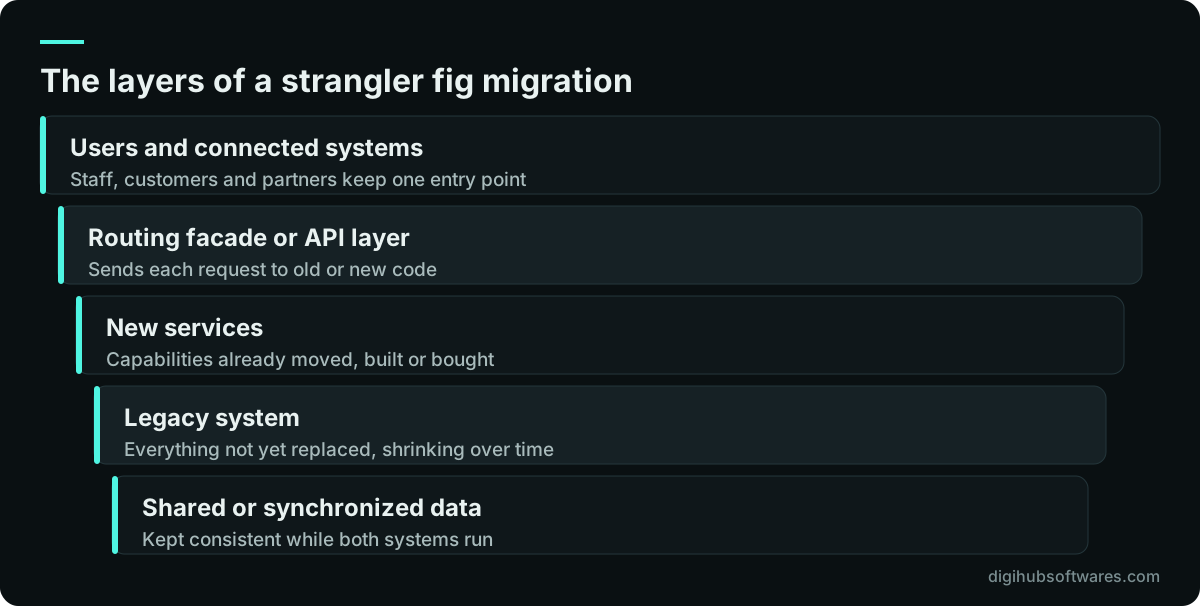
The strangler fig pattern places a routing layer in front of the old system, then moves functions behind that layer to new code one by one, until the old system handles nothing and can be removed. Martin Fowler named it after a fig that grows around a host tree, in his note on the strangler fig application (opens in a new tab).
Microsoft's architecture guidance describes the routing layer as a facade or proxy: it intercepts requests that would go to the legacy system and sends each one either to the old application or to a new service. At first nearly everything goes to the old system. Over time the balance shifts, and users notice only that parts of the system have improved.
The routing layer can be simple. For a web application it may be a reverse proxy that sends certain URLs to new code. For back-office systems it is often an API in front of the old database, so new screens and integrations talk to the API rather than directly to legacy tables.
Which part of the system should you modernize first?
Start with a slice that is valuable to the business, fairly self-contained and painful in its current form. A first slice should prove the approach, build trust with users and teach the team how the old system really behaves, without risking the most critical process on day one.
Customer-facing read-only features are a common first choice: an order-status page, a document download area or a reporting view. They draw on legacy data but do not change it, so a mistake is visible and fixable rather than corrupting records. Heavier slices, such as pricing or stock allocation, come later once the data sync is proven.
- High pain: users complain about it or staff work around it daily.
- Clear edges: it has defined inputs and outputs and few links into other modules.
- Low write risk: it reads data more than it changes it, at least at first.
- Visible value: a manager will notice the improvement within weeks.
- Reversible: the old version can take the traffic back if something goes wrong.
How do old and new systems share data during the transition?
Decide how data moves between the two systems before you build any new feature, because data is where most incremental projects get stuck. There are three common options, and many projects use more than one.
The first is a shared database, where new code reads and writes the legacy tables. It is quick to start but ties the new code to the old data model. The second is an API wrapper around the legacy system, so new code calls documented endpoints instead of touching tables; our API development work often starts here, and the principles in our API design best practices guide apply directly. The third is event interception, a pattern described in Fowler's legacy displacement patterns (opens in a new tab), where updates to system state are captured and routed to the new system as they happen.
Whichever you choose, name one system as the source of truth for each type of record at each stage. If both systems can change a customer's credit limit, sooner or later they will disagree, and someone will spend a week finding out which one is right.
An incremental legacy modernization roadmap in seven steps
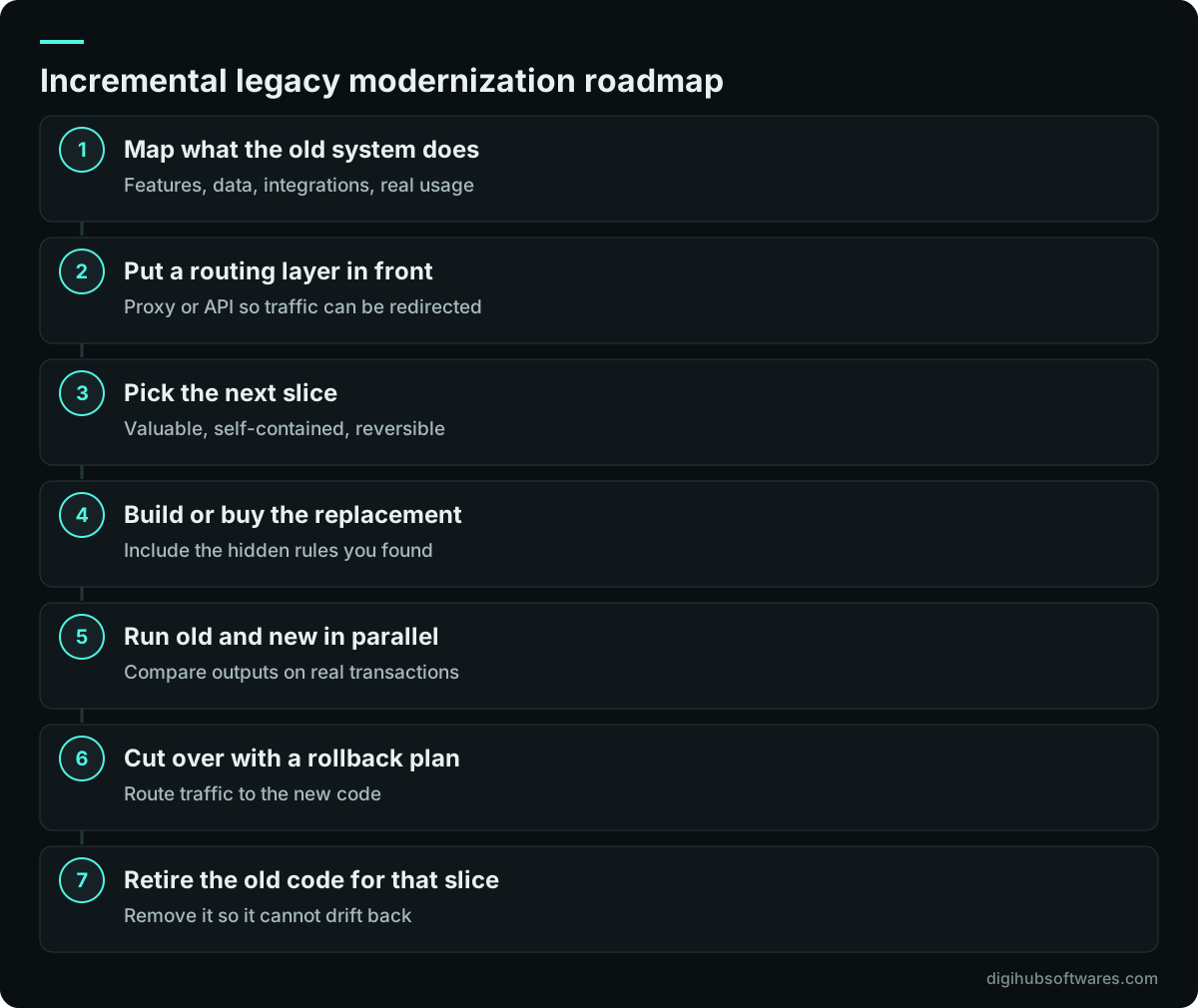
A practical incremental legacy modernization roadmap repeats a short loop for every slice after a one-off preparation stage. The preparation is where you map what the old system does and put the routing layer in place. After that, each slice follows the same pattern from analysis to retirement.
Fowler's team also questions the assumption that a replacement must copy every feature of the old system. Before rebuilding a function, check whether anyone still uses it. Old systems often carry reports and screens that nobody has opened in years, and leaving them behind is the cheapest modernization there is.
How do you keep the business safe at each cutover?
Make every cutover small, observable and reversible. The aim is that if a new slice misbehaves, the team notices within minutes and can send traffic back to the old system the same day, without losing data.
- Parallel run: process real transactions in both systems and compare the results before switching.
- Dark launch: call the new code in the background without using its results, to test load and behavior.
- Canary release: route a small group of users or one branch to the new slice first.
- Rollback switch: a setting in the routing layer that sends traffic back to the legacy path.
- Reconciliation checks: daily totals, record counts and spot checks agreed with finance or operations.
- Retirement date: a fixed point after which the old code for that slice is removed, not left as a fallback forever.
How should you budget and govern a modernization program?
Budget slice by slice rather than for the whole program at once. Estimate the preparation stage and the first slice in detail, and treat later slices as a ranked list that you price as you reach them. That way the program can pause, speed up or change direction based on what each slice teaches you.
The main cost drivers are the size and quality of the legacy data, the number of integrations that touch the old system, how much of its behavior is documented, and how long both systems must run side by side. Running two systems costs money, so set a target date for each retirement and track it like any other deliverable.
Our legacy software modernization service follows this slice-based model, and once each new part is live, software maintenance keeps it current so it does not become the next legacy system.
Sources and further reading
Official documentation and guidance if you want to read more about this topic.
Related guides and services
Questions readers ask
How long does incremental legacy modernization take?
It depends on how many capabilities the old system covers, but the useful measure is time to first value rather than total duration. The first slice typically goes live within a few months, including the preparation work, and each later slice is shorter. Large systems may take a year or more to retire fully, while delivering improvements throughout.
Is the strangler fig pattern only for web applications?
No. It works anywhere you can put a routing point between users and the old system. For web systems that is often a reverse proxy; for desktop or back-office software it is usually an API layer or a message queue in front of the legacy database. The idea is the same: redirect one capability at a time and keep the rest unchanged.
Should we rewrite in the same technology or a new one?
Choose the technology your team or provider can support for the next five to ten years, not the one that matches the old code. Because incremental replacement lets old and new run side by side, you are free to change languages and frameworks. Prefer well-supported, widely used options so finding developers later stays easy.
Can part of a legacy system be replaced with an off-the-shelf product?
Yes, and it is often the best choice for standard functions like accounting, HR or inventory. Treat the product as one slice: integrate it through the routing or API layer, migrate the data for that function, run it in parallel briefly, then retire the old module. Keep custom code for the parts that are specific to your business.
What if nobody understands how the old system works?
That is common and is a strong reason to go incrementally. Map behavior from the outside: interview users, read reports and exports, trace database changes and record what the system does with real transactions. Parallel runs then reveal the remaining hidden rules safely, because the old system is still available while differences are investigated.